Quicken Not Updating Fidelity Intl Trading Account (Domestic Brokerage & IRA/ROTH are OK)
I created this separate thread in order to keep attention on what seems to be a unique Fidelity OSU issue. As mentioned on other threads, the Fidelity server migration earlier this month caused OSU download issues around Sept 11th (in my case). Recently, my US Brokerage, IRA & Roth accounts began downloading and updating again. However, my International trading brokerage account has not downloaded any transactions and has not updated any security prices since Sept 11th. This is a significant issue for international accounts as I am unable to monitor my international portfolio in local currency (USD). It's not practical to try to manually update 20+ securities on a daily (or even weekly basis). The International brokerage account was working perfectly under DC import but is now completely broken on EWC+.
Win 11/QW R64.30 Build 27.1.64.30
Comments
-
Hello @EDacho,
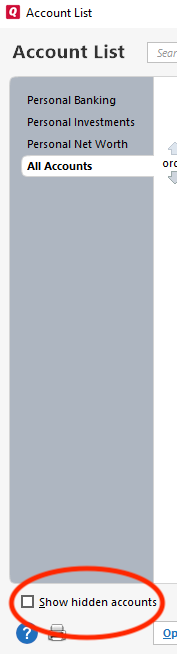
Thank you for reaching out! Based on the information you provided, it sounds like there should be plenty of posted transactions that should be downloading into that account, but haven't. To start troubleshooting, please check if there's a duplicate/incorrect account that the information is downloading into. To do that, navigate to Tools>Account List. If there are any hidden accounts, there will be an option to Show hidden accounts near the lower left of the window. Please select that option if it's there.
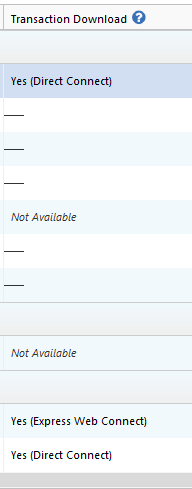
Then, review the Account List to see if there are any duplicate accounts or if an older account is suddenly connected/updating when it shouldn't be. You can tell if an account is connected by looking in the Transaction Download column.
I look forward to your response!
Quicken Kristina
Make sure to sign up for the email digest to see a round up of your top posts.
0 -
Hi Kristina, I've done as you suggested. There are no duplicate Fidelity accounts where the transactions might be downloaded. I look forward to your advice on next steps.
(Even IF there was another account where the transactions were being downloaded, the security prices would have been updated. None of my international trading account securities have been updated since Sep 11.)
PS - For some reason, "Last Download" date/time no longer updates for many accounts in the Account List view. Even accounts that had security prices updated today, do not show a "Last Download" date/time.
0 -
Quicken Support - Please provide instuctions on how to remedy
0 -
Thank you for your replies,
Please be aware that the Community forum is primarily user-to-user based with only a handful of us mods. Therefore, responses are not immediate and can take up to 24 to 48 hours. If you prefer immediate assistance, please contact Quicken Support directly.
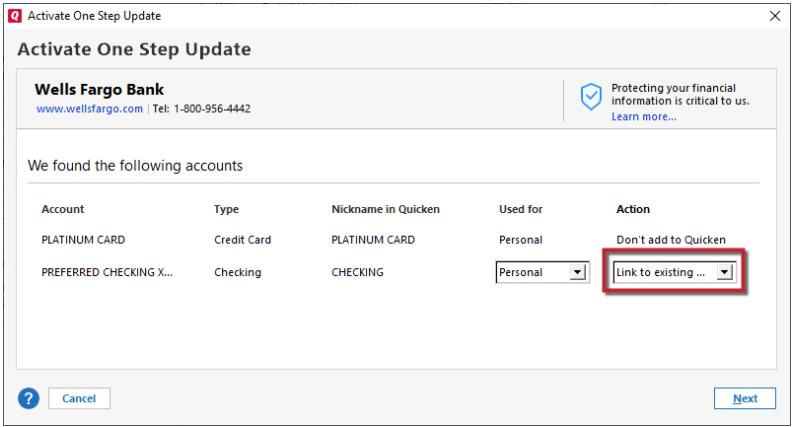
Since the last download date/time isn't updating, I suspect this may be a connection issue with the accounts. Please backup your Quicken file, deactivate the problem accounts, then navigate to Tools>Add Account and follow the prompts. Once you get to the Add/Link screen, please carefully link the accounts with the existing nickname in Quicken.
Please let me know how it goes!
Quicken Kristina
Make sure to sign up for the email digest to see a round up of your top posts.
0 -
Hi Quicken Kristina, I did contact Quicken Premium Support and they informed me they are aware of the Fidelity problem but don't know if or when it will be fixed.
Regarding the download dates not updating in the account register, your suggestion to deactivate and relink did not fix the problem.
Can you confirm that the issue with International accounts OSU not updating is being worked on by Tech Support?
Thank you
0 -
When I contact Quicken Support to resolve an issue, do they provide an incident number that I can use to track resolution status? If so, please provide a URL to the incident resolution tracker website. Thank You
0 -
Thank you for your replies,
I am not seeing any open tickets for issues with Fidelity international accounts not updating. When I review your contact with Support, I can see that they linked the Fidelity Cut-Over Migration alert (and emailed you the link), which mentions issues as they came up (and were resolved), but makes no mention of this issue with international accounts that you are encountering.
To continue troubleshooting the issue with transactions not downloading into your account, please follow these steps from our article on missing transactions/transactions not downloading:
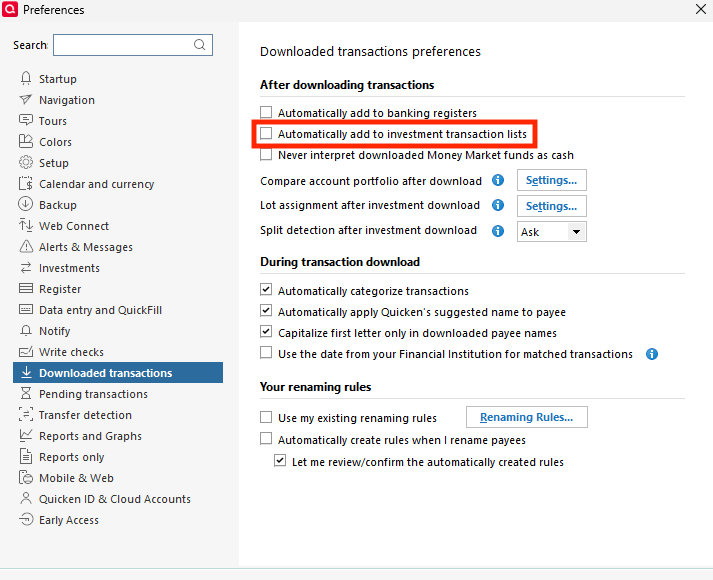
Go to Edit > Preferences > Downloaded Transactions. The option Automatically add to investment transaction lists needs to be unchecked.
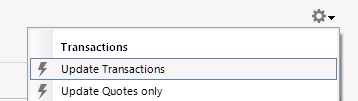
Refresh your online account information by clicking the Actions Gear Icon on the upper right of the register, and select Update Transactions. Follow the on-screen instructions to complete the update.
Confirm that the Sort Order in your account is by Date; just click the top of the Date column in your account register. It's possible the transactions are in your register, but not where you thought they'd be.
Please let me know how it goes!
Quicken Kristina
Make sure to sign up for the email digest to see a round up of your top posts.
0 -
Thanks for checking on my Support contact call. I am dissappointed that there is no mention of the issue I am having with my Fidelity international transactions OSU not working. How do I register this issue with support so that I can get this Fidelity account download operational again?
NOTE: I have a saved copy of my file and am still able to download Fidelity transactions using DC and the transactions are updating as usual. EWC+ download connection is not working for my International Brokerage account but 4 other Fidelity brokerage, IRA and ROTH accounts seem to be working normally.
RE your suggestions:
Automatically add to investment transaction listsis unchecked (and has always been unchecked)- The register is sorted in Date order
Please escalate my issue to next level support.
Thank You Kristina, I await your response.
0 -
@Quicken Kristina, CONNLOG.TXT is logging an unknown 67305901 error for Fidelity (netstatus 36):
==== Mini-OSU Start (20251015/09:09:42) ====
20251015 09:09:42: QFN: Beginning send to https://ofx-prod-brand.intuit.com/qw2800/fib.dll
20251015 09:09:44: QFN: End send to https://ofx-prod-brand.intuit.com/qw2800/fib.dll, netstatus 0
20251015 09:09:44: QFN: Beginning send to https://ofx-prod-brand.intuit.com/fidisable/fidisable.dll?Bid=11112
20251015 09:09:44: ***QFN kQFFinished: returns 67305901
20251015 09:09:44: Cannot find error string for 67305901, please check IC TechNotes QuickBase
20251015 09:09:44: QFN: End send to https://ofx-prod-brand.intuit.com/fidisable/fidisable.dll?Bid=11112, netstatus 36
20251015 09:09:44: Marketing session sending to: https://www.fidelity.com/misc/partners/quicken/ofx/fiindex09.txt
20251015 09:09:44: QFN: Beginning get from https://www.fidelity.com/misc/partners/quicken/ofx/fiindex09.txt
20251015 09:09:45: QFN: End get from https://www.fidelity.com/misc/partners/quicken/ofx/fiindex09.txt, netstatus 0
20251015 09:09:45: QFN: Beginning send to https://ofx.fidelity.com/ftgw/OFX/clients/download
20251015 09:09:46: QFN: End send to https://ofx.fidelity.com/ftgw/OFX/clients/download, netstatus 0
20251015 09:09:49:==== Mini-OSU End (20251015/09:09:59) ====
Last download on 20251009/10:19:57 there was no error:
==== Mini-OSU Start (20251009/10:19:57) ====
20251009 10:19:57: QFN: Beginning send to https://ofx-prod-brand.intuit.com/qw2800/fib.dll
20251009 10:20:00: QFN: End send to https://ofx-prod-brand.intuit.com/qw2800/fib.dll, netstatus 0
20251009 10:20:00: QFN: Beginning send to https://ofx-prod-brand.intuit.com/fidisable/fidisable.dll?Bid=11112
20251009 10:20:00: QFN: End send to https://ofx-prod-brand.intuit.com/fidisable/fidisable.dll?Bid=11112, netstatus 0
20251009 10:20:00: Marketing session sending to: https://www.fidelity.com/misc/partners/quicken/ofx/fiindex09.txt
20251009 10:20:00: QFN: Beginning get from https://www.fidelity.com/misc/partners/quicken/ofx/fiindex09.txt
20251009 10:20:00: QFN: End get from https://www.fidelity.com/misc/partners/quicken/ofx/fiindex09.txt, netstatus 0
20251009 10:20:00: QFN: Beginning send to https://ofx.fidelity.com/ftgw/OFX/clients/download
20251009 10:20:01: QFN: End send to https://ofx.fidelity.com/ftgw/OFX/clients/download, netstatus 0
20251009 10:20:05:==== Mini-OSU End (20251009/10:20:17) ====
0 -
@Quicken Kristina, is there someone in Tech support that can assist with this technical issue? Do I need to initiate another call with Tech Support?
0 -
@Quicken Janean, I notice your post:
https://community.quicken.com/discussion/7967194/updated-10-17-25-fidelity-migration#latestUPDATED 10/17/25 Fidelity MigrationQuicken JaneanQuicken Windows Subscription Moderator admin11:54AMedited 12:25PMWe understand that several Fidelity-related issues have been affecting Quicken users over the past few months. To make it easier for everyone to stay informed, we’ve consolidatedall known Fidelity issuesinto this single alertPlease add this thread to your post so that it can be tracked along with the other Fidelity Migration issues being resolved. Thank you
0 -
Thank you for your replies @EDacho,
Typically, it is faster to report the issue directly through Quicken Support, since they have access to tools that we can't access on the Community and they're able to escalate issues as needed. The Quicken Support phone number can be found through this link here. Phone support is available from 5:00 am PT to 5:00 pm PT, Monday through Friday.
I apologize that I could not be of more assistance!
Quicken Kristina
Make sure to sign up for the email digest to see a round up of your top posts.
0 -
Unfortunately QW support doesn't provide a case # with a tracking ID so that we can get periodic updates and inquiries regarding status. I typically call support line, they tell me they are working on it, and I never hear back from them again. They should at a mininum close the case once the issue is resolved and notify the initiator. I don't think that's too much to ask of premium support desk.
0 -
Thank you for your reply,
Do you recall which date you contacted Support? If you recall the date, I may be able to look up the ticket number and review what happened. If you're not getting an email when the ticket is closed, that may mean that it was marked as a known issue (in which case, they should have sent you an email with the link to the Community Alert).
Thank you!
Quicken Kristina
Make sure to sign up for the email digest to see a round up of your top posts.
0 -
I am pleased to report that after deactivating and reconnecting Fidelity Accounts in Quicken I am again receiving updates in all my Fidelity accounts (including my International Brokerage account)! Yay!!!
However, my international account postings are now posting both DIV & WIthholding Tax in local (international) currency units versus USD.
Previous to the migration, International Dividends would post in USD and withholding tax would post in local (international) currency units. (I would need to manually convert the WH tax to USD as the QW account could only be in 1 currency (USD). I notified the International Trading desk of this issue long ago but remained unresolved.
New Issue #1
I am wondering how mixed US and Intl currencies will be posted in the same account? IE you can't have a both a USD security posting and a FOREIGN security posting in same account. Seems to me that all the FIDELITY foreign security transactions should be converted to USD when posting to the QW account???
New Issue #2
The dividend and WH Tax transactions currently do NOT include the security identifier in the QW posting. IE The Dividend posting has a description of the security but the Security field is blank when it posts in Quicken. Consequently the foreign security price does not update in QW either.
New Issue #3
The Posting "Action" is blank. It should contain "DIV" for dividends, "IntInc" for Interest, "Withdraw" for Tax categories, etc.
Please let me know if you need further clarifications on these 3 issues. Please let me know next steps. Thank you
0 -
Thank you for your reply,
I'm glad to hear you were able to resolve the original issue by deactivating and reconnecting the accounts.
For the new issues you mention, the first one sounds like something Quicken isn't really designed to handle. There is an idea post asking for similar functionality:
Please add your vote and a comment if that Idea is something you'd like to see added. If that Idea doesn't cover what you need, I recommend creating a new Idea post to request the functionality be added. For information on creating a new Idea post, please see this post:
For issue #2, is this happening only with foreign transactions, or with all transactions?
For issue #3, is this happening with all transactions, or only some? If it's impacting only some, is there any pattern to it (such as specific transaction types or holdings)?
Thank you!
Quicken Kristina
Make sure to sign up for the email digest to see a round up of your top posts.
0 -
RE Issue #1 - With DC connection, Quicken would correctly post the transaction in USD (even if it was a foreign security). I would expect EWC+ to do the same? At a bare minimum a security transaction in QW needs to include the security CUSIP, the transaction "Action" (ie DIV, BOUGHT, SOLD, etc), No of Shares, etc.
Currently foreign security transactions contain only the security name (in the DESCRIPTION field) and AMOUNT (in foreign currency).RE Issue #2 - US Securities are now handled correctly. Foreign securities are the issue
RE Issue #3 - US Securities are now handled correctly. Foreign securities are the issue (same issue for all transaction types)
IE:
International Brokerage accounts post US securities correctly but International securities post informational transacations in QW without corresponding "Security" or "Action" data
0 -
Thank you for your reply,
I recommend that you contact Quicken Support directly for further assistance, as they have access to tools we can't access on the Community and they're able to escalate the issue as needed. The Quicken Support phone number can be found through this link here. Phone support is available from 5:00 am PT to 5:00 pm PT, Monday through Friday.
I apologize that I could not be of more assistance!
Quicken Kristina
Make sure to sign up for the email digest to see a round up of your top posts.
0 -
Still having same issues mentioned above. In addition to my original support ticket #11981895 there is a new support ticket #12074394.
I would appreciate if @Quicken Janean would add this to the Fidelity Updates as this remains an open issue for 2+ months and is not mentioned in: https://community.quicken.com/discussion/7965464/updated-10-28-25-fidelity-updates#latest)
0
Categories
- All Categories
- 56 Product Ideas
- 36 Announcements
- 223 Alerts, Online Banking & Known Product Issues
- 22 Product Alerts
- 701 Welcome to the Community!
- 671 Before you Buy
- 1.2K Product Ideas
- 53.7K Quicken Classic for Windows
- 16.3K Quicken Classic for Mac
- 1K Quicken Mobile
- 813 Quicken on the Web
- 111 Quicken LifeHub