Converting from Quicken Windows to Quicken Mac

I downloaded my Quicken for Windows to Quicken Mac. Majority of my accounts on the download were accurate matched Quicken for Windows . On two of my Etrade accounts the only item which was off significantly was the cash balance. A few questions
- Has anyone else experienced an incorrect cash balance when converting from Win Q to Mac Quicken ?
- If so how did you correct ? I have had Etrade for over 20 years . Understand I can input tried re updating my Etrade account cash balance , however prefer not to input a manual transaction
- Since two other accounts are off I am considering on my Mac Air running a Virtual Machine so I can use Quicken for Windows . Understand Parells is highly recommended , however there are other software to run . Can you comment on which software to run to create a virtual machine ?
Thank you
Answers
-
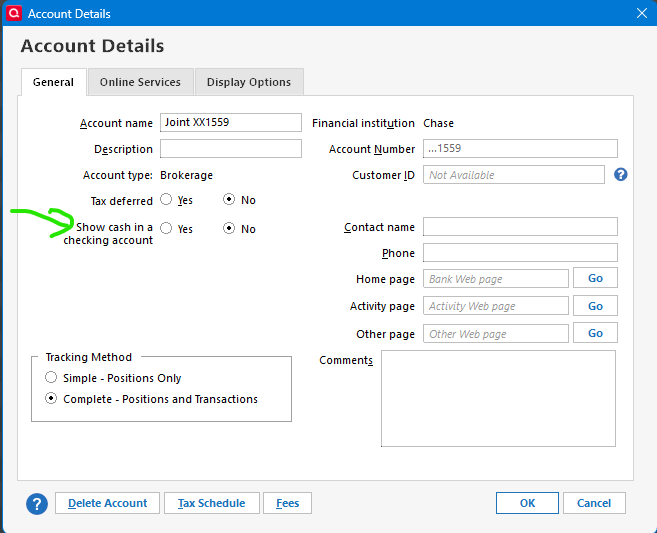
Are you using the option in Quicken Windows to show the cash in the linked checking account?
Quicken Mac doesn’t have this feature and it has been noted that the conversion doesn’t handle this correctly.
0 -
Hi Chris:
Not sure the option you mentioned in the linked checking account in Quicken for Windows. My balance is not off much
The major issue I have on two of my Etrade accounts in one account the cash balance is off significantly . On the other two Etrade accounts balanced match exactly .
0 -
It is an option on the account details dialog on brokerage accounts.
It puts the “cash transactions” in a separate virtual checking account.
0 -
Hi Chris:
I assume this option is in the Quicken for Windows ? Can you let me know the steps to perform on Q for Win , then I assume I would redownload the data in Quicken for Mac ?
Jeff
0 -
Yes I was referring to the option in Quicken Windows.
In theory if you have it enabled you should be able to turn it off and Quicken will merge the transactions back into the investment account, and then you could do the conversion to Quicken Mac again. In practice every time I have tried turning the option off it has messed up the merge back into the investment account. It is one reason I stopped using that feature years ago. But it might work for you.
If that isn’t the problem or the turning off the feature doesn’t work for you then you will just have to deal with the problem in Quicken Mac. To do that the first step would be to ensure all your securities have the right amount of shares. From there you have two choices. Either track down all the transactions that are throwing your cash balance off or put in a balance adjustment transaction to get to the right cash balance.
0 -
Hi Chris:
Thank you . Its strange that two of my 4 Etrade accounts cash balance ( I have IRA's ) matched to the dollar.
If I try this in Quicken Windows ( which is currently correct ) I could mess up my current data in Quicken Windows ? If I elect to do this , how do I turn it off in Quicken ?
0 -
I do run Parallels on my iMac and really only use it for Quicken since I wasn't ready to do the conversion and try it on the Mac side like you have. If you do go the parallels route, you will also need a license for windows since it does not come with Parallels. Then obviously download your quicken version and you can then just use the same file you had on your windows PC inside of Parallels will you will run quicken. This has worked great for me for many years but ideally would like to switch to the Mac version. But always heard there were differences so will be interesting to see what else you might find.
0 -
Yes, it can mess up the Quicken Windows data file, that was what meant by "messed up". Be sure you have a good backup before trying it.
 0
0 -
Chris:
I performed a validate and repair function on my Q for Windows file . I tried re downloading and most accounts were doubled up. Needed to delete the Quicken for Mac folder on my Mac Air and will reinstall
If I click "no in show cash in checking account" will all my brokerage accounts show Zero Balance, thus they will be off ?
0 -
If you select ‘no’ what Quicken will do is merge the transactions in the linked checking account back into the investment account, and delete the linked checking account.
Whether it can do that properly is the big question. In theory you would end up with the right cash balance in the investment account.
0 -
Hi Chris:
I will try this on the two Etrade accounts that have incorrect cash balances . Since I redownloaded a " validated and repaired version I saved in Q for Windows , in Quicken for Mac I will need to delete the entire folder so data does not get duplicated .
I will of course save a " correct copy " Of Q for windows on my flash drive.
Question if you have had this issue on cash balances in any brokerage account , when you converted to Quicken for Mac did this resolve the issue ?
0 -
I have never converted to Quicken Mac (I don’t own a Mac).
My guess at what is going on is based on reading others that have done the conversion.
As for switching “using a linked checking account” off I have done that in the past and it has failed to do the right thing each time. But in theory if it was right in Quicken Windows in just an investment account there isn’t any reason it wouldn’t convert correctly.
0 -
Since I redownloaded a " validated and repaired version I saved in Q for Windows , in Quicken for Mac I will need to delete the entire folder so data does not get duplicated .
@jjrichards Just FYI… Your Quicken Mac data file is a single file (ending in ".quicken"), which is by default located in a folder called Quicken > Documents. (And, by default, that folder is located in the
/User/[your Mac account name]/Library/Application Support folder.) You shouldn't need to delete any folder, just the .quicken data file you want to get rid of (after first quitting Quicken Mac). And you don't even need to delete the existing data file if you want to create a new data file to re-import from your Quicken Windows data file; every data file is completely separate, and no data is shared among different data files.Quicken Mac Subscription • Quicken user since 19930 -
Chris:
I may have to go into Quicken Cloud to delete data since I download two previous versions and the one that loads currently is Jeff Finances 2. If I redownload a version with your suggested changes it will probably read Jeff Finance's 3 .
Am I correct on deleting the other folders in the cloud ?
0 -
Chris:
I just checked the two brokerage accounts where the cash was not accurate . In account details cash was " checked as off" . Its strange on the other two accounts in Etrade when I transferred the data to Quicken Mac , the cash balance matched to the dollar .
I would like to be accurate at year end thus on the two accounts that cash is off go back to 12-31 and match the Q Win data to Q Mac data
Not sure if you have another suggestion ?
0 -
Cloud accounts aren't shared or transferred.
Since that wasn't the problem, you would have to either go through all the transactions fixing what is wrong or make a balance adjustment. Maybe just changing the opening balance. @jacobs can tell you how to do that. Are the number of shares of the securities correct?
0 -
Hi Chris:
I was looking at the balances of the accounts stocks and cash, the shares seem correct though I have not compared all 4 accounts .
In terms of transactions I have over 30 years of transactions to review . May be best to amend the cash amount , though strange why two match to the dollar , and two are off , one was higher by over 100k
0 -
I converted several years ago but be aware that Quicken Mac is missing a couple of entire sections compared to the Windows version and is more feature limited in several other details as well. It has no Income Tax management tool or personal inventory tools, is more limited in how it handles brokerage accounts including cash positions plus some other issues.
It has gotten better from where it was when I first converted and Quicken is making ongoing improvements for the Mac version.
Those missing components didn't impact me and the data file has more stability and integrity compared to the Windows version. You just have to try it to see if it makes sense for you to switch.0

