Fidelity HSA transactions not downloading transactions properly for Quicken Classic
In September my HSA transactions stopped downloading the withdrawal transactions for my Fidelity HSA account. My Fidelity 401K accounts are still working properly. I have tried deactivating and reactivating my downloads as well as resetting my online downloads. This did not correct the errors. Now instead of downloading the withdrawal transactions it started pulling down CVRSHRT transactions. Is anyone else having this issue. Any ideas on how to correct this?
Comments
-
Same problem — Fidelity HSA activity downloads have been broken in Quicken for a few weeks now. Each time I try it, everything gets completely out of whack and I have to go back to my last backup, then update everything EXCEPT my Fidelity HSA. I've tried letting it create a new account instead up downloading into the existing two (mine's split between investments and cash, as of the last change in July 2024), but that's a mess, too.
0 -
Hello @Pam C & @Michele123,
Thanks for posting your experiences — I know this trouble with the HSA downloads must be frustrating.
The first thing that comes to mind is that we need to check your log files to see how Fidelity is sending the transactions to Quicken. You can do that via Help > Report a Problem > Send to Quicken. After you send it, contact Quicken Support directly so they can examine how those transactions are coming in.
Also, grabbing screenshots of what you're seeing can be really helpful — it tends to speed up the escalation process, if that ends up being needed. If needed, please refer to this Community FAQ for instructions on how to attach a screenshot. Alternatively, you can also drag and drop screenshots to your response if you are not given the option to add attachments.
Thank you!
Quicken Alyssa
Make sure to sign up for the email digest to see a round up of your top posts.
0 -
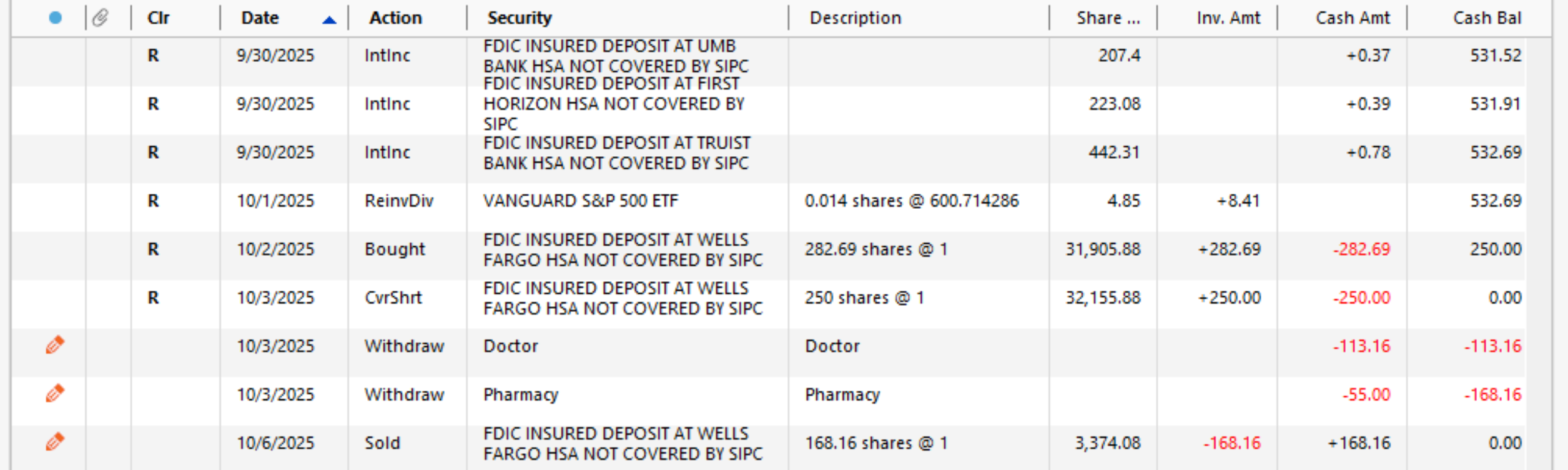
Ok, I've done the "Report a problem", but I'm not sure it included the whole screen (it took it's own screenshot).
But apparently, each CVRSHRT is Quicken's new attempt at showing what should be a sale of a
"fund" to cover a debit purchase I made with my HSA Debit Card. Why can't it just show a sale of the appropriate fund and a check to the debit card payee? It used to just keep all of the "cash" funds lumped as cash in one Banking Account and the truly invested funds in an Investing Account. Now it's all in one, but not showing my medical expenses paid anymore. :-(Below is a screenshot showing recent entries as pulled from Fidelity by Quicken. The last three are my manual attempts to show how I think it should be, if all in one account — selling a bank-fund then writing checks for the expenses paid with the HSA debit card. Online, Fidelity doesn't tell what they sold, though — those "bank" (UMB, Wells Fargo, etc.) funds are only seen if you drill down into current balances.
0 -
Hello again @Pam C,
Thank you for following up with those additional details!
Please contact Quicken Support directly so they can take a look at your log files and investigate this issue with you. They have access to tools we don't have in the Community, and they can get this escalated if needed.
Thank you!
Quicken Alyssa
Make sure to sign up for the email digest to see a round up of your top posts.
0
Categories
- All Categories
- 56 Product Ideas
- 36 Announcements
- 223 Alerts, Online Banking & Known Product Issues
- 22 Product Alerts
- 701 Welcome to the Community!
- 671 Before you Buy
- 1.2K Product Ideas
- 53.7K Quicken Classic for Windows
- 16.3K Quicken Classic for Mac
- 1K Quicken Mobile
- 813 Quicken on the Web
- 111 Quicken LifeHub