Windows 10 to 11 Update

e.subs
e.subs Quicken Windows 2016 Member ✭✭

Quicken 2016, Release R 10 (25.1.10.1)
Windows 10 / 11

I have been using Quicken 2016 on a Windows 7 / 10 machine since its release. Due to the end of support for Windows 10, I purchased a Windows 11 machine. Quicken 2016 loaded without issue on the new machine. However, when I try to open the data file on the new machine, Quicken asks for the Intuit ID and Password associated with the file. I have not entered this information since first creating the data file a decade ago. I no longer know it. Without it, Quicken will not open the data file on the Windows 11 machine. I can still open it on the Windows 10 machine. The "Forgot your password?" link on the dialog box is no longer valid.

Is there a way to either retrieve the password from the Windows 10 machine for use on the Windows 11 machine or bypass the username and password entirely?


Answers

  • splasher
    splasher Quicken Windows Subscription SuperUser ✭✭✭✭✭

    See this link for info on installing QW2014-2017 on a new computer:

    https://www.quicknperlwiz.com/blanklogin2014-2017.html

    -splasher using Q continuously since 1996
    - Subscription Quicken - Win11 and QW2013 - Win11
    -Questions? Check out the Quicken Windows FAQ list

  • The Keeper
    The Keeper Quicken Windows Subscription Member ✭✭✭✭

    Intuit sold its Quicken personal finance software in 2016 so here is what is happening:

    •  Your 2016 Quicken data file (.QDF) is encrypted with an Intuit ID token that was valid when you created the file
    • As long as you open the file on your old Windows 10 system, Quicken uses cached authentication data — so it works fine there.
    • When you move the file to a new computer, that cached authentication doesn’t come with it, and Quicken 2016 tries to contact the now-defunct Intuit ID server to reauthenticate — which fails.

    The following is probably your only option and the only supported way to regain full access. Upgrade to a newer version of Quicken which I recommend. Someone else on this board may have another solution.

    1. On your old computer, open Quicken 2016 and create a backup. (File > backup and Restore > Backup Quicken File. If you no longer have your old computer, hopefully you have recent back up on an external backup source.
    2. Install a current version of Quicken Classic (Starter, Deluxe, or Premier) from quicken.com.
    3. Once Quicken opens, go to File → Backup and Restore → Restore from Backup File.
    4. When you open your backup file in the new Quicken, it will automatically convert and remove the old Intuit ID link.
      • You’ll be prompted to sign in with a current Quicken ID (different from the old Intuit ID) so you will have to create a new Quicken ID
      • All your data should carry over intact.

    Your new version of Quicken ensures continued updates, online services, and compatibility with Windows 11.

    ************************

    There is another option if you think it worth the hassle and that is "stay with Quicken 2016 (offline workaround) but you can only do it on your old computer If you still have it.

    1. Continue using your old Quicken data file on your Windows 10 machine — but back it up regularly.
    2. Optionally, clone the old system (using software like Macrium Reflect or Acronis True Image) and run it as a virtual machine (VM) on your Windows 11 PC.
      • That keeps all your Intuit ID data intact.
      • It’s the only way to run Quicken 2016 on new hardware without hitting the Intuit ID wall.

    This option lets you avoid the new Quicken subscription, but it’s frozen in time which means no updates, no downloads and no new installations. I strongly recommend a newer version of Quicken

  • e.subs
    e.subs Quicken Windows 2016 Member ✭✭

    @Splasher,

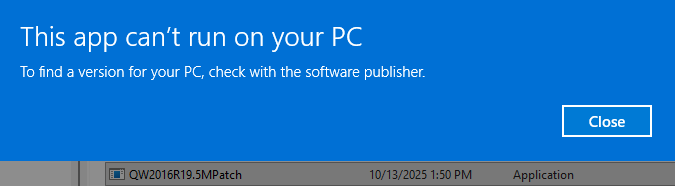
    I did download and try to run patch QW2016R19.5M Patch on my Windows 11 machine. Unfortunately, I received the following error notice.

    image.png

    I was not aware of the issue until I loaded Q16 on the W11 machine and tried to open the data file. Before running the patch, I uninstalled Q16 and shutdown and restarted the system. After rebooting, I again installed Q16. Before running Q16, and with the internet off, I attempted to run the patch, which resulted in the error message above. Is there a work around for this?

    There is a note on this page Quicken 2016 Patches - QuicknPerlWiz that states the patch is corrupted.

    image.png

    There is a release

    Release 19.3 Mondo

    The patch was obtained from a One Drive Share Point at this link.

    OneDrive

    Note that I am not getting a blank login screen as described in most of the posts on the topic. I am being asked for the Quicken User ID and Password. It appears that the Quicken server is no longer operational to accept credentials.

  • e.subs
    e.subs Quicken Windows 2016 Member ✭✭

    @The Keeper

    "Upgrade to a newer version of Quicken which I recommend."

    I assume that this will result in an annual subscription, which I would prefer to avoid.

    There is also the question of Intuit's / Quicken Data Access Guarantee. I feel that if they, or the new owner, chooses to disable the server that provides access to former versions of the application, they should also provide a workaround to allow one to access their own data.

    What is the Quicken Data Access Guarantee? | Quicken

    ~~~~~~~~~~~~~~~~~~~~~~~~~~~~

    "Continue using your old Quicken data file on your Windows 10 machine …"

    This is a temporary fix at best. Eventually the machine will fail from age, and the data will again be lost.

    "… clone the old system (using software like Macrium Reflect or Acronis True Image) and run it as a virtual machine (VM) on your Windows 11 PC."

    This is intriguing, but I personally lack the technical expertise to execute on it.

  • The Keeper
    The Keeper Quicken Windows Subscription Member ✭✭✭✭

    Regarding the Quicken Data Access Guarantee, this guarantee does not apply to Quicken that was supplied by Intuit who sold Quicken in 2016 but to the newer versions of Quicken since then. I doubt that the new owner of Quicken has the ability to disable Intuits server that provided former versions of the application and since Intuit divested itself of Quicken, they probably have no interest in providing a work around. That is just my guess.

  • Chris_QPW
    Chris_QPW Quicken Windows Subscription Member ✭✭✭✭

    Were you able to install the Release 19.3 Mondo patch?

    I’m interested since I’m maintaining the old patch installs and wonder how far the file problem you encountered goes.

    The thing to understand is for Quicken 2016 it changed over from the Intuit Id to Quicken Id with R13. You need to be on that patch level or above or it will still try to connect to the Intuit Id, not that it might matter. I have no idea if it matters at this point because the behavior of the blank login in window is what everyone else is reporting. The history is that after the change over to the Quicken Id it worked until a few years ago but then Quicken Id changed something on their server and that is when the blank login started. And the work around was to copy the Quicken.ini file from the old machine to the new ones. There were also other possible work arounds because of people either not having the Quicken.ini file of for some reason it not working for them. The reason for this as a possible solution is because the Quicken.ini file contains the license information and so Quicken wouldn’t try to get the information from the server. This doesn’t work for everyone.

    I’m not sure why you even get the login in prompt window, but it sounds like the results are the same, you can’t login and get the license validated.

    I do notice that you said that you are using R10 on your old machine. That means that you never went through the conversion between Intuit Id and Quicken Id. I’m not sure if the transition was purely on the servers or if the user really needed to do the update when it was provided to make the transition. You might have been caught in the “why should I update if my version is working trap”. Not to mention that you have forgotten the username and password, which I have to assume means that you created a new Quicken Id to login in here(the same one can be used for the data file if desired, I personally use a different one). This new Quicken Id will not be tied to a valid license. And of course the lost password function will definitely not work if you don’t know the username. (I’m not even sure it will work if you don’t know the username)

    Signature:
    This is my website (ImportQIF is free to use):

    http://www.quicknperlwiz.com/

This discussion has been closed.