When transferring funds, why does the wrong amount show in the budget?

wpg 51
wpg 51 Member ✭✭

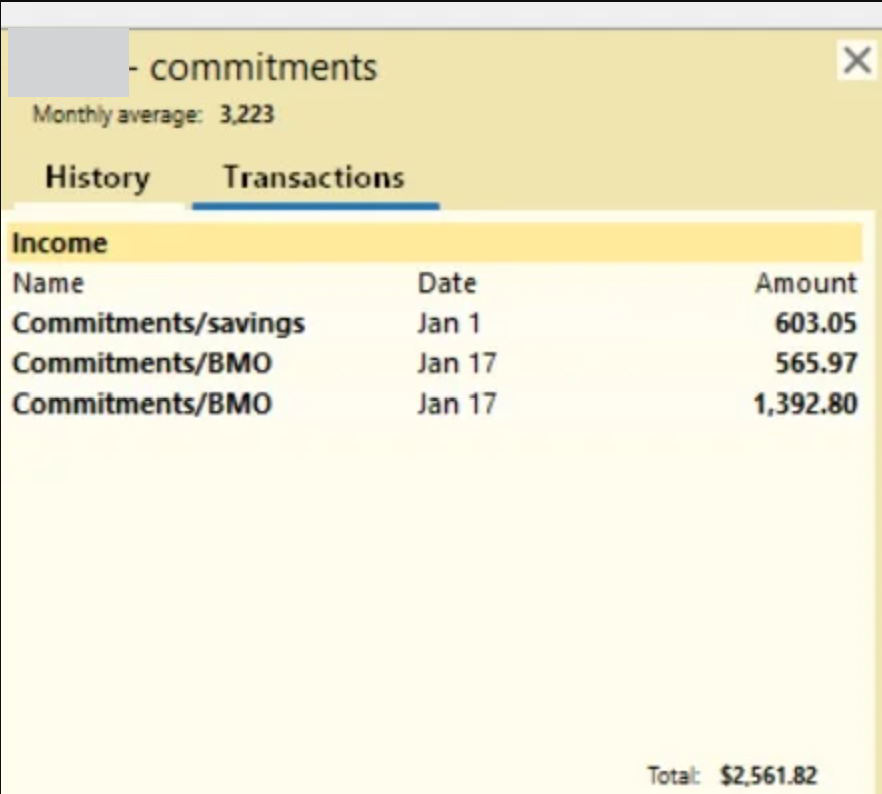
I'm using the Canadian version of Classic for Windows. I have several accounts for different purposes. I often transfer funds from Commitments to Savings. In the example below, I am transferring '$603.05 from commitments to savings. However, in the savings budget, the amount shows as $2,561.82. Clicking on this amount, I see that it is the total of three transactions in commitments. What can I do so that the budget only shows the $603.05 transaction?
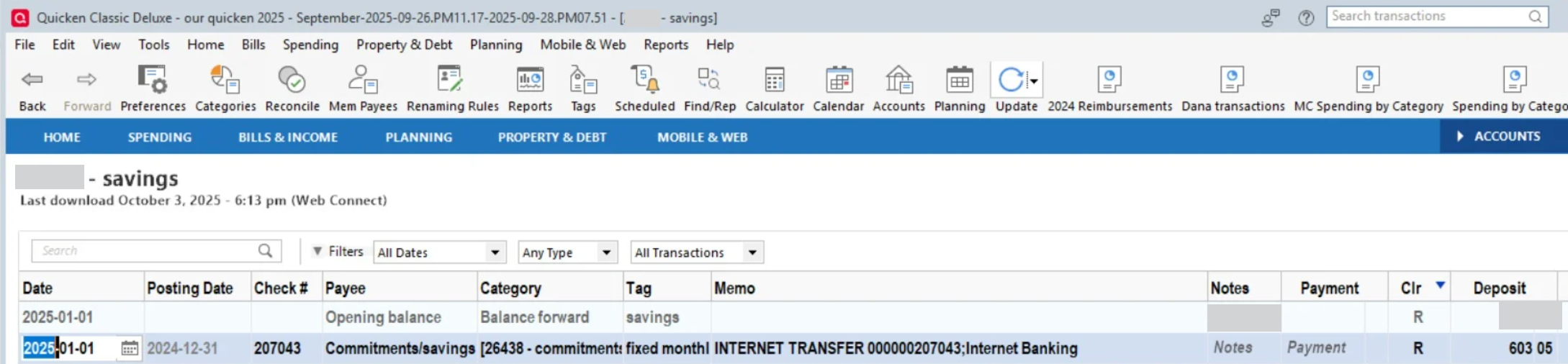

image.png image.png image.png

[Edited Screenshots for Privacy]
Tagged:

Comments

  • Quicken Anja
    Quicken Anja Moderator mod

    Hello @wpg 51,

    Thanks for sharing those details and screenshots!

    The budget calculates all transactions that use the same assigned category. In your last screenshots, it looks like there are two transactions with the payee name Commitments/BMO, which suggests they’re using the same category as the Commitments/Savings transaction.

    Please click one of the Commitments/BMO transactions to open it in the register, then check which category is assigned. If it’s using the same category as Commitments/Savings, that would explain why it’s being included in your budget total.

    Let us know what you find after checking—that will help narrow things down further!

    Thank you!

    -Quicken Anja
    Make sure to sign up for the email digest to see a round up of your top posts.

  • wpg 51
    wpg 51 Member ✭✭

    Hi Anja. Thank you for responding to my post. I understand why I get the result I do - I wondered if that might be the problem. I charge all my purchases to my BMO and pay them from whatever account has the corresponding budget. To show expenditures from the correct category, my budget, using savings as an example, would include savings and BMO. All my expenses, whether cash withdrawals from the savings account, or purchases on BMO, are categorized correctly. The problem comes with, as you saw in my previous post. I want to budget my income because most of it is transferred in from commitments so I can adjust my expenses if my income is insufficient to cover them. I have come to the conclusion that I can only get around the problems regarding transfers and getting only the transfers that affect the budget account to show, and/or finding a way to show transferred amounts into the right categories, in one of the following ways.

    1. Not include income in the budget
    2. Enter transfers as 2 separate transactions that don't link one account to the other
    3. Just use excel for budgets and copy the expense total for each category into the matching budget category
    4. Set savings goals for each category so transfers can be broken down to include income or expenses
    5. Don't bother with Quicken budgets

    Unless I can find a better way, I think I will continue using savings and BMO accounts together in one budget so the expenses are correct and can be compared to the budget. I will budget income but not worry about adding transferred amounts. Most income that doesn't come from transfers can be categorized to offset expenses or increase the amount available in expense categories.

    Maybe these ideas will help others who have been having the same problems as me or will give you an idea for a solution.

  • Quicken Anja
    Quicken Anja Moderator mod

    Thanks for the follow-up, @wpg 51! You’ve clearly put a lot of consideration into how to work around this, and your insights will definitely be helpful for others experiencing similar budgeting challenges.

    At this time, there aren’t additional solutions beyond the ones you’ve already explored, but we appreciate you sharing your approach and feedback.

    Thank you!

    -Quicken Anja
    Make sure to sign up for the email digest to see a round up of your top posts.

  • Arctic Hare
    Arctic Hare Quicken Windows Subscription SuperUser ✭✭✭✭

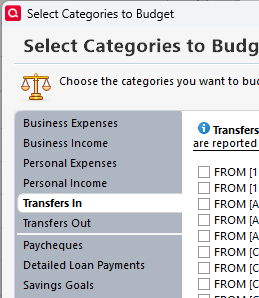
    @wpg 51 you can selectively choose which account transfers in/out are included in a budget here, which is accessed by clicking on the "Manage Budget Categories" button:

    image.png

    FWIW, while I believe it is possible to do what you are desiring to do, I do question the value of such a detailed process. I wouldn't recommend the approach discussed here, but I do believe it is supported if you find value in using it.

  • wpg 51
    wpg 51 Member ✭✭

    Hi @Quicken Anja

    I think I found a solution for my initial post where the total of all commitment transfers showed up in my savings budget. I set up a budget report using the same information as the budget to try out my theory and it worked. In the budget report, I could use the payee "commitments/savings". The total amount shown was the amount only transferred to savings. If the budget had the capability of using payees, the amount entered would match more specific criteria. I can now create my budget using the BMO and savings accounts to show all expenditures and only the amount I want transferred in. Does this seem possible to you?

  • wpg 51
    wpg 51 Member ✭✭

    @Arctic Hare

    Thank you for responding to my post. I was already doing what you suggested. In my savings budget, I only want the amount from commitments that pertains to my savings account. Unfortunately, the amount that shows is the total of all transfers out of the commitments account. The screenshots in the first post explain this more explicitly.

  • wpg 51
    wpg 51 Member ✭✭

    @Quicken Anja

    I found an even easier solution. Take the amount shown minus the budget amount and create a new transaction using the category transfer out. This then decreases the amount in the budget to where it should be.

  • Quicken Anja
    Quicken Anja Moderator mod

    @wpg 51 Thanks for sharing your follow-up and the solution you found! It’s great that you were able to adjust the budget by creating a compensating transaction to get the totals to match. Your approach of isolating the transfers that actually affect the budget will likely help others facing the same issue with linked accounts.

    Budgets in Quicken can get tricky with transfers and multiple accounts, so practical workarounds like yours are always valuable to share in the Community.

    Thank you!

    -Quicken Anja
    Make sure to sign up for the email digest to see a round up of your top posts.

  • Arctic Hare
    Arctic Hare Quicken Windows Subscription SuperUser ✭✭✭✭

    FWIW, this sounds like a rather detailed, complex, and involved (i.e. time intensive) way of budgeting. One alternative, that might not have all the same functionality, but I believe is simpler, is to use the Savings Goals feature as a budgeting method. A key "advantage" to this method is you don't need multiple bank accounts, because the "budgeted" amounts are reserved virtually in Quicken for specific purposes. I use this method for things like our annual home insurance payment. It is a relatively large expense, so I have monthly transactions that add to the savings goal and then, when I pay the home insurance bill annually, I withdraw the funds from the savings goal. Another example is that my spouse is self employed and I use this method to set aside funds as a income tax ilability using a simple pro forma calculation. I don't "budget" for everything this way… in fact, I use it only for a handful of expenses, but I do find it simple, useful, and quick method. Mileage may vary.

This discussion has been closed.