Another Fidelity issue

Steve360@
Steve360@ Member ✭✭✭

I just ran a OSU and it crashed in the middle of it. After relaunching and rerunning OSU I have over 200 duplicate transactions. This isn't the first time this has happened post-EWC+. The very long and tedious fix I've been using is to turn off automatic downloads for all 9 of my Fidelity accounts and manually delete them one by one. Then turn automatic downloads back on for each.

I'd think that restoring from a backup would be a clean slate but it's not. It ran fine this morning and I have a backup from then. Even after restoring from that it still downloads all the duplicate transactions.

Has anyone else encountered this and found a better workaround?

Comments

  • leishirsute
    leishirsute Quicken Windows Subscription Member ✭✭✭✭

    Quicken really needs to have a multiple select feature for downloaded investment transactions in order to delete many with one click. It is very tedious with the current design.

    Deluxe R64.30, Windows 11 Pro

  • Quicken Kristina
    Quicken Kristina Quicken Windows Subscription Moderator mod

    Hello @Steve360@,

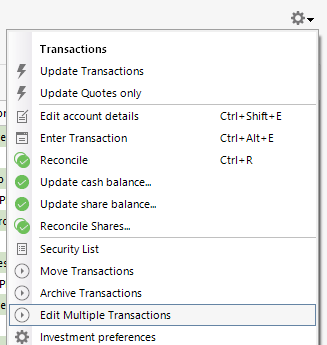
    Thank you for reaching out! The best work around I know of for deleting multiple duplicate transactions from an investment account is making a backup of your file, then clicking the gear icon near the upper right corner of the register and selecting "Edit Multiple Transactions".

    Edit multiple transactions.png

    That option will bring up a window that will allow you to select all the duplicate transactions, then click the Delete button to delete them. Note - If you have automatic entry turned off, you may need to accept the transactions before you can select and delete them.

    Restoring a backup from before the duplicate transactions downloaded can result in them downloading again, since whatever issue was causing Quicken to not recognize that they already were in your register may still exist in that newly restored file.

    Do these duplicate transactions keep redownloading every time you update your Quicken, or is it a one-time occurrence (unless you restore a backup)? Does crashing during the One Step Update seem to trigger this behavior? When did the issue with crashing start? How often does it happen?

    I look forward to your reply!

    Quicken Kristina

    Make sure to sign up for the email digest to see a round up of your top posts.

  • Steve360@
    Steve360@ Member ✭✭✭

    Thanks for the reply. I'll have to try this if it happens again but think that option only allows you to edit transactions in the register. Unfortunately when this happens, the duplicate transactions are not easily found which is why I have to turn off automatically accepting downloading transactions. Do you know if it works in the downloaded transactions pane as well?

    It has happened three different time. The first one on 9/30 after I had already migrated to EWC+ and seemed to be random as it was after a OSU finished with no errors. The past two came this week when all of Quicken crashed during the OSU. After relaunching and running OSU is when the 200+ transactions showed up, presumably because the crash caused Quicken not to remember when the last time it got transactions was (at least that's what the Quicken AI chatbot told me).

    I have had intermittent crashes during OSU for as long as I can remember (maybe 3-4 times per week and I am running multiple OSUs per day…yes I know I probably shouldn't be in Quicken that much!). It's just in the past week that it caused the issue of downloading 90 days worth of transactions. As a matter of fact, I just ran a OSU and it crashed and I thought I was going to have to do it again but thankfully it had 0 transactions after relaunching and rerunning. I've done validate and repair and it always comes back with no errors. If / when it happens again I think I'll probably contact support directly.

  • Quicken Kristina
    Quicken Kristina Quicken Windows Subscription Moderator mod

    Thank you for the follow-up,

    Since transactions in the downloaded transactions pane haven't been accepted into the register yet, I don't believe that the option to edit multiple transactions works for them.

    The intermittent crashes are a bit concerning, since they could cause issues with your file. Do you keep your Quicken file directly on your local hard drive? Is it synced with any cloud services, such as OneDrive, iCloud, or Dropbox? Are there any programs, like an antivirus, that may be scanning Quicken when it's running One Step Update?

    Thank you!

    Quicken Kristina

    Make sure to sign up for the email digest to see a round up of your top posts.

This discussion has been closed.