Fidelity Accounts Transaction Downloading Has Once Again Stopped Working
This is getting very frustrating. For many years the connections between Fidelity and Quicken have been (MOSTLY) trouble free. Now, just about daily I have problems with all my Fidelity accounts and am left to spend lots of time entering everything manually.
What is the proper and best approach to re-setting up all my Fidelity accounts. Is there a good guide that I should follow? I would like to reset and re-sync everything so it just works again moving forward.
Right now I disconnect my Fidelity accounts and then re-authorize them via Quicken. Fidelity lists ALL of my accounts and I link them on the Quicken screen with the accounts on the register. But event then, no updates come through?
If anyone has had success please let me know. I am almost ready to just give up and start from scratch all over again after 10+ years of using this same system. It is a shame this paid for, expensive, yearly service, is not better maintained.
I appreciate any help and can provide whatever details are needed. Please let me know what are the best steps to resolve this once and for all.
Thanks!
Comments
-
Hello @Jean-Marie,
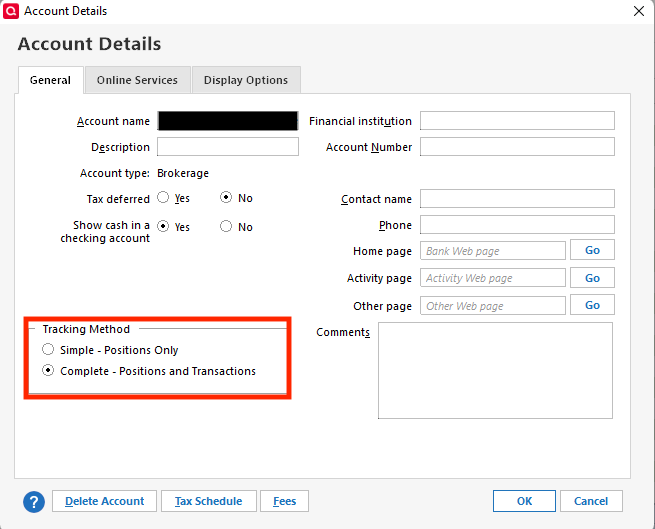
Thank you for letting us know you're seeing this issue. To troubleshoot, if the transactions section is not visible at all, then that would mean your accounts are using Simple investing. If that is what is happening, then you can correct it by navigating to Tools>Account List. Click the Edit button next to the problem account. On the General tab, select Complete - Positions and Transactions, then click OK.
If the transactions section is visible, but nothing is downloading, then please follow these steps from our article on missing transactions/transactions not downloading:
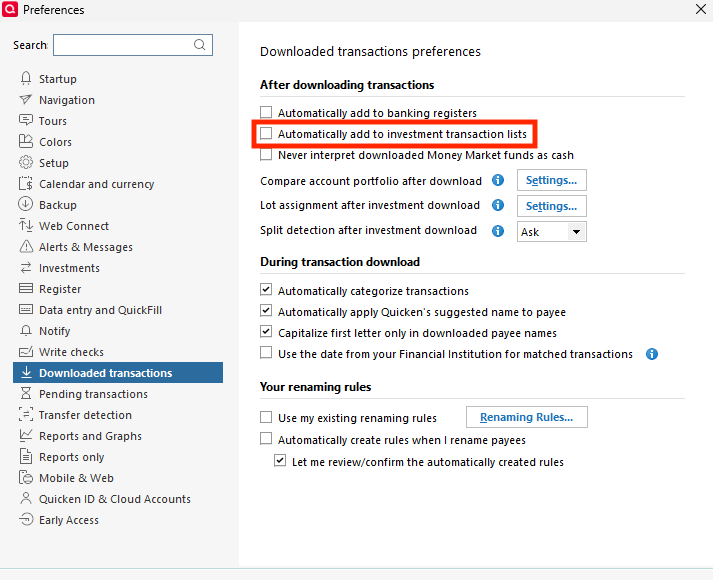
1. Go to Edit > Preferences > Downloaded Transactions. The option Automatically add to investment transaction lists needs to be unchecked.
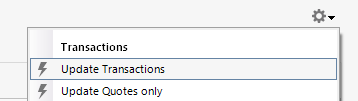
2. Refresh your online account information by clicking the Actions Gear Icon on the upper right of the register, and select Update Transactions. Follow the on-screen instructions to complete the update.
3. Confirm that the Sort Order in your account is by Date; just click the top of the Date column in your account register. It's possible the transactions are in your register, but not where you thought they'd be.
4. Try refreshing your login session: To do this, go to Help > Refresh Sign in. After completing the log-in process, trying running a One Step Update again.
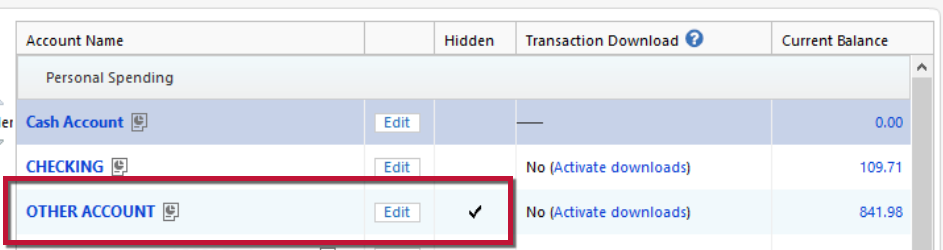
5. Go to Tools > Account List and check Show Hidden Accounts at the bottom left. Confirm the missing transactions haven't been added to a hidden account by clicking on the name of any account that appears with a check mark in the Hidden column.
Please let me know how it goes!
Quicken Kristina
Make sure to sign up for the email digest to see a round up of your top posts.
0 -
I have been using Quicken for many many years. The accounts are and have always been all setup as "Complete - Positions and Transactions" ands never as "Simple". I just checked again to verify. I have also had "Automatically add to investment transaction lists" not checked for many months now. I have verified that no transactions ever went to any of my hidden old closed investment accounts. I have tried to disconnect and re-connect my Fidelity accounts but with no luck. I have gone through your process and it is not helping. I wish I could go back to how it was for MANY years when it all just worked.
Please let me know what to try next? Are there any log files I can examine to see what it is downloading from Fidelity? I am will to try anything, but really would like to see some data that can pinpoint the issue.0 -
Thank you for your reply,
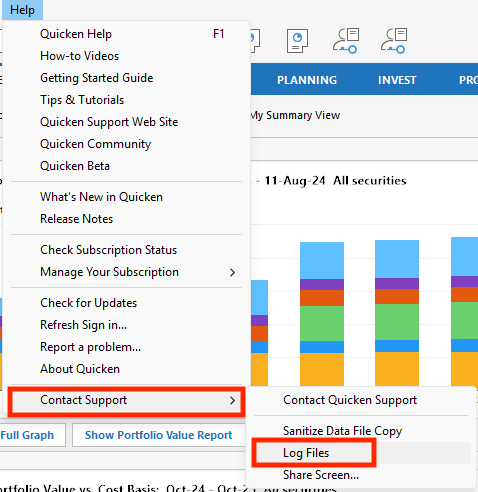
If you want to review log files in your Quicken, you can do so by navigating to Help>Contact Support>Log Files.
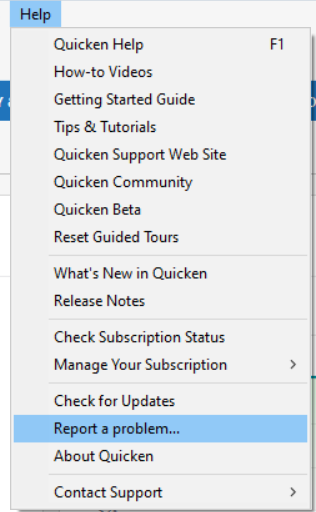
If you're not able to view the logs there, you can also access log files by navigating to Help>Report a Problem, and clicking on the link for the log file you want to view. Express Web Connect+ transactions usually show up in the Sync log. Please note that any transactions you manually entered or manually corrected will reflect in the logs.
If you would like me to review the logs, then please navigate to Help>Report a Problem and send a problem report with log files attached. Please include at least 3 transactions (date/payee/amount) that are showing posted on the financial institution website, but are not in your Quicken at all, not even manually entered. With that information, I would be able to check the logs for those transactions.
If you send a problem report, please post here to let me know it was sent.
I hope this helps!
Quicken Kristina
Make sure to sign up for the email digest to see a round up of your top posts.
0
Categories
- All Categories
- 56 Product Ideas
- 36 Announcements
- 223 Alerts, Online Banking & Known Product Issues
- 22 Product Alerts
- 701 Welcome to the Community!
- 671 Before you Buy
- 1.2K Product Ideas
- 53.7K Quicken Classic for Windows
- 16.3K Quicken Classic for Mac
- 1K Quicken Mobile
- 813 Quicken on the Web
- 111 Quicken LifeHub