During Fidelity Download, PREVIOUSLY entered transactions are lost
I reported this problem today via Help > Report a Problem AND a call into Quicken Support. It is the second time in 2 weeks it affected me.
Windows 11, Quicken Classic Premier R64.30, Fidelity EWC+
Following my daily download, Quicken reports a "Securities Comparison Mismatch" on a handful of securities. I found that the mismatch occurred because transactions previously reported and entered into Quicken had gone missing. Example: on 10/06/25 39 transactions were downloaded to one of my Fidelity accounts. These included Dividends, Buys, and Solds. Today (10/17/25) I did my update for transactions recorded on 10/16/25 and Quicken reported a Mismatch. Turns out, 7 of the 39 transactions from 10/6/25 were no longer in the register. I confirmed this by loading a recent backup and I could see the original transactions. The first time this occurred; previously reconciled transactions were lost.
For Quicken support; I just determined that the 7 securities that were lost from 10/6/25 had new transactions on 10/16/25. The 10/16/25 transactions were completely different buys/sells from those lost on 10/6/25.
The workaround is to find the lost Quicken transactions in Fidelity's Activity & Orders tab and manually reenter them.
Comments
-
Hello @rwaynerogers,
Thank you for letting us know you're seeing this issue. Data should not be vanishing from your registers like that. I suspect this may be happening due to a file-specific issue. You mentioned this is the second time it's happened in two weeks. Did the issue start two weeks ago? Was there anything that happened around the same time, such as a program/computer update or an unexpected program/computer shutdown? Do you keep your Quicken file directly on your local hard drive? Is it synced with any cloud services, such as OneDrive, iCloud, or DropBox?
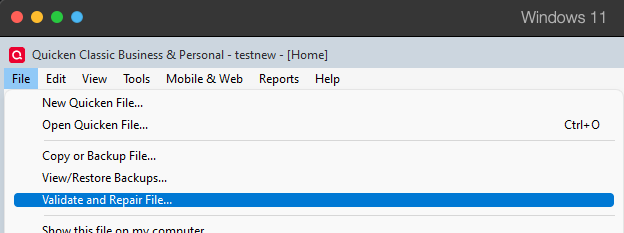
To start troubleshooting the issue, I suggest that you try validating your data file. Please save a backup file prior to performing these steps.
Validate:
- File
- Validate and Repair File...
- Validate File
- Click OK
- Close the Data Log
- Close Quicken (leave it closed for at least 5 secs)
- Reopen Quicken and see if the issue persists.
Please let me know how it goes!
Quicken Kristina
Make sure to sign up for the email digest to see a round up of your top posts.
0 -
Kristina: It was first seen in the previously mentioned two-week issue. No know issues/upgrades on my windows system coincide with this issue surfacing. I did validate my files both time this occured and nothing was found. I just repeated the validation and no indication of any issues that this may be attributed to. I've attached the results. I keep quicken on my local drive and haven't recently sync'd to the cloud.
[Edited - Removed attachment to protect personal information]
0 -
Thank you for your reply,
Since validating the file did not correct the issue, the next step is to try restoring a backup from before the issue started and test to see if the issue persists in the newly restored file.
Thank you!
Quicken Kristina
Make sure to sign up for the email digest to see a round up of your top posts.
0 -
Okay, this problem occurred again!
Per your suggestion above, I restored the last backup (taken 2 days prior), validated that file, then reran the update. The results were the same. Previously recorded transactions dropped in both updates. The exact same transactions were dropped.
The problem statement is this; During a Quicken update, previously recorded transactions within my Fidelity accounts go missing from Quicken. During my update on 31-Oct-25, 6 previously recorded transactions were dropped from each of 2 of my Fidelity accounts (that is a total of 12 dropped transactions). Here are some observations.
—This is occurring when Fidelity rebalances my accounts which they do 1 or 2 times a month. In this example they did a rebalance on 16-Oct-25 and one on 30-Oct-25. 6 of the transactions that had been recorded on 16-Oct went missing following the update on 30-Oct.
—The 6 deleted transactions impact 6 different securities, e.g. WABTEC COM.
—According to my Register in Quicken as the transaction in the 30-Oct update are ordered, the 6 transitions dropped from the 16-Oct rebalance involved the first 6 securities listed in the 30-Oct rebalance. This is true for both of my impacted accounts.
My work around until this is fixed is to find the missing transactions by going to Fidelity and reviewing their Activity log, find the missing transactions, and then manually enter them back into Quicken.
WHAT I HAVE:
*Validation Logs for before and after files. Both showing good files.
*Copies of the "Security Comparison Mismatch" box Quicken throws up following the account updates. This is how I come to know I have the problem.
*Pictures of the Quicken register from the known good backup showing the transactions on 16-Oct. Pictures of the same register post update documenting the transactions are no longer in the register/Quicken.
What can I provide/do to help Quicken fix this issue? And how would you like me to provide it?
0 -
A further update. Today, 11/1/25, my daily update was run. This issue of dropping transactions occurred on a third Fidelity account (not associated to the two mentioned above). They rebalanced and I lost transactions.
I noticed that the transactions lost were from the last batch of transactions rebalanced on 17Oct. As before, securities in the 31Oct update batch got deleted from the 17Oct batch. In this case, the Securities in first three transactions in the 31Oct register match to the Securities from the 3 lost transactions originally posted on 17Oct.
This pattern is consistent with the issues documented in my post above earlier.
0 -
Can someone take a look at this and give me some direction on what to provide to resolve?
0 -
Thank you for your replies,
Was the backup you restored from before the problem started? If not, please try restoring an older backup from before the problem started.
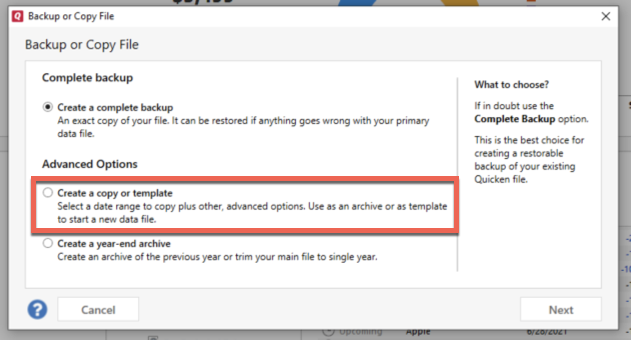
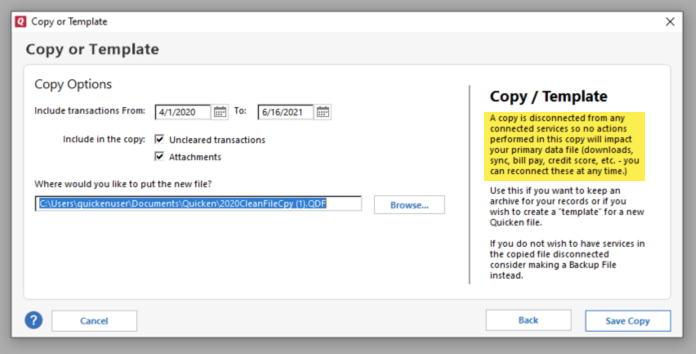
If it was from before the problem started, and the issue is persisting, then I suggest that you try creating a copy of your data file, which will rebuild all of the internal lists and database tables. If successful, you would then move forward with the copied file. To create a copy, please navigate to File > Copy or Backup File... > Create a copy or template (see examples below) which will also allow you to select a date range to move forward with.
If you wish to move forward with your entire data file, please check the full date range of your entire data file before copying so you can enter the correct date range if you do not wish to "shrink" your file by eliminating certain dates. Note - You should not need to "shrink" your file unless you believe older data is the cause of the issue, in which case you would "shrink" the file to exclude that older data.
It's important to know that all online services will be disconnected in the copied file, and you will need to sign back in with your Quicken ID and reconnect all of your online accounts, online billers, Quicken Bill Manager services, etc if you plan to use that copied file going forward. The reason for this is that the new copy also creates a new and separate dataset ID.
Please reconnect only what is necessary to test if the issue is resolved. If the issue is resolved, then reconnect your accounts and use the copied file as your new main file.
If the issue is not resolved in the copied file either, then feel free to switch back to your original file. For instructions on switching between Quicken files, please click here.
Thank you!
Quicken Kristina
Make sure to sign up for the email digest to see a round up of your top posts.
0
Categories
- All Categories
- 56 Product Ideas
- 36 Announcements
- 223 Alerts, Online Banking & Known Product Issues
- 22 Product Alerts
- 701 Welcome to the Community!
- 671 Before you Buy
- 1.2K Product Ideas
- 53.7K Quicken Classic for Windows
- 16.3K Quicken Classic for Mac
- 1K Quicken Mobile
- 813 Quicken on the Web
- 111 Quicken LifeHub