I was looking at the printed assumptions from my Lifetime Planner in Quicken Classic. I was surprised to see investment accounts that I have not included in the Lifetime Planner. It is picking them up from the account list.
There are only three accounts that I have selected to be part of my Lifetime Planner. You can see the three below that should be included when I click on edit “Investments”.
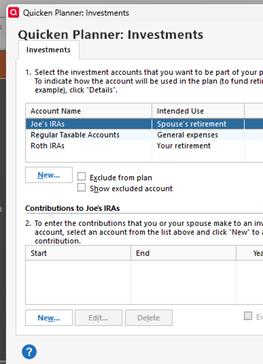
However, when I print the Lifetime Planner assumptions or just look at them without clicking “edit”, it includes three additional accounts: DSB 403b, John Hancock Non-Qualified Plan, and ML Total Historical Growth. All of these accounts are in the “Separate” section of the Account Lists and also aren’t chosen to be included above.
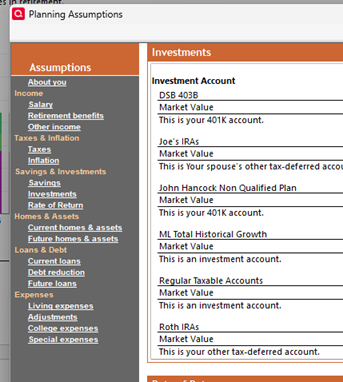
I want to make sure that none of these account values are being used to calculate retirement income.
There is clearly some kind of a glitch in the program.
Thanks
[Edited - Readability]