Should Not Be Prompted to Migrate Fidelity NetBenefits Account to EWC+

Boatnmaniac
Boatnmaniac Quicken Windows Subscription SuperUser, Windows Beta ✭✭✭✭✭

I migrated all of my Brokerage and Retirement account from DC to EWC+ last week and, except for not being able to properly manage FDRXX MMF as Cash instead of Shares in my IRA and Roth IRA accounts, for the most part it is working pretty well.

But every time I do OSU I get the popup prompting me to migrate a NetBenefits 401K account.
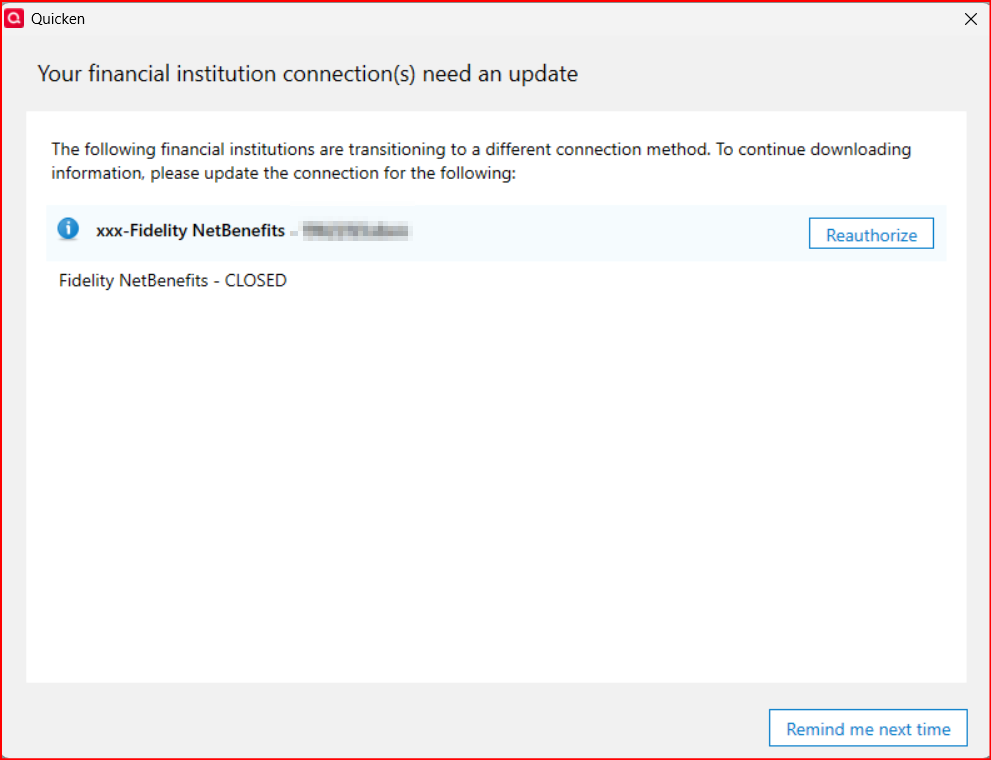
image.png

The problem is that this account at both Fidelity and in Quicken has been closed since 2015. So clicking on Reauthorize doesn't work because I no longer have any access to Fidelity Netbenefits. My login for that site has long ago expired and cannot be reset.

Using my Fidelity.com login also does not work because that login was never used with NetBenefits.

So, I end up having to close the browser webpage and waiting for Quicken to tell me that the reauthorization process failed before I can start to use my file, again.

Clicking on Remind me next time does close the popup so I can proceed with OSU. But every time I initiate OSU I get this reauthorization prompt, again.

I also confirmed with the Online Services tab for this NetBenefits account that it is not connected.

This prompt shows the FI is xxx-Fidelity NetBenefits but the General Tab of Account Details shows it is zzz-Fidelity NetBenefits. On the General tab I've removed this zzz-Fidelity NetBenefits from the FI line but when I close Account Details and reopen it the FI still shows zzz-Fidelity NetBenefits.

Is anyone else experiencing this?

Short of deleting the account (which I will not do), does anyone know how I can stop the migrate prompt from popping up?

Quicken Classic Premier (US) Subscription: R65.15 on Windows 11 Home

Tagged:

Best Answers

  • GeoffG
    GeoffG Quicken Windows Subscription SuperUser ✭✭✭✭✭
    edited October 22 Answer ✓

    I had the same issue with a long ago closed Merrill Lynch account. Assuming you hid the closed Fidelity account, go to Accounts and tick Show hidden accounts. The account you closed will have Direct connect showing in the Transaction Download column when it should state "Not Available". So something in the version when we closed these accounts did not clear this correctly.

    What I did to resolve this was to create a new Offline account with a similar naming structure. Once created, I used the Move transactions menu option and selected all transactions from the "bad" account to the new account. The move process ran without issue and I briefly reviewed all looked OK in the new account.

    From there, I once again closed the new account and verified "Not Available" was present. I then successfully deleted the problem account and no longer get prompted to reauthorize.

    I failed to mention, but of course did a backup before starting.

    Good luck.

  • Boatnmaniac
    Boatnmaniac Quicken Windows Subscription SuperUser, Windows Beta ✭✭✭✭✭
    edited October 23 Answer ✓

    @GeoffG - This morning I did the following which resolved the NetBenefit EWC+ migration prompt issue for me.:

    1. Created an Offline 401(k) account.
    2. Moved all transactions from the problematic NetBenefits account to the new Offline account and confirmed that this process was done correctly.
    3. Deleted the problematic Net Benefits account.
    4. Closed the Offline account.
    5. Initiated OSU which completed properly without prompting me to migrate the Offline account to EWC+.

    While the errant fractional shares issue was not a contributing cause to the issue I was experiencing your suggestion did help me to identify the errant fractional shares in the NetBenefits account, to identify the root cause of that shares issue as originating in the prior Hewitt 401(k) account (going back to the converted original MS Money history) and to get the issues resolved in both accounts.

    And your suggestion to set up the Offline account, move all the transactions from the errant Net Benefits account into this Offline account and then to delete the Net Benefits account fully resolved the errant EWC+ migration issue for me.

    So, thank you for your assistance on both matters.

    Quicken Classic Premier (US) Subscription: R65.15 on Windows 11 Home

Answers

  • GeoffG
    GeoffG Quicken Windows Subscription SuperUser ✭✭✭✭✭
    edited October 22 Answer ✓

    I had the same issue with a long ago closed Merrill Lynch account. Assuming you hid the closed Fidelity account, go to Accounts and tick Show hidden accounts. The account you closed will have Direct connect showing in the Transaction Download column when it should state "Not Available". So something in the version when we closed these accounts did not clear this correctly.

    What I did to resolve this was to create a new Offline account with a similar naming structure. Once created, I used the Move transactions menu option and selected all transactions from the "bad" account to the new account. The move process ran without issue and I briefly reviewed all looked OK in the new account.

    From there, I once again closed the new account and verified "Not Available" was present. I then successfully deleted the problem account and no longer get prompted to reauthorize.

    I failed to mention, but of course did a backup before starting.

    Good luck.

  • Boatnmaniac
    Boatnmaniac Quicken Windows Subscription SuperUser, Windows Beta ✭✭✭✭✭

    Interesting. I started the process with Accounts List and got this:

    image.png
    • It shows the account is still connected with DC…but on the Online Services tab of Account Details it shows the account is not connected.
    • Last Download = Not Available. So this is correct and not as you saw with your situation.
    • FI: Shows xxx-Fidelity NetBenefits but on the General tab of Account Details it shows zzz-Fidelity NetBenefits.
    • The account was closed in Quicken in Jan 2016 (not in 2015 as I'd mentioned earlier)…so why does it show the last reconcile was 4/28/2017?

    Then I went to the Holdings view of the account which showed 3 securities with small fractional shares. So I did Update Share Balance to 0 shares for each of them. That resolved those errant holdings.

    Then I initiated OSU and I got the migration prompt for -my Fidelity.com login id. Not for either xxx-Fidelity NetBenefits nor zzz-Fidelity NetBenefits. So that certainly was weird.

    I decided to proceed with the reauthorization attempt and it logged me into Fidelity.com but this NetBenefits account was not included in the list of accounts so I could not authorize it.

    I'm getting tired. I think I'll try doing your suggestion to move the transactions to a new offline account, see if the transactions and holdings look correct. Then delete the main account and close the new offline account. I'm thinking that might work because then Quicken will no longer have a previously set up DC account to try to reauthorize. I'll let you know tomorrow.

    Quicken Classic Premier (US) Subscription: R65.15 on Windows 11 Home

  • ct89
    ct89 Quicken Windows Subscription Member ✭✭

    I had the same issue (not with NetBenefits) with Quicken trying to reauthorize a long-closed Fidelity account and posted it here:

    I followed the instructions under "Third, Copy your file and Validate" in the "support article" and it resolved the issue:

    https://www.quicken.com/support/advanced-data-file-troubleshooting-correct-problems-quicken-windows/

    Good Luck.

  • Boatnmaniac
    Boatnmaniac Quicken Windows Subscription SuperUser, Windows Beta ✭✭✭✭✭

    Thanks for the suggestion. I generally avoid doing V&R on this particular file because it always changes transactions for an old and closed Brokerage account that adversely impacts my Net Worth and investment reports. I did try doing V&R this morning and it did it, again, so I ended up restoring my backup file.

    Quicken Classic Premier (US) Subscription: R65.15 on Windows 11 Home

  • Boatnmaniac
    Boatnmaniac Quicken Windows Subscription SuperUser, Windows Beta ✭✭✭✭✭
    edited October 23 Answer ✓

    @GeoffG - This morning I did the following which resolved the NetBenefit EWC+ migration prompt issue for me.:

    1. Created an Offline 401(k) account.
    2. Moved all transactions from the problematic NetBenefits account to the new Offline account and confirmed that this process was done correctly.
    3. Deleted the problematic Net Benefits account.
    4. Closed the Offline account.
    5. Initiated OSU which completed properly without prompting me to migrate the Offline account to EWC+.

    While the errant fractional shares issue was not a contributing cause to the issue I was experiencing your suggestion did help me to identify the errant fractional shares in the NetBenefits account, to identify the root cause of that shares issue as originating in the prior Hewitt 401(k) account (going back to the converted original MS Money history) and to get the issues resolved in both accounts.

    And your suggestion to set up the Offline account, move all the transactions from the errant Net Benefits account into this Offline account and then to delete the Net Benefits account fully resolved the errant EWC+ migration issue for me.

    So, thank you for your assistance on both matters.

    Quicken Classic Premier (US) Subscription: R65.15 on Windows 11 Home

  • GeoffG
    GeoffG Quicken Windows Subscription SuperUser ✭✭✭✭✭
    edited October 23

    @Boatnmaniac Glad it worked out. That was driving me nuts also and knew it was not going to go away on its own.

  • SCMichel
    SCMichel Quicken Windows Subscription Member ✭✭

    Thanks for the process to get this fixed. Too bad Quicken can't do proper testing before releasing this mess.

  • Boatnmaniac
    Boatnmaniac Quicken Windows Subscription SuperUser, Windows Beta ✭✭✭✭✭
    edited October 29

    Well, to be honest, I am not convinced that the issue I was experiencing had anything directly to do with Fidelity's migration to EWC+. My NetBenefits account was created in MS Money and was converted over to Quicken back in 2010 when MS stopped supporting MS Money. There were a couple of other E*Trade investment accounts back then that also did not properly convert and they are still sometimes problematic for me even though the accounts were closed in Quicken back in 2017….at the same time that I closed out the NetBenefits account. So, I'm assuming this issue is more related to the MS Money-to-Quicken conversion back in 2010 than anything else.

    That all being said, the scope of the issues encountered with Fidelity's EWC+ migration was so large that it's hard to imagine even minimal testing by Fidelity, Intuit and Quicken would not have identified many of them.

    Quicken Classic Premier (US) Subscription: R65.15 on Windows 11 Home

  • SCMichel
    SCMichel Quicken Windows Subscription Member ✭✭

    I also came over from MS Money, so everything you say is probably true. Guessing Quicken does not have a test case for former MS Money users.

    I also am having a lot of the issues with Fidelity as all of my retirement accounts are through them. I decided to turn off updating completely until the issues are fixed. Been a few months now. Recently tested turning updates on again on my 401k account, but it was a giant mess. Netbenefits accounts that show on fidelity.com do not have the appropriate transaction information to download properly. Everything says Unknown security. Oh well, I will just continue to wait and manually update my accounts.

This discussion has been closed.
