Can't download from my USAA Checking Account

When updating accounts, I get this message for USAA my checking account "There is a problem downloading transactions for this account" . My USAA credit card update works fine, so it's just the checking account.
It's been going on for months, but since I don't use the account ( I keep $1 in there :) ) , I have been ignoring the error. I decided today to see if I could fix it.
I tried clicking "reconnect" , selecting the connection type, logging into USAA, accepting the terms, and then returning to Quicken.
That didn't fix the issue.
I found these instructions by searching this community. Note that the are for Windows , not Mac.
- Deactivate all the accounts associated with USAA.
- Navigate to USAA's website, (www.USAA.com), look for third-party apps, and unlink Quicken.
- After the accounts are unlinked, return to Quicken, and attempt to Add the USAA accounts by using the "+" button.
- Click on "Tools"
- Select "Online Center"
- Make sure that "USAA" is selected in the account dropdown
- Hold CTRL + SHIFT + Click on Contact Info
- Click on "Reset DTStart"
- Perform a One Step Update.
However, I don't know how to perform #1 "Deactivate all the accounts associated with USAA." There isn't a "deactivate" menu option in any of the menus. If I right-click on the account, I see "delete account" . If I got into account settings, I see "Downloads-Disconnect Account" as the 2 options most similar to "deactivate"
So how do I "deactivate" an account? Or what should I do if that isn't the correct next step?
My Environment
- macOS 15.7.1
- Quicken Classic for Mac v8.3.2
Answers
-
I faced same issue.
1 -
Hello @majorgear,
Thank you for reaching out! Before deactivating any accounts, please make sure to backup your Quicken file (for instructions, click here).
Once you have done that, navigate to Accounts>Hide and Show Accounts…, and check for any hidden USAA accounts that may still be connected. To see if Quicken thinks the account is connected, check to see if a financial institution is listed in the Financial Institution column.
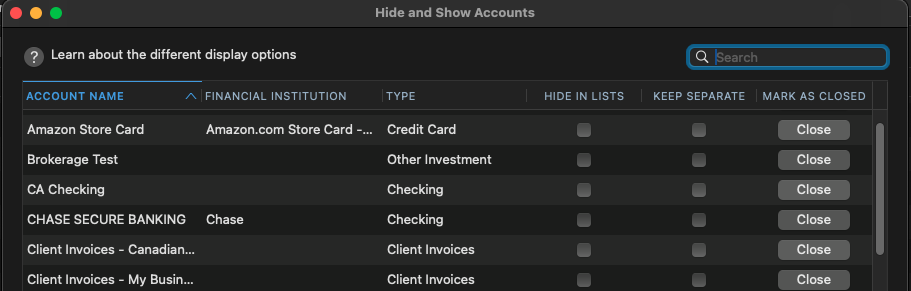
If any hidden USAA accounts are connected, make sure to unhide them by removing the checkmark from the Hide in Lists column.
Once that is done, deactivate all your USAA accounts.
To deactivate an account in Quicken for Mac, please follow these steps:
- Select the account to open its register.
- Click the Settings gear icon in the lower right corner of the register.
- Click the Downloads tab.
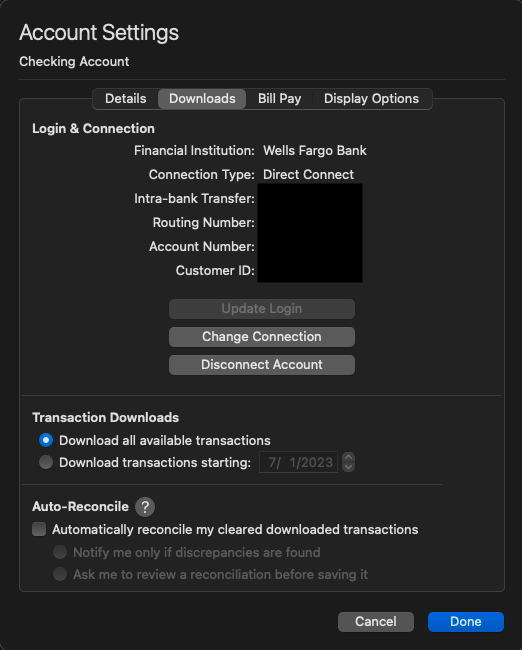
- Click the Disconnect Account button.
- Click Done.
Please note that Quicken for Mac does not have an equivalent to the "Online Center" the instructions you found refer to. You will not be able to do steps 4-8.
To reconnect the accounts, you can use the + icon or navigate to Accounts>Add Account…. Follow the prompts, and when you get to the Add/Link screen in your Quicken, carefully link your accounts to the correct account in Quicken.
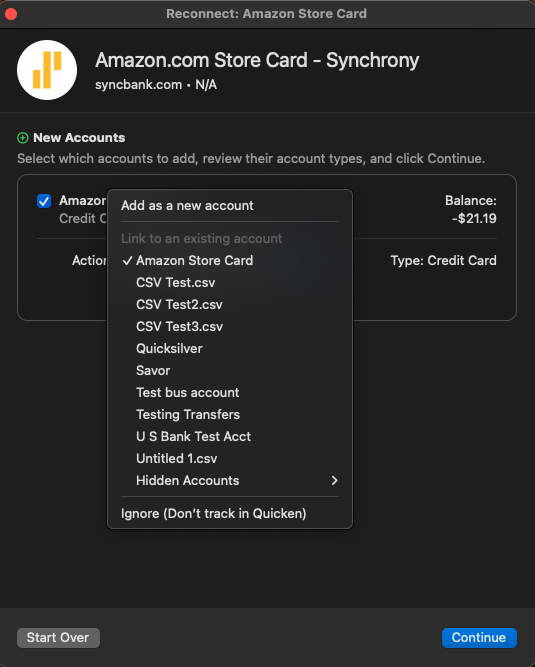
Once that is done, test to see if the issue is resolved.
Please let me know how it goes!
Quicken Kristina
Make sure to sign up for the email digest to see a round up of your top posts.
1 -
did all of this and my USAA checking account is STILL NOT DOWNLOADING.
'
0 -
Following…I’m having a similar problem.
0 -
Hello All,
We now have a Community Alert for this issue. I recommend bookmarking it to be notified of any updates, once available, and know when the issue is resolved. If you do not see the bookmark icon near the upper right, please make sure you're logged into the Community.
Thank you!
(Ticket # 12054304)
Quicken Kristina
Make sure to sign up for the email digest to see a round up of your top posts.
1
