My payee list is becoming unwieldy. Is there a way to delete or hide payees in the drop down payee list that is used when crating reports or editing transactions
Yes, you can delete, hide, or clean up payees so they no longer appear in dropdown lists or reports.
If the payee is used in past transactions, Quicken will warn you that deleting it might affect reporting. In that case, you can instead hide it.
Thanks for your response. I already mange my memorized payees.
I have the most recent version of Quicken for Windows - Classic premier BUT I do not see Tools> Payee list. I'd like this feature to hide numerous payees that appear in Report customization. In report customization I believe the list should have the option to show hidden payees with the default being do not show them
I do not see Tools> Payee list
That should have been Tools> Memorized Payee List in your version of Quicken
If possible, give us an example or two of what makes your MPL "unwieldy". Screen image snapshots might be helpful so that we can give you specific suggestions.
How do I post a screenshot in the community from a macHow do I post a screenshot in the community from windows Please save images to files of file type PNG or JPG only. They're easier to work with than PDF files.
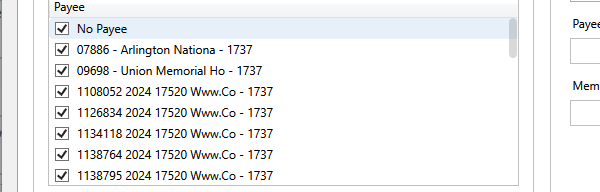
I have displayed an example. This view is from the drop down Payee list shown when creating reports. I would like to hide many of them. In the 'www.co' example, I'll usually rename the payee in the transaction or later via a report to allow them to be all together when I create a payee report. However, many of these I do not change since I do not need them to be together in any reports. As the result of this need I believe there are a variety of things Quicken could do unless others can suggest options.
There are probably other options and nuances relative to my suggestions but I believe one of these would be of benefit. BTW these multiple names for the same vendor has existed for a awhile (I've used Quicken since the 90S) but became worse when the update transactions down load of CCs began to display vendor names differently.
For new transactions of the "Www.Co" type, a Renaming Rule might help to name all new transactions just "Www.Co".
For existing register transactions you can try using Edit / Find/Replace to find all transactions where Payee contains www.co Select and Replace all Payee with Www.Co
Once you have cleaned up your existing register transactions, the original (unwanted) payee names will disappear from the report selection lists.
The best way to deal with large numbers of variations on the same Payee going forward is to use Renaming Rules to standardize the names. For example a rule might be Change the name to www.co if the downloaded payee contains www.co.
To fix the Payee variations in existing transactions you can use Edit > Find/Replace. If you fix all the related transactions, the original variations should be purged from the list.
Warnings: The Find/Replace process defaults to all dates and there is no way to stop it. If the Find returns a lot of matches, it may take a very long time to complete.
There is no Undo. Always back up your data before making a bulk change.
See this discussion for more information
Thanks everyone. I will give the above a try. I use renamimg rules extensively. I must have missed some but it'll prompt me to do a further clean up
Once a quarter I cleanup my payees by renaming them accordingly. I use the Reports > Spending > Itemized Payees report. That reports allows me to see similar payees next to each other and I can rename them right there as needed. It takes just a few minutes since I do it quarterly.
Understood. I agree the workaround you mention is helpful . I use it when I need to clean up a report
thx