I posted the original problem here:
I missed any notification of a response (sorry) so that topic was closed, but I am still having the issue.
Hello @--phantom--,
Thanks for following up, and no worries about the previous thread closing—we can pick up from here.
The error you're encountering (FDP-350) indicates that the security token for your Vanguard connection is expiring, which is why Quicken prompts you to reauthorize. Normally, completing the Reauthorize flow should resolve it, but Vanguard’s systems can sometimes expire tokens more frequently, which is why it keeps returning.
Please refer to this support article, which explains this behavior and why it occurs.
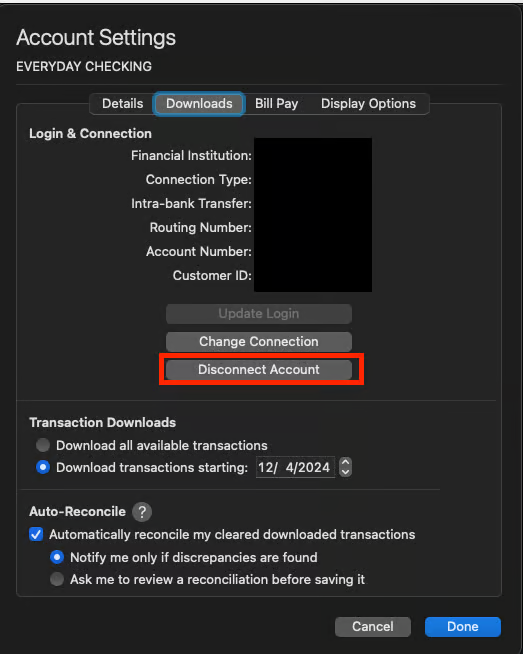
To help stabilize the connection and prevent repeated reauthorization, please try the following full reset steps:
Once you’ve completed these steps, let me know if you're still experiencing issues.
Hope this helps!
Yes, I know how to do it, having had to do it repeatedly. It just seems like it requires reauthorization every couple months or something. It's excessive. I'll start tracking the interval and I'll call them to see if they know what the expiration policy is.
Thanks for the update @--phantom--! That sounds like a good plan—tracking the interval should help clarify what’s happening.
Thank you!
I have the same issue, which started this week. I did send a report to Quicken support within the app.
Hello @redvw,
Thanks for sharing your experience! To help us better understand what’s happening with your Vanguard connection, could you please confirm whether you’ve tried the full reset steps I provided in my earlier response in this thread? This includes disconnecting all Vanguard accounts in Quicken, revoking any Quicken access on Vanguard’s website, and then reauthorizing the accounts in Quicken.
Knowing this will help determine the next best steps.
I’ve been with Quicken for over 30 years. I also have over 30 accounts at various Financial institutions, including Vanguard, Schwab, Fidelity, USAA, Wells Fargo, Chase JPMorgan, etc. I do more appreciate spending 4 or 5 hours correcting my Vanguard accounts at year end…and finding the absence of detailed transactions.
My position is simple. I can eliminate my 5 accounts with Vanguard…and transfer the assets to Fidelity. Having felt with the big three brokers for years….I already know that Vanguard provides the ‘least” service to its customers.
If Vanguard can’t make itself work with Quicken…there are many brokers who can! I am too old mate this nonsense!
Frustrated !