PayPal downloading double entries for credit card transactions

This discussion was created from comments split from:
How to manage Paypal Credit? Manual download format changed; automatic downloads problematic.
.
Comments
-
I am in a similar situation. For a long time, I was having problems with the automatic download of my PayPal User Credit account. Then, they converted that to a credit card, and sent me the physical card.
With some difficulty, I managed to set up the card as a new account with automatic download. There's a major problem, in addition to the above-described, »For each item, it returns two transactions: one of the charge or credit hitting Paypal, and the other offsetting transaction of Paypal transferring it to Paypal Credit.«
It's downloading transactions from my Wells Fargo checking account?! How is it getting into the wrong account, and how can I make it stop??? Manual entry is an obvious immediate solution, but I find it alarming that it's accessing data from another account.
Help, please!
[Edited - Readability]
0 -
Similar situation here wasting too much [Removed - Language] time trying to figure this out. Trying to d/l the credit card transactions results in the double entries as well as commingling everything between the credit card and my normal PP balance. It's 2025… how is this such a tremendous mess up [Edited - Language]?? [Removed - Off Topic]
0 -
Thank you for reaching out! To help troubleshoot, please provide more information. Are your PayPal credit accounts connected using the PayPal connection or the PayPal Credit, MasterCard and Crypto connection?
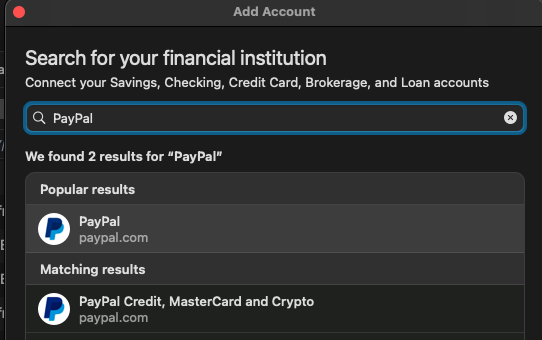
To confirm which connection you are using, navigate to Accounts>Hide and Show Accounts. In the financial institution column next to the account name, you should see which financial institution it's connected to.
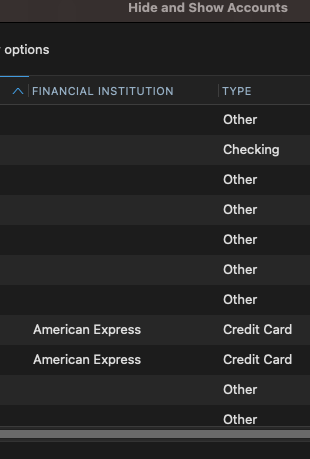
From what I've observed in my own PayPal account, it's normal for the PayPal connection to show the double entries you describe. If your PayPal account doesn't already have funds in it, it will take the necessary funds from the funding account you specified, then send the payment to the payee you specified. In Quicken, that will reflect as 2 transactions, one transaction taking the money from the funding account and the other showing the money being sent to the payee.
I look forward to your reply!
Quicken Kristina
Make sure to sign up for the email digest to see a round up of your top posts.
0 -
Thanks very much, Kristina. In the Hide and Show Accounts window it shows as PayPal. I guess I could deal with the double entries if I have to. Or may just disconnect and change it to manual. I don't want to take the time to deal with filling in missing category information, etc. Thanks again for the help!
0 -
Thank you for the follow-up,
If you would like further assistance, please feel free to reach out!
Quicken Kristina
Make sure to sign up for the email digest to see a round up of your top posts.
0

