Fidelity Download Express Web

CTNC
CTNC Quicken Windows Subscription Member
edited November 10 in Investing (Windows)

I finally changed my accounts to Express Web and things seemed to be going fine until I realized that all of my Fidelity S&P 500 Index fund (FXAIX) shares in my various accounts had disappeared completely with the exception of my 401(k) account. Anybody else? Not sure how I am supposed to fix just one fund disappearing from multiple accounts with decades of history.


Comments

  • Quicken Kristina
    Quicken Kristina Quicken Windows Subscription Moderator mod

    Hello @CTNC,

    Thank you for reaching out. To clarify, since Fidelity is phasing out Direct Connect, did you change your accounts to Direct Connect, or did you migrate to the new connection type: Express Web Connect+ (EWC+)?

    Are there any placeholder transactions that account for the vanishing fund?

    Is FXAIX a core fund in the problem accounts? If so, have you checked to see if it's reflecting as cash instead of as a holding?

    I look forward to your response!

    Quicken Kristina

    Make sure to sign up for the email digest to see a round up of your top posts.

  • CTNC
    CTNC Quicken Windows Subscription Member

    You are correct, I was changing to the Express Web Connect. There were no placeholder transactions for the S&P Index Fund. They just disappeared all together from my Quicken accounts as if those positions had never existed. FXAIX is not a core fund it is Fidelity S&P Index Fund.

  • Quicken Kristina
    Quicken Kristina Quicken Windows Subscription Moderator mod

    Thank you for your reply,

    Data disappearing like that, without any placeholder or being a core fund to account for it, indicates that this may be a file issue. To troubleshoot, please restore a backup from before the problem started. You will likely need to migrate the accounts to Express Web Connect+ again. Once that is complete, check to see if the problem is resolved in the restored file.

    Please let me know how it goes!

    Quicken Kristina

    Make sure to sign up for the email digest to see a round up of your top posts.

  • CTNC
    CTNC Quicken Windows Subscription Member

    Okay. So I restored to a backup from October and then did my husband's accounts via Web Connect and all was good including his S&P index funds. Then I did my accounts via Web Connect and all of our Fidelity S&P 500 Index funds disappeared on all of our accounts including the positions in my husband's accounts that have a different login. Please explain that. This is so frustrating and have spent so much time trying to correct the issues. Quicken really needs to give people an extended subscription for free.

  • CTNC
    CTNC Quicken Windows Subscription Member
    edited November 16

    Okay so now I went back to my original backup and did just my account via Web Connect and everything was going fine including the S&P Index Funds. As I am working through my accounts, after I do my 401(k) account and move to the next account not connected at all to online, the S&P Index funds all disappear from all of my accounts except my 401(k) account. Please explain that!

  • ChrisP.
    ChrisP. Quicken Windows Subscription Member ✭✭

    There are a myriad of problems with transactions downloading from Fidelity using Express Web Connect+. See the article posted on the front page of Quicken Classic support, linked here:

    Updated 10/28/25 Fidelity Migration — Quicken

    If the problem you described is the only one you're having then congratulations.

  • Quicken Kristina
    Quicken Kristina Quicken Windows Subscription Moderator mod

    Thank you for your replies,

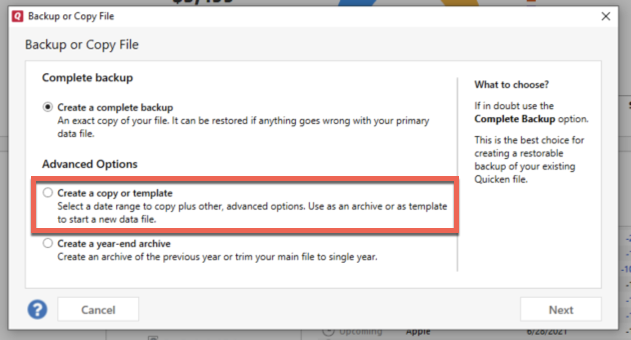
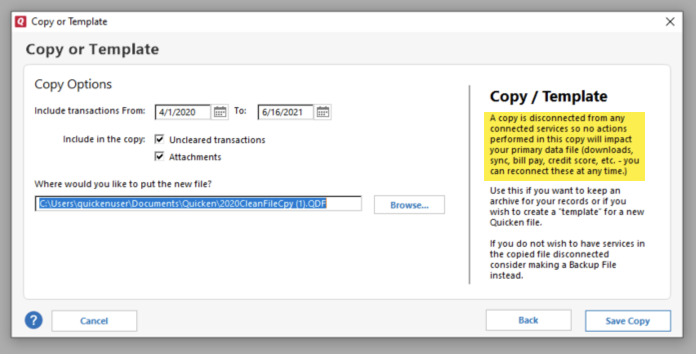
    Since restoring from a backup didn't correct the issue, I suggest that you try creating a copy of your data file, which will rebuild all of the internal lists and database tables. If successful, you would then move forward with the copied file. To create a copy, please navigate to File > Copy or Backup File... > Create a copy or template (see examples below) which will also allow you to select a date range to move forward with.

    If you wish to move forward with your entire data file, please check the full date range of your entire data file before copying so you can enter the correct date range if you do not wish to "shrink" your file by eliminating certain dates. Note - The only reason to "shrink" your file is if you believe older data is causing the problem.

    image.png image.png

    It's important to know that all online services will be disconnected in the copied file, and you will need to sign back in with your Quicken ID and reconnect all of your online accounts, online billers, Quicken Bill Manager services, etc if you plan to use that copied file going forward. The reason for this is that the new copy also creates a new and separate dataset ID.

    Please reconnect only what is necessary to verify if the issue is resolved in the copied file. If the issue is resolved, then I recommend reconnecting everything and using the copied file as your new main file.

    If the issue is not resolved in the copied file either, then feel free to switch back to your original file. For instructions on how to switch between Quicken files, click here.

    Thank you!

    Quicken Kristina

    Make sure to sign up for the email digest to see a round up of your top posts.