Shares Transferred Between Accounts Errors

MangoMan
MangoMan Member ✭✭✭✭

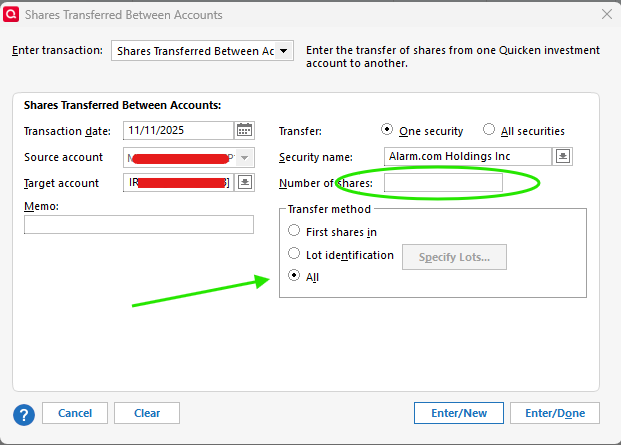
I began transferring shares between accounts in Quicken to close out one of my Investment accounts. I used the Enter Transactions option and Shares Transferred Between Accounts. Transfer option used was One Security. I put in the Security Name, Transfer Account and Transfer Method was set to All. I selected Enter/New and did the next 5 transfers.

Quicken only records and transfers the first one. The subsequent 5 are marked Removed with missing share amounts. They don't appear as Added in the Target Account.

Even though All is shown as the selected option after pressing Enter/New I don't think Quicken is actually recognizing it. You have to click off of All onto a different option and then click on All again to make sure the Number of Shares window shows a value.


image.png image.png image.png

Comments

  • Quicken Kristina
    Quicken Kristina Quicken Windows Subscription Moderator mod

    Hello @MangoMan,

    Thank you for reaching out! I attempted to replicate the issue, but could not get my Quicken to behave that way. To clarify, is there a specific order of operations needed to trigger this issue, such as selecting All prior to selecting the security name?

    Thank you!

    Quicken Kristina

    Make sure to sign up for the email digest to see a round up of your top posts.

  • q_lurker
    q_lurker Quicken Windows Subscription SuperUser ✭✭✭✭✭

    Yes, selecting All or having it preselected prior to specifying the security name seems to be the issue.

    I believe I was able to replicate the issue.

    1. Enter a Shares Transferred for one security, All Shares, transfer account as desired, Enter/New
    2. New mostly blank form appears
      1. Enter Security, Note that All Shares is selected but share count is not filled in (this is the part that is easy to overlook)
      2. Continue with transfer account and again, Enter/New (or I expect Enter/Done)

    When all done, the first security will have a Remove Shares in sending account and Add Shares in the transfer account for the correct umber of shares. All other securities processed after that will have Remove Shares in the sending account for no number of shares specified. There will not be Add Shares in the transfer account.

    The problem is that it is easy to overlook the lack of shares in the second transaction specification, or else it is seeing the All Shares selection and expecting that to apply even though the number of shares field is empty.

    The normal sequence would tend to be to enter the security name, then either chose a number of shares or All Shares at which point the number of shares field would fill in.

    Possible solutions:

    1. When the security is entered, if All shares is also pre-selected, fill in the number of shares, or
    2. If All Shares is selected, apply that independent of whether the number of shares is filled in or not.
    3. If when Enter/New or Enter/Done is clicked and if number of shares is blank for a One security transfer , indicate a number is required. (That alert actually pops up if one clicks or tabs into that field and then moves on leaving it blank.)

    I suspect Option 3 would be the easiest to implement.

  • MangoMan
    MangoMan Member ✭✭✭✭

    That is exactly the case. It is after the first transfer and then using the new defaults for the subsequent ones. It's easy to overlook the share count field when you see All selected as the default. When I did it the second time I clicked one of the other 2 choices and then clicked All again.