Importing Investment .csv Files Is Not Reliable
Ever since the debacle with Bank of America discontinuing support for downloading .qfx files from the website (both banking and investing) I have been working on scripts to convert transaction reports available on the B of A investments website into .csv files for import into Quicken (for Windows). But, my conclusion is that these .csv files don't work at all well. First, there is no documentation other than the few sample lines of code in the example file that Quicken will create for you. Second, when I create .csv files in that format importing the files creates transactions, but at least a third of the transactions import with a 0.0.1 cent difference from the amount specified in the file. This affects pretty much all transaction types I have tried. Some amounts work correctly, others have the error. The errors are consistent and repeatable.
I spent 2 hours on the phone with Quicken support repeatedly demonstrating these problems to them via screeen sharing, but was told this was not a bug. They said this "approximation" was expected and acceptable, which it so clearly is not! I'm frankly shocked at this attitude.
So, unless you want to deal with a myriad of discrepancies in your data, I suggest you avoid importing investments from .csv files. I don't know if banking transactions or quotes files work any better.
FYI - Quicken version is Premier R64.35
Comments
-
I think you will be interested in this;
I suggest you look into ImportQIF.
Signature:
This is my website (ImportQIF is free to use):0 -
Note that the CSV import for investing transactions has not been announced in the release notes or anyplace else, so I suspect it is not fully baked yet.
As you can tell from the discussion @Chris_QPW linked above, this is pretty clearly an issue of truncating when it should be rounding in the import routine. If you are writing scripts, you may be able to disguise this bug by adding $0.00499999 to the amounts before importing. Please let us know if that works for you.
Did you get a ticket number from your interaction with Support, or did they insist that it is working as designed?
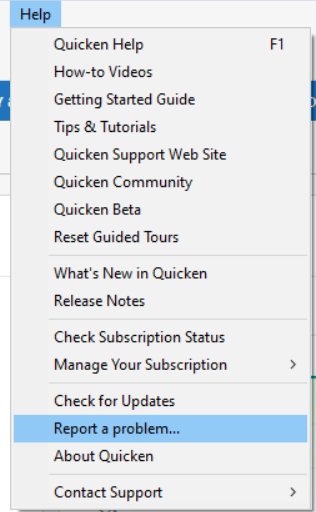
You could also document this issue by submitting a report using the Help > Report a problem link. In your submission, be as clear and thorough as possible. Reference the ticket number if any and provide a link to this discussion. Provide step by step instructions to reproduce the problem and note any error messages you receive. They will not pay much attention to a problem unless they can replicate it in house or see it in a support session.
You will not get a response to an electronic submission, but they say they review and prioritize the submissions and use the data to help resolve problems they decide to work on. The more reports they receive the better.
QWin Premier subscription0 -
I did find a program that correctly converts (Schwab) downloaded .csv files. It's called ProperConvert. It does take some manipulation so is still not as easy as a brokerage firm's .qfx download. Plus it costs $20 per month.
0 -
-
Pardon me if I am missing something here. I have used Quicken for 35+ years. Why not just perform the Online Update with Bank of America from within Quicken to import the transactions directly into your Quicken register(s)?
0 -
Some people don't feel comfortable with the fact the Express Web Connect + has their transactions flowing through both Intuit and Quicken servers, and that the transactions are stored there for some period of time.
Signature:
This is my website (ImportQIF is free to use):0 -
I hear you Chris. Not really a concern of mine. I have security alerts on most all transaction types.
0 -
I actually bank with Bank of America Private Bank. When the QFX downloads stopped working I did try Express Web Connect+ but it was forcing the view of the account into "Simplified" view instead of "Complete" view. This was not acceptable, which is what led me to writing scripts. Last week, after encountering the CSV bugs, I tried Express Web Connect+ again, and this time it allowed the account to remain in Complete view. But, the transactions were riddled with errors, and some missing. So, both approaches have their problems. I don't have problems with banking transactions. It's the investments that don't work right.
As to the question about tech support. They simply assured me that the "approximately correct" behavior was not a bug. I still can't believe it.
For now I have put my scripting work on hold until I see how the Express Web Connect process improves. Even if I get the scripts working it will be very tedious to manually create reports, download them, run the scripts and import to Quicken. EWC+ will be infinitely easier if it ever works right.
0 -
Does Merrill Lynch still have the QFX files on their website?
If so, the "simple workaround" at least until Express Web Connect + is fixed is to change the FID to a financial institution that still supports Web Connect/QFX for the account type in question. These can be found in (first number in each line):
INVESTMENT for any non-retirement account and 401K for retirement account support.
ImportQIF can help with this edit (select Convert QFX/OFX to QIF button to toggle to Convert QFX/OFX to QFX).
Signature:
This is my website (ImportQIF is free to use):0 -
There are only 4 institutions that include the keyword QFX and none of them show INVESTMENT. Does that mean it's too late for this method?
I created a test Quicken file and added a brokerage account. I found an institution on your list that contains INVESTMENT&WEB-CONNECT, and is also marked ACTIVE and edited the downloaded QFX to contain that <ORG> name and <FID> number from the institution from your list. I also set that institution name as the Financial Institution for the brokerage account in Quicken. When I try importing that file it says: Quicken is currently unable to verify the financial institution information for this download. So, there must be a step I'm missing or it doesn't work. I tried enabling the account for download, which fortunately didn't require logging into that institution. But, got the same error.
0 -
Oops sorry, I gave you the wrong field (FID). FID and INTU.BID have the same number, but it is INTU.BID that needs to be changed; it is the critical one.
BTW there are a lot more that support Web Connect for investment accounts, but it might be a bit tricky to find them all because of the fact that 401K and other options can be mixed in unless you have an editor that can do regular expressions/wild card searches. But even searching for INVESTMENT&WEB-CONNECT I found lots of them (stopped counting at 40).
Signature:
This is my website (ImportQIF is free to use):0 -
Thanks! That worked.
1 -
I keep seeing notifications of this post. Pardon me for asking, but why are we trying to use .csv files anyway?
Is Quicken direct download not available from within Quicken , or even Download for Quicken from the Banking site?
0 -
Whenever you post a comment on a thread this forum it automatically set to “watch it”. At the top of each thread to the right there are three dots, click on them and then Mute to stop the notifications.
The only reason one would use a CSV file over Express Web Connect + is because they don’t trust Intuit and Quicken Inc with copies of their transactions and no other better method is available like Web Connect/QFX or QIF files are available.
Signature:
This is my website (ImportQIF is free to use):0 -
I understand the muting process, in fact earlier today I muted the discussion about Black Friday. Regarding the this posting, seems like a whole lot of work to use a .csv file vs Express Web Connect+. I have been a Quicken user for 35+ years, have always used the Quicken connection methods, and have never been too concerned about the data. I worked in IT for nearly 40 years, including within the Security arean. I would imagine with the amount of data, and financial institutions that Intuit and Quicken deal with, they must have strong Firewalls and IT Security. But Heck, nothing is totally fool proof, even Morgan Stanley had a breach a few years ago, as have others; but all through that I've never heard of anything involving Intuit and Quicken. I only use Quicken's desktop version. As a personal choice, I do not use the Mobile or Web versions of Quicken. I have several security measures in place on most all of my transactions which quickly notify me. If something does happen, I'd be on it like gravy on biscuits.
1 -
My concern is not with the security of Intuit/Quicken. It is that the data coming through Express Web Connect+ from Bank of America Private Bank is wrong.
I like the work around of using the QFX files that they continue to produce on their website even if they have to be tweaked to be imported. It was an act of greater desperation to generate my own CSV files from downloadable reports. I hope the QFX files will remain available until they fix the issues with Express Web Connect+. I will certainly ask them not to remove that part of the website before then.
0
Categories
- All Categories
- 56 Product Ideas
- 36 Announcements
- 225 Alerts, Online Banking & Known Product Issues
- 22 Product Alerts
- 703 Welcome to the Community!
- 671 Before you Buy
- 1.2K Product Ideas
- 53.7K Quicken Classic for Windows
- 16.3K Quicken Classic for Mac
- 1K Quicken Mobile
- 812 Quicken on the Web
- 111 Quicken LifeHub