Planning Tab Not Available using Macbook Pro and Quicken Premier 2024

Peapod44
Peapod44 Quicken Windows 2017 Member ✭✭

I converted from Quicken for Windows to Quicken Classic Premier 8.3.3for Mac desktop and everything I expected works except I cannot figure out how to run a budget vs. actual report (or anything similar). I do not have a Planning Tab and under the View Tab, I do not have the option of showing a Planning Tab.


Answers

  • Quicken Kristina
    Quicken Kristina Quicken Windows Subscription Moderator mod

    Hello @Peapod44,

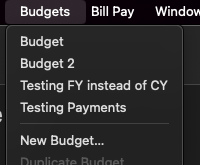
    Thank you for reaching out! In Quicken for Mac, there isn't a Planning tab, like there is in Windows. There are a couple places where you can create a new budget or view your existing budgets. When Quicken is the active program on your screen, you should see Budgets as one of your menu options. You should also see the option in program, near the top center.

    Screenshot 2025-11-17 at 4.23.58 PM.png

    When you click on Budgets, from the menu or in the program, it will give you a dropdown showing any existing budgets you've created, an option to create a new budget, and options to duplicate, edit, or delete your budget (if applicable).

    Screenshot 2025-11-17 at 4.24.09 PM.png

    For more information about budgets, please see this Help article: https://info.quicken.com/mac/budgets-planning-mac

    I hope this helps!

    Quicken Kristina

    Make sure to sign up for the email digest to see a round up of your top posts.