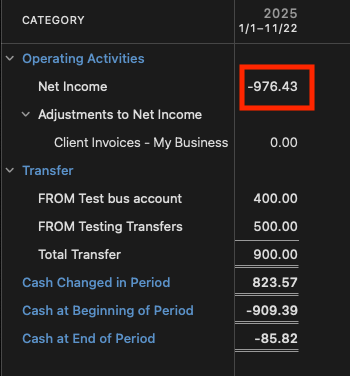
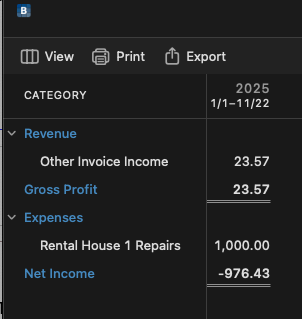
I just upgraded to Home and Business from Premier to manage my LLC rental property and started using the new functions and reports that H&B have to offer. Specifically, I am looking at the Business Cash Flow report in the Business tab under reports (not the Cash Flow report in popular reports). This report generates a mini statement of cash flows with Net Income, transfers, cash changed in period, beginning cash balance and ending cash balance. I think this report would be super helpful to analyze my cash balances and see the cash in/out flows that aren't just assigned to expense categories in Net Income.
The problem I am seeing is that the report isn't calculating correctly and is double counting transfers in the cash changed in period. I attached an excel to show what is going on but to summarize if I have net Income of $100 and transfers of $(100), I should have cash changed in the period of $0 but Quicken is calculating it to be (100) and I have pinpointed that the problem is the transfers. I spoke with a representative and we disconnected before figuring it out.
Some notes-
I don't have advanced options in the business reports
I can't unselect transfers from the categories
The transfers are currently making their way onto the cash flow report by manually assigning them to my business by transaction. There is no double entry, I only assign one side of the transaction or it will wash from the report.
I would really appreciate some help on this. Ive spent a few hours trying to figure this out and just think now it's a bug in the software.
[Edited - Readabilty]