Missing many transactions after converting from Quicken Windows to Quicken Mac.

I am converting from Quicken for Windows to Quicken for Mac. I went through the prescribed conversion process but when I finished I find that I am missing many transactions in 2 out of 3 Schwab accounts. They are too numerous to do manually because I have data dating back to 2004. Is there any way to download transactions from only 2 of the 3 accounts from Schwab? Every time I've tried to download a single account the download always downloads all accounts including even those that are not Schwab accounts ie. credit card accounts. Can anyone help?
Comments
-
Just wondering … in Q Mac investment account registers, is there a Filter selection displaying only a selected Date Range instead of "All Transactions"?
Is the register correctly sorted by Date?
0 -
No it's set to "All Transactions" and it is correctly sorted. Here are some examples of missing transactions. I'm missing in one account all transactions after 3/14/2022, missing transactions for month of 3/2022, and many others. Also the type of transaction is incorrect in many cases. Many transactions got changed to Misc. Income, Add Shares, Dividend Income, Reinvested Income, etc. So the only way I can see to correct this is to be able to transfer just 2 accounts from my Windows HP to my Mac without disturbing the other accounts that are now ok. I was able to make some corrections to those accounts and don't want to lose that work.
0 -
By any chance are you using the option to a checking account in your investment account in Quicken Windows?
Quicken Mac doesn’t support that and that can cause problems.
I also believe Quicken Mac doesn’t support BuyX or SellX so they can cause problems too.
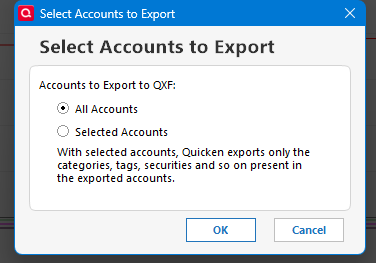
As for importing one account that might now be possible given a new feature in Quicken Windows with the latest patch release that allows you to decide what accounts to export using the QXF format. I sort of doubt any transfers would work right through.
0 -
I just did the latest update to Quicken Windows and started an export but I don't see any way to export just 1 or 2 accounts. Can you give me any more information on how to do that? Also when I import that on my Mac how will I specify to just import those files and not destroy the rest of the accounts?
0 -
You need to be on R65.15. You can install it from here:
Then it is File → File Export → Quicken Transfer Format (.QXF) File…
 0
0 -
Another way you could approach this is to convert your entire Quicken windows data file to a NEW Quicken Mac file. (Be sure to use File > New and give it a filename indicating it's a temporary file.) Open this Quicken Mac data file and delete all accounts except the one or two you want to import into your real Quicken Mac data file. When your temp file has just the one or two accounts, export it via File > Export > Quicken Transfer File (QXF). Now open your real Quicken data file and select File > Import > Quicken Windows File (QDF, QXF). The two accounts will be imported into the existing Quicken data file.
Quicken Mac Subscription • Quicken user since 19930



Categories
- All Categories
- 16 Product Ideas
- 34 Announcements
- 248 Alerts, Online Banking & Known Product Issues
- 20 Product Alerts
- 517 Welcome to the Community!
- 681 Before you Buy
- 1.5K Product Ideas
- 55.6K Quicken Classic for Windows
- 16.8K Quicken Classic for Mac
- 1K Quicken Mobile
- 834 Quicken on the Web
- 126 Quicken LifeHub