PNC bank upgrade affecting Quicken downloads?
Answers
-
My 8 account balances did not update to today's date, but are accurate. I am thinking that is normal since there was no activity according to Quicken. @Boatnmaniac am I correct that this is normal…. or should the balance date update everytime we do an OSU?
Good question. I seem to recall that PNC would always update the Online Balance date with each OSU.
After reading your post I checked all 3 of my accounts to see what the last data download dates are and noticed that one had not updated the Online Balance since 11/14 and another had not updated the Online Balance since 11/18. There were no transactions downloaded since those dates. So maybe you are correct that now PNC is only updating the Online Balance date when there is something that causes a change to the Online Balance?
My other account (checking) had 3 more transactions downloaded today and the last data download date for that account correctly shows today's date.
I did a savings-to-savings transfer via Quicken today and PNC acknowledged and accepted it. So, tomorrow I should know whether or not there is on ongoing DC downloading issue.
Quicken Classic Premier (US) Subscription: R65.15 on Windows 11 Home
0 -
Thank you @Boatnmaniac for confirming the balance change thing is not just me. I can confirm that whenever there is “DC”/Quicken account activity, the balance gets a new balance and date. No activity, no date change…. at least for my accounts.
As of today all is correct with my PNC DC downloading with one exception. I have one single missing transaction. A Venmo charge to a PNC debit card for $27 on 11/17. It came out of the checking account, but never downloaded via DC. I just added it manually and marked it with an “R”. I know others have complained about missing transactions, but I haven’t seen any until this one. My assumption is that there is nothing we can do about transactions that were missed by the new DC mapping. PNC and Quicken certainly are aware and hopefully as PNC fine-tunes the new DC, the problem goes away.0 -
It has been a couple of weeks now that Direct connect to PNC is not working. My Web connect will download transactions however I NEED Direct connect to pay bills. Quicken still does not have an ETA for the fix. How hard can this be. Please fix it. Gotta pay bills.
0 -
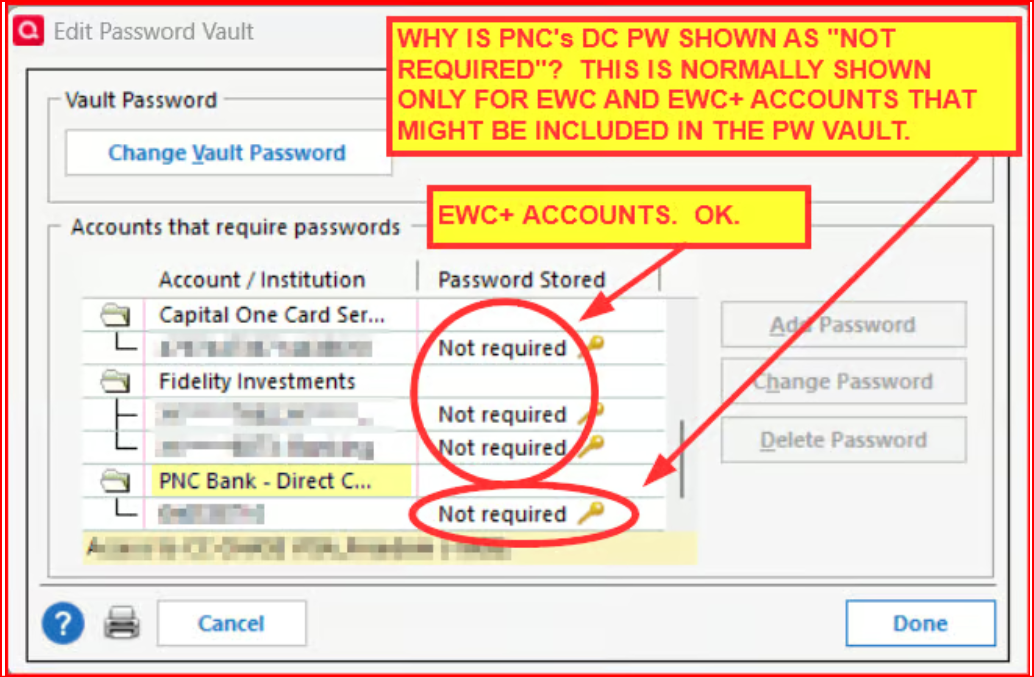
Did you read what people have been posting for the last 5 days regarding what has been working for them to get PNC DC to function normally, again? The primary cause of the current issue (apparently not directly related to the PNC system upgrade issue that started on 10/24) is that the PW Vault shows "Not required" for the the PW being saved for PNC Bank - Direct Connect. Various things that have worked to resolve the issue:
First, if you do not have PNC Bank - Direct Connect set up for downloading:
- Back up your data file.
- Deactivate all of the PNC accounts that you might have.
- Do Add Account > select PNC Bank - Direct Connect > click on the Advanced Options link > select Direct Connect > complete the set up process making sure to Link the downloads to the accounts already in Quicken. (It is important to use Add Account and not Set Up Now and to also make sure to click on the Advanced Options and select Direct Connect.)
If that does not resolve your DC download issue or if you already have DC already set up and it is not working: Read this post.
The Quicken Copy process is what fixed DC functionality issues for me and for several others posting since then. We've been getting transactions downloaded and have been able to successfully use the DC Bank Bill Pay feature.
Others have said that the following resolved the PW Vault issue for them and restored their DC functionality but others have said that some of these things did not resolve the issue for them. So, it is a bit of a trial and error process unless you got straight to the Quicken Copy process listed in my 11/15 post.:
- Did Validate and Repair which resolved the issue.
- Delete the PW Vault, then created a new one. This might require you to deactivate and reactivate the DC connection with the activation following #3 above.
- Delete the PW Vault and then manually entered their PNC DC PIN each time they do OSU. (Not ideal but it works.)
Note: Some of these options might cause there to be some duplicate transactions to be entered. If that happens they will need to be manually deleted.
Let us know which, if any, of these steps resolved the download functionality for you.
Quicken Classic Premier (US) Subscription: R65.15 on Windows 11 Home
0 -
Day 5 Update for PNC DC
Downloaded transactions, updated account balances and nothing missed by DC. Still waiting on a couple test paper checks I sent myself via BillPay. All still looks good. Fingers are still crossed.
Just an FYI. Account information to/for PNC Direct Connect (from PNC's servers or 3rd party) happens once per day. I did some testing this AM just to get a better idea of when to do my OSU "post" the PNC migration. I had no idea if anything changed. I started at 7AM EST. I finally got my download of transactions today sometime between 9:30AM EST and 10AM EST. This is the same for me as "pre PNC migration".
0 -
Can someone tell me if Quicken and or PNC is still working on this issue? I am not a tehkie and feel uncomfortable trying to solve this myself.
0 -
Yes, they very much are working together on this issue. I've had a few conversations with one of Quicken's Development Team leaders about this, most recently just yesterday. I messaged to him that there is an issue with the Password Vault and that fixing that issue has been resolving the issue for many users. I was surprised that he did not know about this, yet, since it's been messaged in this forum and reported to Quicken for at least the last 6 days. But he got back to me later last night and said that members of his team are going to meet with a code engineer to find out why this PW Vault issue is occurring.
If you are uncomfortable doing troubleshooting yourself you should call Quicken Support at Contact Quicken Support. They have tools whereby they can access your system remotely and help walk you through troubleshooting steps. If/when you do talk with them You might want to make sure they know about the PW Vault issue and maybe reference the post at this link…click on the date to the right of "Boatnmaniac" to view the post with original formatting and pictures.:
Quicken Classic Premier (US) Subscription: R65.15 on Windows 11 Home
1 -
Just getting back to you on my latest OSU results:
- New transactions were downloaded for all 3 of my accounts and the Online Balances were brought up to date for each of them.
- The savings-to-savings transfer I sent to PNC via DC yesterday did indeed process yesterday and the posted transactions downloaded this morning.
So, based upon your observations and mine, it does appear that PNC is only updating the downloaded Online Balance date when there is some transaction that changes the account balance.
It's now been 6 days since I fixed the PW Vault PIN issue and PNC has been downloading/updating well with no further issues identified.
Quicken Classic Premier (US) Subscription: R65.15 on Windows 11 Home
0 -
@Boatnmaniac Thank you for the update. I feel bad for PNC DC Quicken users that haven't found this thread or you!
I plan on continuing to monitor and report to this forum thread for another week…… just in case. :-)
1 -
Boatnmanic's comment on a conversation he had with the Quicken Development team clearly shows how screwed up their IT/Support/Dev teams are and don’t interact.
This issue has a 14 page forum post with 3 working fixes depending on your personal problems. It has been going on for 1 month plus and they are finally going to have a meeting about it! Really, you can’t make this up!
I found a password vault issue about 3 months ago when I was changing my password for PNC. The boxes asking for the user name and password kept reversing the two when it placed them in the Vault. Sometimes it would say the password was not necessary for Direct Connect (which it is). I reversed them first. Got it to work and let Quicken Tech Support know. They did nothing about it. It was still doing this 2 months ago! My Quicken continued to work till the Oct update. If they had fixed it 3 months ago, the existing problems might never had occurred.
It is sad really. Thank you Boatnmanic for all your help and persistence.
0 -
I agree with you @Rick8. It is pretty surprising for a banking product. I think disconnecting and reconnecting corrupted the vault for me. Was it my fault or Quicken’s, I am not sure.
To be clear, support for Quicken is handled by a third party call center in Guatemala. We are not talking directly to Quicken…. and they aren’t either. However, I have had nothing but good luck with this call center. The people seem very well trained on Quicken, but they only know what they are told by Quicken (with regard to issues, problems and fixes). I think that is why “Quicken” support jumped the gun two weeks ago when they announced on the forum that PNC DC was fixed… and it wasn’t.
I am more disappointed with PNC support. I have spoken to tier 3 support three times over the last month. They only read off scripts and barely knew anything other than to tell me there was a PNC DC issue related to the migration. They never followed up despite promising to call me back each time. My case remains open. I am not sure if PNC outsources some or all of their online banking support. I suspect even tier 3 is outsourced…. maybe to the people that also did the migration.
I sat with my local PNC branch manager yesterday and expressed great concern over the problems with DC and PNC’s lack of transparency and support. Unfortunately she had not a clue what DC was/is or even how BillPay worked. She agreed to do some research and get back to me next week. I am not expecting much, but we will see.0 -
Can't wait till Quicken decides to try AI for something!
1 -
worse yet …. what if Comcast buys Quicken!! :-)
1 -
I think that is why “Quicken” support jumped the gun two weeks ago when they announced on the forum that PNC DC was fixed… and it wasn’t.
IMO and in hindsight I no longer think the fix that was announced was premature. I now think there have been 2 issues at play: One that was caused by things (multiple things) regarding PNC's system upgrade. The other being this PW Vault PIN not stored issue.
I now think the PNC issues were largely resolved when they made the announcement. This is evidenced in that some people began posting soon afterward that they were suddenly getting DC downloads and were able to send Bill Pays to PNC. These people, I'm guessing, either never had switched their DC connection with PNC to EWC+ or they restored a backup file that still had the DC connection intact so they never were exposed to the PW Vault PIN not stored issue….some have actually posted this regarding their situation.
Most of the rest of us, though, have been changing connection methods, deactivating/reactivating (with a DC default EWC connection?), reauthorizing and resetting our PNC accounts and something in that process broke in how DC was being set up in the PW Vault for PNC. I'm also guessing that perhaps a contributing factor to this is that for Add Account the PNC DC set up process defaults to EWC, not to DC. We do need to keep in mind that it was just 6 days ago that this whole PW Vault PIN not being saved issue was first identified in this thread. And, I think the Quicken Dev Team also did not know about this particular issue because it was first brought to their attention yesterday and within a few hours they replied that they are now going to engage a code engineer to see if they can find out what in the code might be causing this issue. So I'm kind of excited to hear that.
In other words, I think both Quicken and PNC for the last couple of weeks might have been spinning their wheels some looking for a solution to the original problem when perhaps that original problem had already been resolved.
Well, this is all just speculation but it makes some sense to this muddled mind of mine so it is more logical and understandable to me.
Quicken Classic Premier (US) Subscription: R65.15 on Windows 11 Home
0 -
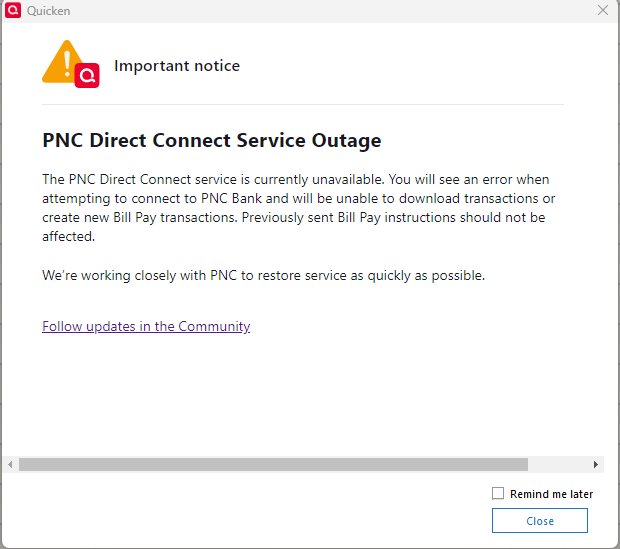
@Boatnmaniac what I was referring to when I said "Jumped the gun" had nothing to do with PNC fixing the DC mapping, it was with regard to the fact that PNC hadn't yet turned DC back on when I saw the post from the admin. After I disconnected at Quicken's suggestion, I was unable to reconnect because DC wasn't able to reach PNC. It took PNC almost another day to turn their connection back on. I did share my screen with Quicken when this happened and I also called PNC. PNC tier 3 said that they weren't ready and to "try again on Monday". To be honest, I have no idea what the truth is/was. I do remember getting a popup in Quicken about the same time on November 6th stating that there was a "PNC Direct Connect Service Outage". I had never seen such a notice before and hope to never see it again :-). That is "the jumping the gun" I was talking about. I think that PNC was refusing DC connections until they were 100% sure they were correctly mapping their data and Quicken support assumed they were already set. No big deal.
I happen to agree with you on the vault issue. I created my vault problem by disconnecting and reconnecting and inadvertantly adding EWC+ accounts that, I guess, overwrote the vault incorrectly. That really wasn't Quicken's fault. On the otherhand, in hindsight, I don't understand why Quicken, the program, doesn't indicate to the user that their was a DC authentication error (that there absolutely was). I hope that is incoprporated going forward.
I am just so thankful this forum exists. You and Rick8 need the Quicken Medal of Honor. :-).
0 -
Since my comment on 11/13, I've had some activity on my Money Market account that isn't being reflected in Quicken. I did a deactivate/reactivate for both Direct Connect accounts and noticed my Money Market account is listed twice, once as a Money Market that I can link to an existing account and the other as a Checking account (I can choose between Checking or Savings for the type) that I can only add to Quicken. I have a suspicion that if I add the incorrectly typed account to Quicken its balance will reflect the correct Money Market balance, but I'd rather not do that. I'm guessing this would be a PNC issue since Quicken is only showing what information is being presented to it?
Also, my PNC credit card is being listed as an option under Direct Connect accounts. I thought credit cards were only EWC+.
0 -
Personal Quicken and PNC Bank Direct Connect still NOT Downloading Transactions nor is the Bill Pay working. Per a Quicken Help AGENT ON 11/23/25, this isue is still not resolved. :(
0 -
My PNC Business Premium Money Market Account isn't being reflected either. My Business Checking seems to have started working though. Both are Direct Connect (Password Stored > YES). I never took any action regarding disconnect/reconnect/vault/etc.
0 -
When will PNC Direct Connect Be Fixed for Bill Pay?
0 -
I don't know about the rest of you, but I've had enough of this with PNC. This has happened a few times in the past few years. I've been with them for 25 years, and I just opened all new accounts elsewhere. I even tried to get billpay going on the PNC site, and they told me it would take about 45 minutes over the phone to get that set up, but I never followed through since I thought it the quicken billpay option would work again. Between that, and writing out 30 checks this week was the final straw for me.. Good Luck everyone.
0 -
10 days and over 4 hours on phone with "tier 3" tech at PNC has not resolved this issue. Happened 3 years ago with merger to my old bank. Probably time to move on.
0 -
JFTR……..
The issue with PNC and Direct Connect the service is not bidirectional (downloads only). When PNC did their migration last month we lost the ability to download transactions. BillPay for most, if not all, continued to work as it always did. I never missed a transaction that was accepted (that got the lightning bolt and a check number). Everything has been paid from the start of the PNC migration. I too have used Quicken with PNC for over 20 years.
Once Quicken instructed us to disconnect from Direct Connect and then reconnect, supposedly to get Direct Connect downloads working after PNC fixed the "mapping" two weeks ago. . . . that's when the BillPay problems started. Now, for me, Direct Connect still didn't work AND BillPay suddenly stopped working. Several users on this forum figured out that during the reconnection process we somehow corrupted the Quicken password vault. No password was being stored in the vault for Direct Connect and evidently BillPay too. I believe the root cause had to do with inadvertantly adding EWC+ accounts that weren't needed. BillPay stopped working because Quicken wasn't authenticating us correctly (no passoword) and never let the user know. Once the Quicken password vault is fixed (and it says "password saved" for DC), BillPay starts working again. DC should also work.
Bottom line, I believe PNC Direct Connect has been fixed for most users for almost two weeks (it was for me for sure… so far). If DC and BillPay aren't working, it's likely your passowrd vault. Chances are that in your password vault it says "password not required". That is not good for DC.
For my fix, I felt most comfortable calling Quicken Support and having them share my screen and fix the password vault… and reconnect DC again. Everything downloaded immediately and all my BillPay's that said "send" were finally sent.
So the original problem was absolutely the PNC migration for Direct Connect. It seems however that the BillPay problem was on Quicken (and users like me).
I am by no means an expert on this situation and certainly others may have difference experiences. I have spent time on the phone with Quicken support and PNC Tier 3 support on numerous occaisions over the last month. Quicken support was extremely helpful with each call. PNC during the last call maintained that Direct Connect was fixed completely last week. If you call PNC support, insist on only speaking with Tier 3. Nobody else in support has any idea of what is going on with Quicken, etc.
Something else that doesn't seem to be made too clear to the Quicken end user. Direct Connect is still owned by Intuit (not the bank). Direct Connect is the OFX (open financial exchange) provider that sits bewteen PNC and Quicken and facilitates communication from the bank into Quicken the program. The same holds for bank BillPay used within Quicken.
0 -
The craziest part about this issue is that there are those at Quicken that try to pretend the issue is fixed with posts that don't address the root cause and then there are those at PNC that are mostly clueless.
I've de-activated and re-activated at least 10 times now. I can receive transactions via DC but the bill pay feature has been constantly broken.
When I contacted Quicken per their post, I was told it wasn't working. So why post that it is working for some people?
Does it really take over a month to fix this issue?
If it isn't fixed in about a week, I'm moving to a different bank. I only chose PNC for Quicken DC.
0 -
Does your Password Vault for PNC look like this?:
If so, see the following post. Since it was posted the number of people posting about downloading issues with PNC seems to have dropped off considerably so maybe what is stated in there helped them to resolve the issue, just like it did for me.:
Quicken Classic Premier (US) Subscription: R65.15 on Windows 11 Home
0 -
I even tried creating an new Quicken file and that didn't work either. Bill pay still missing for PNC.
0 -
"Pretend the issue is fixed"??? I haven't seen anybody pretend about anything on this forum thread. I am honestly not sure why you would even think that.
I posted that I got my PNC Direct Connect and BillPay working almost two weeks ago after Quicken helped fix my Password Vault. No pretending. It is working flawlessly as late as today after being "broken" for two plus weeks. Had I not tried to disconnect-reconnect my Direct Connect accounts it would have probably started downloading even sooner.
Actually, PNC BillPay was never broken. BillPay only stopped working for me after I corrupted my password vault and my Quicken was no longer authenticating with Direct Connect (I think that is what happened with most users as well). Any and all bills that are sent from within Quicken and that get a check number and lightning bolt after sending, I bet will get paid. In my case every BillPay I have made since 11/1 have been paid on time (including paper checks). In fact, PNC Tier 3 support can actually see every bill that is set to pay in real time. In my case they saw every bill I paid via Quicken (even some from today).
As far as PNC telling you that BillPay is broken, I am not sure who you spoke to. Unfortunately, you must speak with PNC Tier 3 support (also called the escalation team) at PNC to get any meaningful DC information. Anybody else (chat, Tier 1 or Tier 2) have no good information regarding DC or BillPay. BillPay is NOT broken and if someone at PNC told you otherwise, they were incorrect. Not only do I know this from personal experience this week, but I called PNC this afternoon to confirm that there are no new issues.
I think @Boatnmaniac is right on. Check your password vault. If your DC password doesn't seem to be there, call Quicken support and they can help fix it and even screen share with you. If your password is there and Quicken can't get your DC working correctly, call PNC support and insist on speaking with Tier 3-escalation. I held on the phone today for no more than 2 minutes before I was able to speak with someone who was well versed on DC and BillPay.
0 -
When you tried setting up DC for PNC in that new file, did you: Tools > Add Account > select PNC Bank - Direct Connect > click on Advanced Options (instead of clicking on Next) > select Direct Connect > Next > follow the prompts to complete the process? For some reason the DC setup is defaulting to EWC+, not to DC. Following these steps is thought to correct this issue.
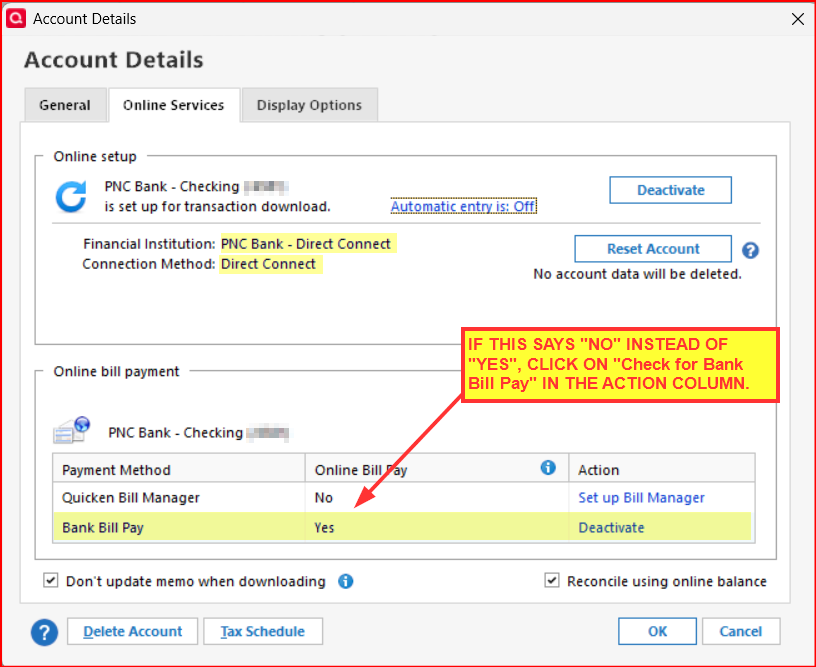
If the Online Services tab of Account Details is showing the account is connected with DC and if PW Vault is correctly showing the PW is "Saved" (and not "Not required"): Is the account enabled for Bank Bill Pay?
Quicken Classic Premier (US) Subscription: R65.15 on Windows 11 Home
1 -
Well all my accounts have been downloading fine till today. I use bill pay directly on PNC website, I paid 1 bill like normall per month from 1 account, well when I download it to Quicken via 1 Step Update it downloaded 2 times. Is this related to all the Bill pay issues even though I didn't use Quicken bill pay to pay it. It did not affected my balance.
0 -
The part I was missing is that I was using my PNC credentials when setting up Direct Connect which apparently causes Quicken to not add Bill Pay and go with Express Web Connect.
When I added PNC with using my SSN/Quicken pin, Bill Pay was added, I just had to click on it on the online service tab and activate it. I don't like having to use my SSN.
1 -
My PNC transactions have not downloaded for the last week. I am using DC and it was working. Are there any known issues?
1
Categories
- All Categories
- 56 Product Ideas
- 36 Announcements
- 223 Alerts, Online Banking & Known Product Issues
- 22 Product Alerts
- 701 Welcome to the Community!
- 671 Before you Buy
- 1.2K Product Ideas
- 53.7K Quicken Classic for Windows
- 16.3K Quicken Classic for Mac
- 1K Quicken Mobile
- 813 Quicken on the Web
- 111 Quicken LifeHub