Tax Planner
I am trying to figure out how to add how much withholdings, state, federal, medicare, SDI, etc into the wages section of the tax planner to see if I owe estimated taxes on my capital gains, interest and dividends from investments. I cannot see where to add the information, especially state and federal withholdings to see if I have to pay estimated taxes for 4th quarter.
Does anyone know where that information goes in the planner?
Answers
-
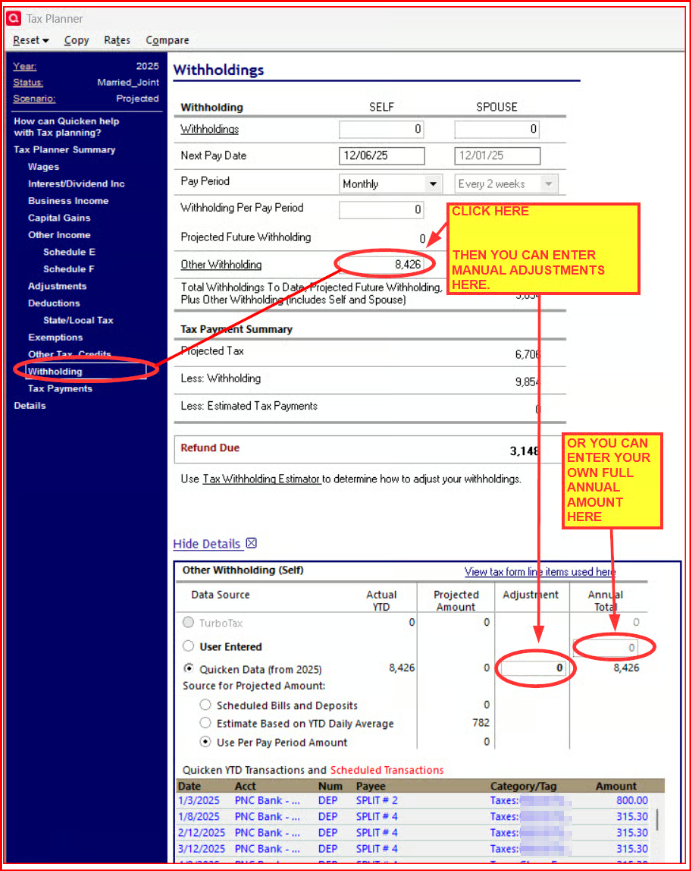
Click on the section you wish to edit. Then click on the line item you wish to modify. That will open a section below where you can enter an adjustment or enter your own full annual amount. Does this answer your question?
Quicken Classic Premier (US) Subscription: R65.15 on Windows 11 Home
1 -
Adding ...
If you have set up Reminders or used the Paycheck Wizard for these items, you will see both the past and future amounts in the section at the bottom. The Categories to include are based on the tax line items for those Categories.
QWin Premier subscription1 -
@Boatnmaniac I want to be able to enter year to date deductions for federal, state to see if I have enough withheld. Can I accomplish that with this form? I don’t see where each can be entered.
0 -
Ah, that's different from what I was thinking you wanted to do. I had assumed you already had YTD transactions entered into your account register(s) that would then be visible in Tax Planner like what is shown at the bottom of the picture I'd posted above. Then you could simply use those manual fields to enter adjustments that you might want to make for the balance of the year to get to the end tax result that you want to see.
That being said, if you do not have YTD tax and income transactions already entered into the register, you can enter the sums for that YTD and projected remaining future data into one of the 2 fields. But in order to let you know whether or not the amount you've had withheld for tax is sufficient you would need to make sure to enter all of your YTD tax-related data (i.e., wages, deductions, investment income, IRA/401k contributions, retirement account distributions, etc.) into the appropriate sections of Tax Planner.
Ideally, you should have a Paycheck Reminder and/or other Income Reminders and taxable Bill Reminders set up for these things. Once these things are set up the actual transactions as well as the remaining Reminder transactions will show up Tax Planner.
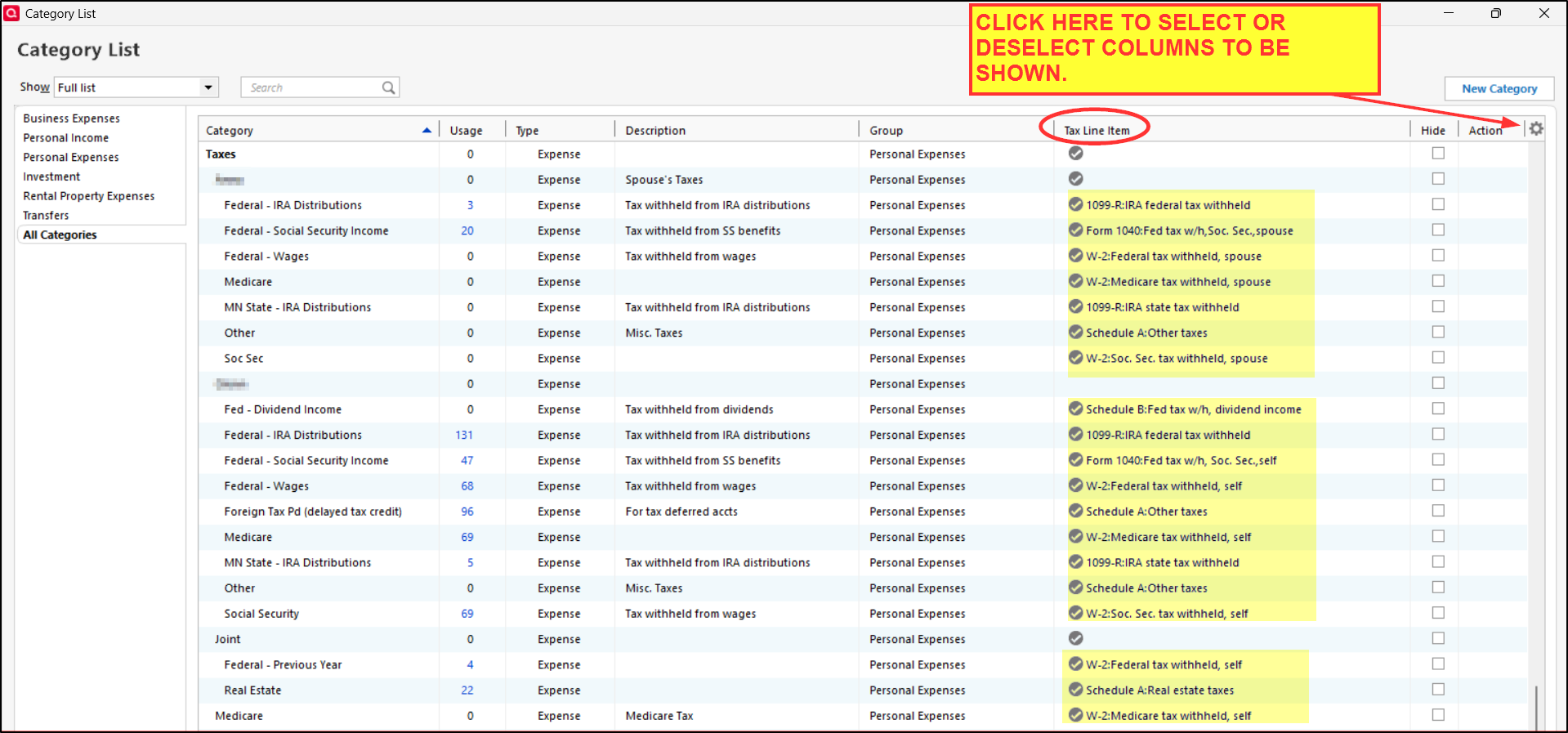
But all this assumes that you are using the correct categories for these things. Those categories will need to have IRS Tax Line Items associated with them in order to work with Tax Planner. If you go to Tools > Category List you can see which categories have tax line items associated with them in. This following picture shows the Category List that has been customized to suit my needs but there are a number of tax-related categories that are default. The Tax Line Item column toward the right (circled) will list the categories that have been assigned to the default tax related-categories. If you do not see that column, click on the Gear icon as shown in this picture where you can select that column so it is included in Category List. Using these categories for tax-related transactions will then populate Tax Planner and the tax reports. Using other categories that do not have Tax Line Items associated with them will not be picked up by Tax Planner nor the tax reports.
A few additional comments regarding Tax Planner:
- It will give you a good ballpark picture of your Fed income tax situation but it's only as good as the data that goes into it so make sure all transactions are properly categorized.
- While it can pick up State and Local tax information (like State income tax paid, property tax paid) this information is only used in Fed tax planning. There is no State or Local income tax planning functionality in Quicken at all.
- Tax Planner is not an official tax reporting software. It is used for planning only. As such it is not highly accurate like you might expect from a tax software like TurboTax and H&R Block. It is intended to give us a good ballpark picture of our tax situation so hopefully we are not too surprised when it comes time to actually prepare our tax returns.
- What I also find to be of great value regarding Quicken's tax planning is the tax reports because as long as all taxable transactions are properly categorized it is a huge time saver when it comes time to preparing tax returns.
Well, enough of my rambling. Questions?
Quicken Classic Premier (US) Subscription: R65.15 on Windows 11 Home
1 -
Since you do not appear to be correctly assigning categories with tax lines to your transactions in Quicken that would automatically report to the Tax Planner, I'd recommend just using something like the TurboTax estimator where you enter all of the data and see a result based on the data you enter.
The problem with using the Projected scenario in your case is that it's not clear how much data you have in your Quicken file that is reporting accurately to the planner. You either need to spend the time to set up the planner, so it sees all of your tax data or use a manual method to estimate it. You can use the Scenarios feature in Tax Planner where you change the scenario from "Projected" to "1" and then enter all of your data manually. That will prevent incorrectly assigned tax lines in your register data from messing up the tax calculation.
The Tax Planner will provide a very accurate estimate of tax owed for the income types you have mentioned. But it requires an accurate value for each of the inputs in the planner. Normally that is done by accurately assigning categories with tax lines to all of your register transactions. If you step thru the Details section of the planner, it will show you each input value Quicken uses to calculate tax owed. It's a useful exercise to compare what you have actually provided from register transactions versus what you did not provide or did not correctly assign in the register transaction details.
1 -
Thank you!
0
Categories
- All Categories
- 56 Product Ideas
- 36 Announcements
- 224 Alerts, Online Banking & Known Product Issues
- 22 Product Alerts
- 702 Welcome to the Community!
- 671 Before you Buy
- 1.2K Product Ideas
- 53.7K Quicken Classic for Windows
- 16.3K Quicken Classic for Mac
- 1K Quicken Mobile
- 812 Quicken on the Web
- 111 Quicken LifeHub