Everbank Connection Issues
Comments
-
Quicken Alyssa
Make sure to sign up for the email digest to see a round up of your top posts.
0 -
@Quicken Alyssa Hi again Alyssa, I just checked again, and I'm sorry to say that my scheduled paycheck transaction has been corrupted again, and all the splits removed except the transfer account. I'm not sure when this happened or what caused it, as it was ok yesterday. I even tried closing and reopening the file to be sure it didn't reoccur yesterday, and it was fine. But today, all the splits have once again been removed. This is very frustrating!
0 -
Thank you for following up. I am sorry to hear the issue resurfaced.
You can switch back to your original file if you would like, by going to File and selecting the second file listed at the bottom of the menu options.
Once you have done that, I think it would be best if you contact Quicken Support directly, so they can walk you through troubleshooting steps and hopefully, see this issue in real-time. Definitely let them know the steps we have already tried and the outcome of those as well.
I'm sorry we couldn't get it resolved from here!
Quicken Alyssa
Make sure to sign up for the email digest to see a round up of your top posts.
0 -
@Quicken Alyssa Unfortunately, the problem with the removal of all the split transactions from the reminder (except transfers to other accounts) has returned. This occured both in my regular Quicken file, and in the copy file that was created per the steps above. I think I have determined now when the corruption occurs. At first, I thought this was happening after exiting and re-entering the file, but this does not appear to be the trigger. Instead, it seems to happen when the one step update is performed. Immediately after this, the reminder transaction becomes corrupted. I have repeated this several times now, both in my original file, and in the copy file made. Note that in the copy file made, none of the accounts have been reconnected, so the one step update should not really be updating any accounts.
I went one step further, and exported only the accounts involved in the paycheck transaction (checking, 401k, and HSA account), and then imported those into a brand new quicken file. In this file, I do not seem to have the corruption issue. I do notice a difference in the one-step update summary though, with the new file only showing quote updates, while the copy of the original file shows quote updates, currency exchange updates, and investing.quicken.com portfolio updates (screenshots attached). I'd like to methodically remove the other updates from the original copy if possible, in order to determine if one of these steps is corrupting the reminder for some reason. Can you tell me how to disable the investing.quicken.com updates? I deselected all accounts in there, but it still seems to try to do the update, and returns an error that I need to select an account.
1 -
AHA- I figured it out. It is the "Update Bills" part of the one step update that is corrupting the reminders! If I leave this unchecked in the one step update settings (see attached), then the splits on my reminder are not corrupted. I'm also attaching the one step update summary with the "Update Bills" option unchecked.
I have now verified this on my regular Quicken file as well. The whole billing thing seems to be problematic and generate more troubles than it's worth. If you could please report this finding to your team, it may save a lot of users from similar troubles. Thx for your assistance in helping me work through this.
1 -
Just FYI.
I have been having a problem downloading to Quicken from Everbank for weeks. It is asking me to reconnect. When I go through that process and tell it to text me, it eventually asks me for the code, however it has not sent a code via text. I have escalated this, but so far no help.
I do know that they have the right number for texting, because it works when I log in directly and they send the code via text.
Wish they would use another MFA like Google Authenticator so you don't have to get a text from them.
0 -
Hello All,
The issue of not receiving the MFA from Everbank has been escalated internally. Can I have those of you who are still having this issue go to Help>Report a problem>Send to Quicken, from within your Quicken software?
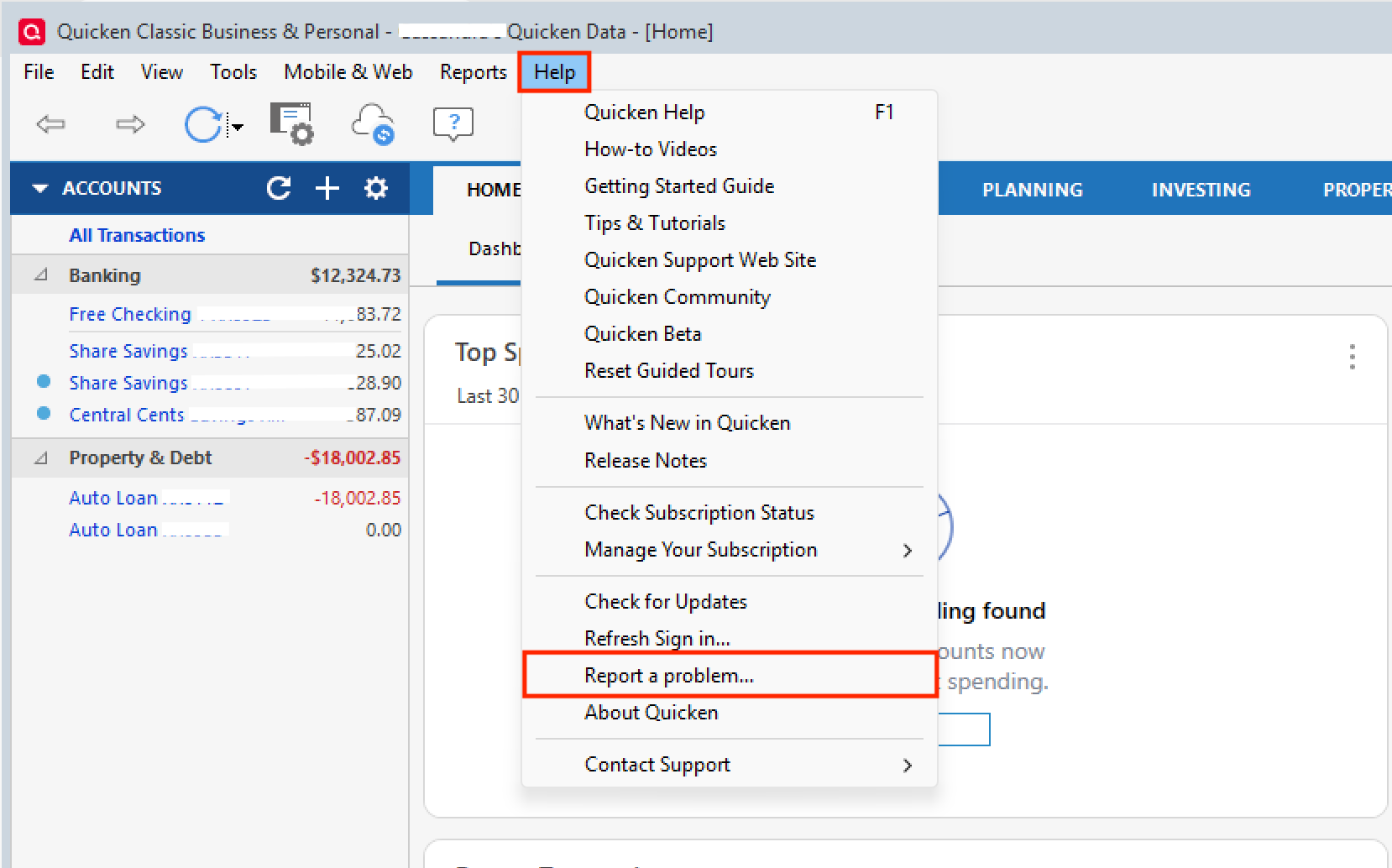
Doing this will allow you to send over your log files. Let me know once you have done this, so I can add you to the escalation ticket.
Thank you for contacting Quicken Support to report this issue.
I have escalated your issue as well. [CBT-961] If you don't mind, can you send over a new set of log files as well?
Thank you!
[CTP-15523]
Quicken Alyssa
Make sure to sign up for the email digest to see a round up of your top posts.
0 -
Done. Sent with comments: "This is a follow up log sent at the request of Quicken Alyssa today, moderator on the Quicken Community boards. I had already opened ticket #12092926 last week, and Everbank also has an internal ticket #9194 that I opened with Nick in IT dept."
1 -
Quicken Alyssa
Make sure to sign up for the email digest to see a round up of your top posts.
0 -
@Quicken Alyssa Thank you for your help. I have since discovered the problem of the reminder splits being corrupted occurs not only with the one step update with "Update Bills" enabled, but anytime that the bills are updated (for example, going into the billing overview, etc.). To solve this, I had to entirely remove all my online billers, and now I no longer have the issue. I have sent over 2 sets of log files- one with all online billers removed where theproblem does not occur, and one where I added back online billers, and the problem immediately reoccurred. I did reference the CBT-961 number you gave above in those report submittals.
1 -
Thank you for providing those additional details and sending over those log files.
I will update the ticket accordingly.
Thanks again!
Quicken Alyssa
Make sure to sign up for the email digest to see a round up of your top posts.
0 -
Ok, so now I'm back to the original thread starter issue here, which is Everbank MFA timing out causing all subsequent transaction downloads to fail for all other financial accounts that follow in the one step update. It had stopped with the Everbank MFA for a while, but now it's back again. Here is a screenshot showing the failures of all subsequent downloads in the one step update when the timeout occurs.
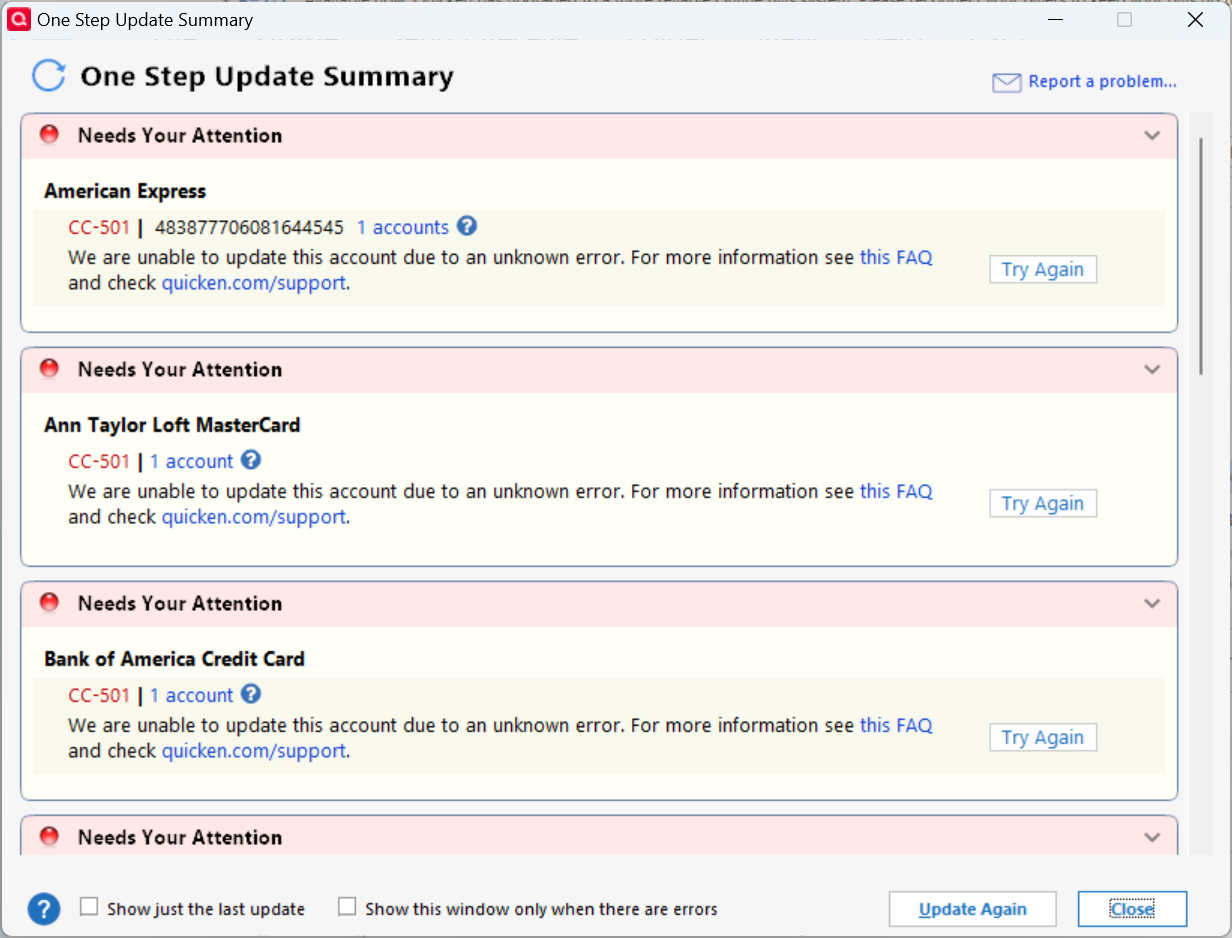
Every one of them shows a CC-501 error. And as I mentioned in the original post, you cannot just redo the one step update, as this error will reoccur over and over for all these accounts. You have to wait several hours to a day before something gets reset, and these account downloads are enabled again.
Regardless of what is going on with Everbank and their issues, there should be no reason for Quicken to error out on the other financial institutions. This should be easily correctable by Quicken. I reported this problem through Quicken, and sent the log files. They should be able to easily reproduce this issue at will, and find the root cause of the bug.
1 -
I have sent you a direct message. Please navigate to the inbox in the top right-hand corner of the Community page and check your inbox.

Thank you!
Quicken Alyssa
Make sure to sign up for the email digest to see a round up of your top posts.
0


