This discussion was created from comments split from:
Everbank connection issues again.
"anyone else having connection issues with Everbank. Have not been able to log into Everbank past few days"
Yes, indeed. I have been able to resolve this by either resetting my account, or by deactivating and reactivating transaction downloads. The most annoying thing about Quicken and Everbank to me is that it requires a code be sent to your phone each time for security purposes. Because this one-step update process can take a while, you often start doing other tasks, and then miss the window for the prompt, which then causes the transaction download to fail.
Fair enough if it only impacted the Everbank download. But somehow Quicken then shows an error on every account in the One Step Update that is supposed to be updated subsequent to Everbank (at least, that's what I'm assuming, since the ones before that prompt downloaded fine). Even this would be acceptable if you could just redo the one-step update, or go back to those accounts and download for them only. But it seems Quicken somehow puts a block on all these accounts for a day or so, and you just have to wait until they unblock the transaction download before you can update any of these accounts. This is something Quicken needs to address, as there's no logical reason for this to be the case.
And now to make it even more annoying, it seems Everbank is sending you 2 different codes you have to enter two times for every transaction download.
Hello @jptra,
Thank you for adding to this discussion.
One-time passcodes/multi-factor authentication codes come directly from the bank. Many times, you can adjust the settings for these from the financial institution's website. You would log in to their website, and look under privacy and security settings to see if this can be turned off or the frequency reduced.
Hope this helps!
Hi Alyssa,
thank you for the suggestion. I did check on Everbank, but I didn't find a way to turn off the MFA. But the good news is, it seems to have stopped asking me for 2 codes now, and is back to only 1 again.
I understand the MFA requirement is set by the bank, but do you know why when an MFA fails, Quicken gives an error for every other bank institution on the one-step update? And then even if you try to download transactions individually from those institutions, Quicken continues to give an error for some period of time (at least several hours). This is surely not controlled by Everbank, but is some bug in Quicken that impacts all subsequent downloads in the One Step Update. It seems like it should be an easy fix, but I'm not sure if anyone has ever looked into it. Could you bring that to the attention of the appropriate team, please?
Thank you!
@jptra,
Thank you for following up with that additional information.
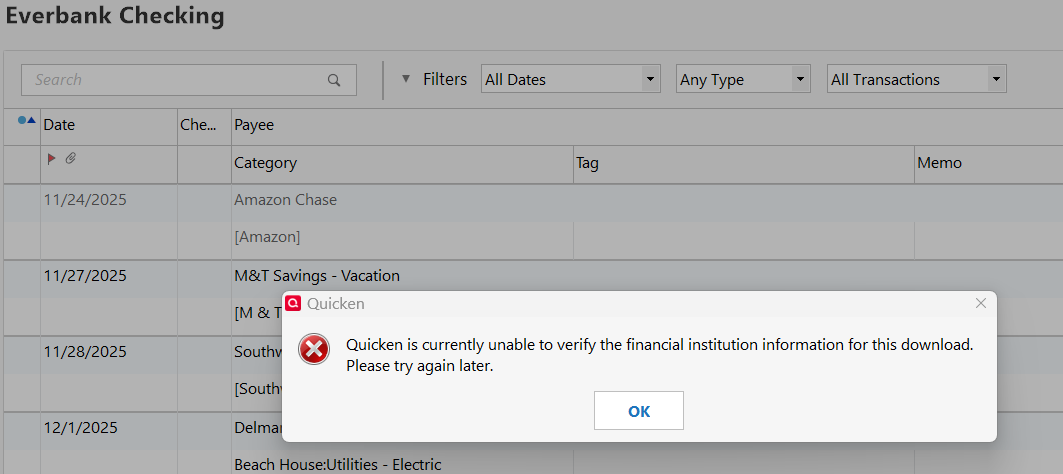
In regard to the Everbank error causing the following banks to result in errors. This is not the expected behavior. All banks should be able to update independently, regardless of any other having an issue.
That being said, let's see if we can determine why this is happening.
Looking forward to your response.
thank you for your help.
This has been happening for as long as Everback has been requiring MFA (at least several months, but I think longer). I don't have any other financial institutions that require this, so I can't say if the behavoir would be the same with a different institution, but I have to believe that it would.
Well, the issue occurs when it's waiting for me to either enter the phone number at which I want to be texted the MFA code, or the MFA code itself that was texted to me. As I said, this delay is my fault because I get busy doing other things while I'm waiting for the one step update to prompt me on these things, then forget to go back for maybe 10 minutes or so. By then, I assume Everbank has timed out the MFA, and returns an error. Every single institution down the list after that returns an error, and none of them will subsequently update for several hours after that. Quicken should be able to easily reproduce this error by testing with an institution that requires MFA. Just have your team not respond when it asks for the authentication, so that institution times out. Every institution in One Step Update that is updated after that one will fail. If it helps, I can reproduce this at will, and provide Quicken any logs or information needed to help resolve the bug.
My data file is located on my local hard drive
Yes, OneDrive automatically backs up all my files
Thank you for following up.
Can I have you exclude the file you are actively using from the OneDrive backup? Allowing your active data file to be accessed by any third-party services can cause damage to your file.
Additionally, can you tell me what errors you see for the other institutions when this happens? Screenshots of what you are seeing could be helpful as well. If needed, please refer to this Community FAQ for instructions on how to attach a screenshot. Alternatively, you can also drag and drop screenshots to your response if you are not given the option to add attachments.
Thank you.
please see attached for the screenshot following the failures.
I will attempt later to exclude the folder from Onedrive backup- it's not letting me for some reason and I'll have to figure that out. I will retest again once I've accomplished this, and let you know.
Hi again,
I did move the folder to a non-synced location, and I still get exactly the same behavoir.
Thank you for following up with additional information.
Now that the file has been moved, we should validate it.
To do this:
Once the validation has completed, it will produce a report of anything it has found/corrected. After this, try updating your accounts, and let me know if anything has changed.
Hello again,
I validated the file and repeated the process. It still does the same thing. I think Quicken can easily verify this for themselves by performing a one-step update, and then when the MFA is requested, either just wait long enough for it to timeout before entering it, or I think even hitting cancel will produce the same result of erroring out all subsequent updates.
Thank you for trying those steps and following up, though I am sorry they didn't work to resolve the issue.
At this point, I think it would be best for you to contact Quicken Support directly, so they can see this happening in real-time and investigate this issue further. They will also be able to process an escalation if needed.
I apologize, I wasn't able to resolve your issue from the Community.
I appreciate your help on this. Interestingly enough, I recently deactivated and reactivated all my Everbank accounts. After doing this, Everbank no longer sends the MFA request every time. So while I'm not sure the problem of all subsequent banks giving errors after the MFA timing out has been solved, I no longer have the issue since the initial MFA doesn't seem to happen any longer. All's well that ends well!
I have recently noticed another issue that I wonder if you have any insight on? We can start a separate thread on that if you prefer. I had a reminder set up for my recurring paycheck transactions, and that had been working fine until the last few weeks (I can't say exactly when). Recently however, all the splits in my paycheck transaction are removed from the reminder (tax withholdings, insurance , etc.), except those involving transfers to other Quicken accounts (for example, my 401k, my HSA, etc.). I thought at first this was just a simple corruption, and I deleted the old reminder and added a new one. When I initially check the reminder, the splits all look to be there, but at some later point, all the splits are again removed except the transfer accounts. I don't know what causes this corruption, and it has occurred both before and after the file validation you had me perform. For sure the reminder doesn't stay valid after closing and re-entering Quicken, but I suspect it is corrupted even without exiting Quicken.
Quicken has always had issues with paycheck entries for some reason (particularly corruption of transfers), but it seemed these had been resolved, and this corruption of paycheck reminders seems to be a new issue. Are you aware of this, and is there any fix for it?
And sorry about this, but I wanted to ask you one more thing if I could? This is in regards to Online Billing. I know Quicken has made some changes there, and some billers that used to be available are no longer available. I gave up on using Quicken to actually pay the bills, but I have set up my credit cards (American Express and Citibank) as online bills and linked those to reminders. These bills used to update accurately, but no longer seem to report the amounts due, even though they don't report any error or other issues. I expect these billers are still supported, right? Again, we can start a separate thread on this if you'd rather.
Thank you again for all your help and support!
Thank you for following up, and I am happy to hear the Everbank issue seems to have self-resolved. I hope that sticks!
Absolutely no need to apologize about asking for help, that's what we are here for! I have split our full conversation into its own thread. The other thread was technically in a Mac category, and I didn't want others getting confused by seeing Windows steps.
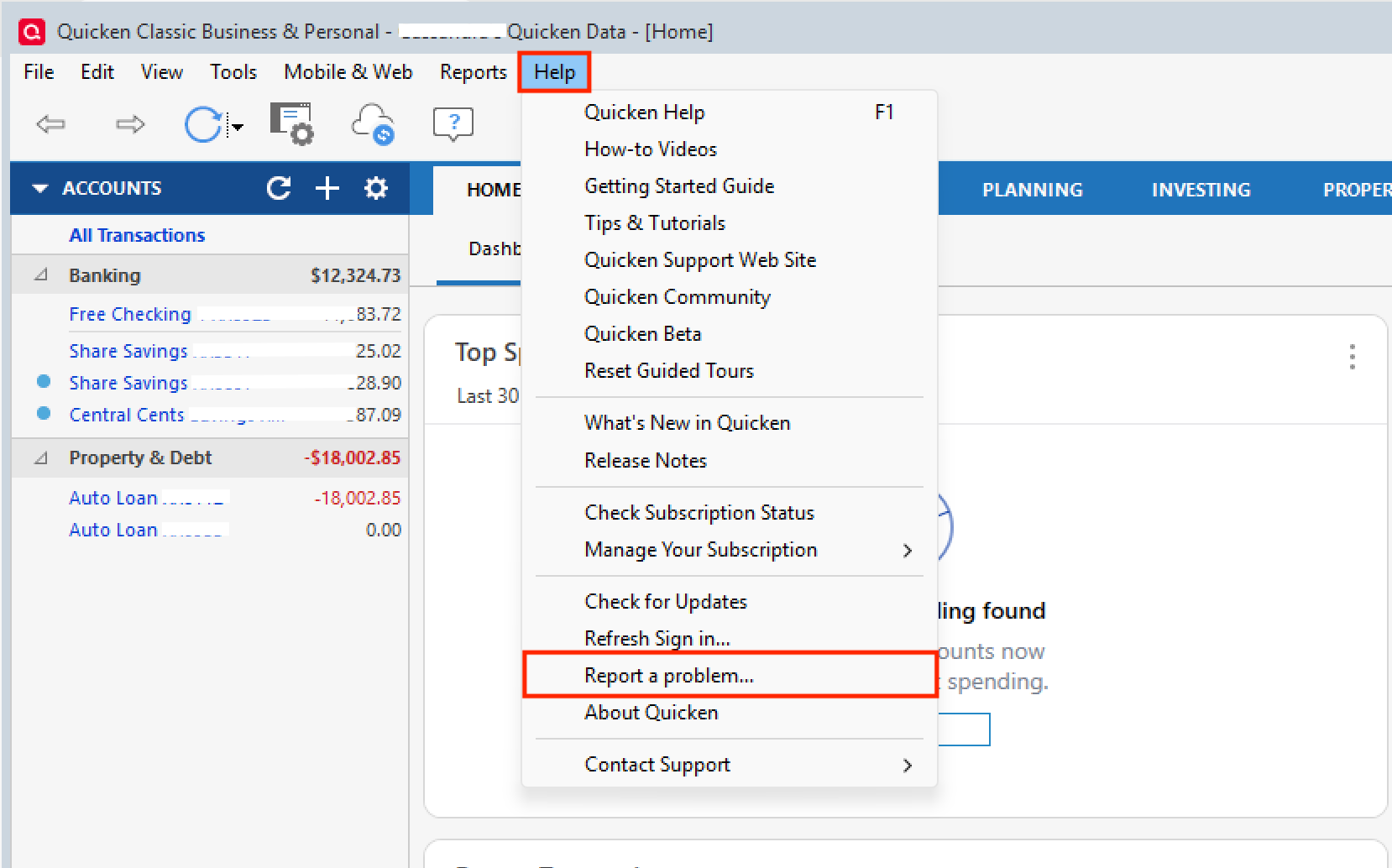
The bill issue you mentioned, are these getting stuck in an "Awaiting Next Bill" status? If so, this issue has been reported, and if you would like, I can add to the escalation ticket. [CTP-15189] In order to be added, you would need to send over your log files by going to Help>Report a problem>Send to Quicken from within your Quicken software.
As for the issues you are having with Paycheck splits, I am unable to recreate this issue in my own Quicken. So I think it could be specific to your file. To test out if this is the case, we could follow some Advanced Data File Troubleshooting steps. You can start on step 3 in the linked support article. Once in the copy file, test to see if you are still seeing the same issues.
Note that if you find that the issue no longer exists in the copy file and wish to remain in this file, you will need to reconnect all of your connected accounts in Quicken. If you choose to return to your original file, you can do so by going to File and selecting the second file listed at the bottom of the menu choices.
Let me know what you decide and how it goes!
Everbank and Quicken are not a nice marriage. I'm getting used to it and accept it because they offer high interest but both should work on a structural solution. Making MFA optional by Everbank would only solve half of the issues.. I think it's the way Quicken 'screen scrapes' the Everbank communication.
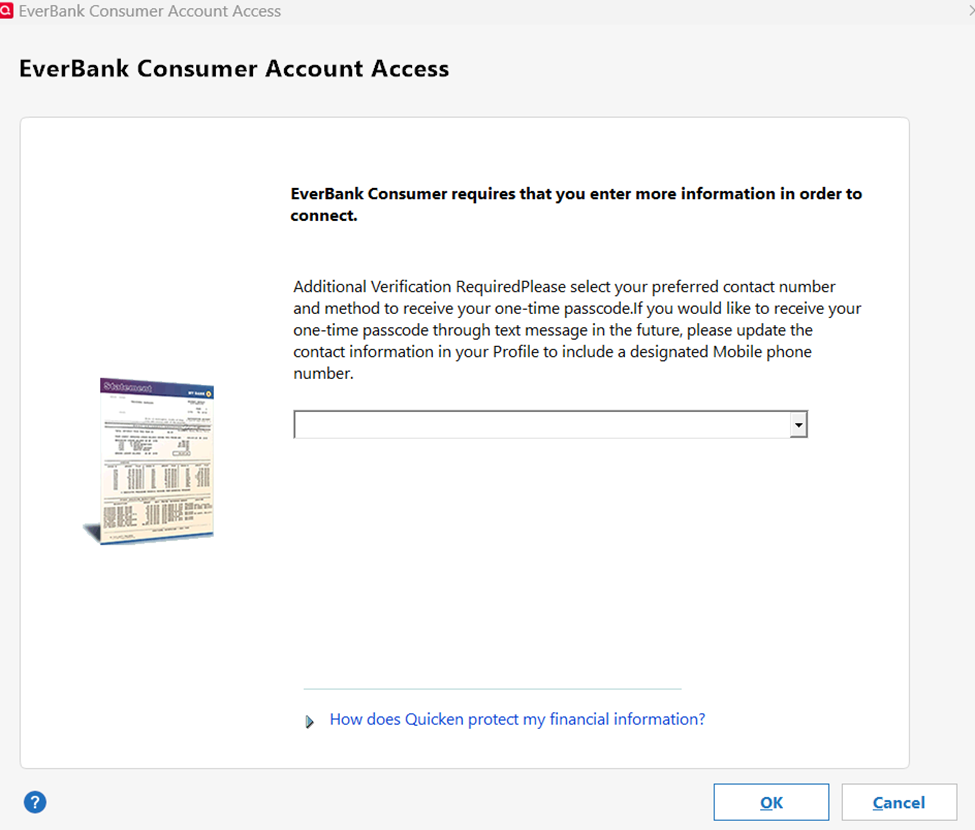
Just today Everbank one step update has failed. It now takes about a minute to present the MFA drop down list to call or text the six digit code. But then it spins for several minutes and times out without ever making the call or sending the text. Just returns a CC-587 and that the code was incorrect, which is probably the equivalent of no code being entered in time. Also posting this as new thread for vis.
One step updates still not working after 2 days. Submitted a problem report to quicken. Has something changed? It was working fine last week.
See Anja's response here in my other thread:
Thanks for the quick response. But now its even worse. In the past when I had issues with everbank, I was still able to import transactions manually. Now this feature no longer works also. See below.
This looks like an old issue with a wrong ID in the QFX file. There was an earlier post with a manual fix for it.
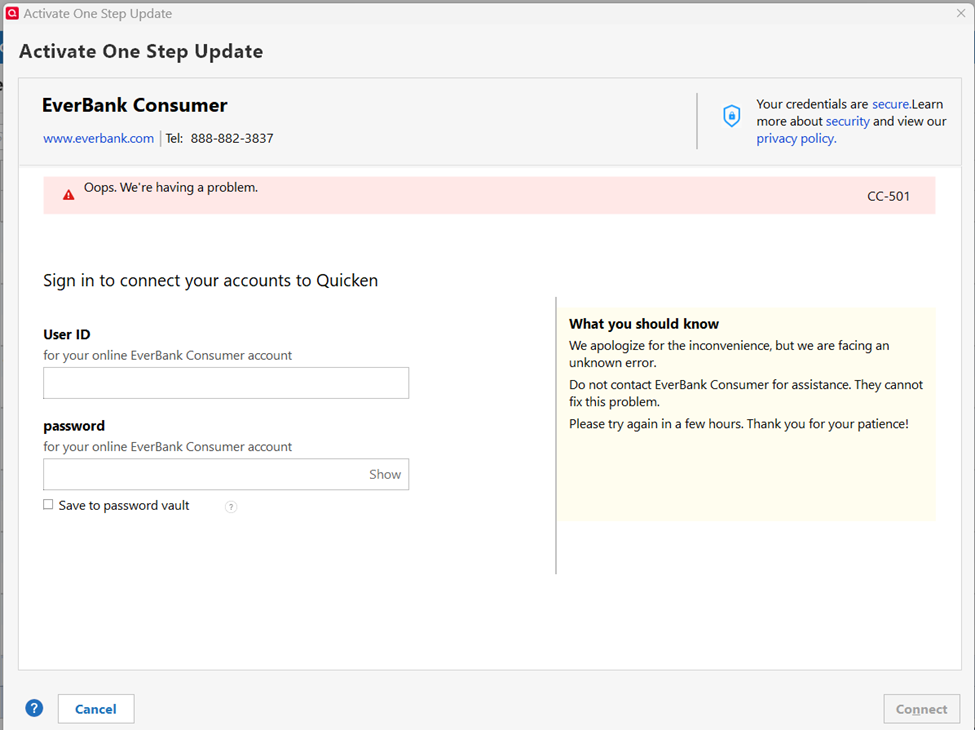
Today the Online Services setup gets a little further, but is in a loop from additional verification screen to entering userid/password screen.
I had troubles yesterday, but as of this morning, my Everbank one step updates are working again. As for esaurusaitis's problems, I think pbmsmit may be right. I remember having this issue before when trying to do a manual download. The fix is this- open the .QFX file, do a search on "INTUBID", and replace it with "INTU.BID". Then it should work. The user who posted this fix said they were going to contact Everbank to get them to fix it, but apparently Everbank ignored them. It would be nice if Quicken could work with them to point out these kind of problems/fixes, and insure follow-through.
@Quicken Alyssa "
The bill issue you mentioned, are these getting stuck in an "Awaiting Next Bill" status? "
Yes indeed, they do all say that. Yes, I would appreciate it if you could escalate this- I have submitted the help request with log files.
Thanks for your help!
@Quicken Alyssa For the problem of the reminders losing the paycheck splits, I have followed the steps outlined. I have only just done this today, but after exiting the file and re-opening it again, so far, my splits are being retained. I will keep an eye on this over the next couple of weeks, and let you know if the problem returns again.
Thx again for the help on this issue!
Changing the "INTUBID", and replace it with "INTU.BID" didn't work. Same error as above. I think the import is failing before it tries to process the qfx file.
FYI - tried again to set up online for everbank. Still failing.
The total fix was (at that time):
Open the downloaded QFX file with Notepad (or any other ASCII text file editor).[Edited:] Change the FID to 70459. Also add or change the INTU.BID number to 70459 and ensure the line reads INTU.BID with a period in the middle. <FI> <ORG>B1 <FID>70459 </FI> <INTU.BID>70459 Save the file and import it into Quicken.
I'm receiving the same today
I have no issues with Everbank recently. It is even better now: They don't ask for the MFA code if you do a manual refresh! What a relief! (or is it an error and will come back? You never know with Everbank)
Hello All,
@pbmsmit,
I am happy to hear that you are not having any issues with Everbank currently. If that changes, let us know!
@esaurusaitis & @Paulio,
After checking your connections internally, I can confirm you are both getting CC-587. Please follow this Support Article that you previously linked from one of Quicken Anja's responses. If the steps do not resolve the issue, you will need to contact Quicken Support directly so they can escalate this issue from our end, if necessary.
Thank you for following up. Hopefully, the last steps resolve the issues you were seeing with reminders. I will get you added to the ticket for the "Awaiting Next Bill" issue right now.
Thank you all!
I posted in another thread:
After a lengthy conference call with Everbank and Quicken, Quicken has said there are "other customers" affected, and they have "escalated". So we'll see what happens……