This discussion was created from comments split from: PNC - 12/4 Download Duplicated Recent Transactions.
Same here I'm getting one then 2 duplicates, wish they would get this fixed
I too, am getting duplicate transactions. For me it started on December 3 and continued today. Prior to that everything was going smoothly. I thought PNC finally had these problems straightened out but I guess not.
Same problem here. Attempting to contact PNC. Had to search the internet for phone number as the PNC site only gives the number for credit cards. On hold now.
Just got off the phone with PNC. They tell me this is a quicken issue. Quicken tells me its a PNC issue. What now?
Hello All,
Thank you all for sharing the details of what you’re experiencing. i went ahead and split your comments into a separate thread as the original post you commented on was a Mac post, and upon reviewing your accounts, it appears you all are using Windows.
We want to let you know that we currently have an internal ticket open for this issue (CTP-15396) regarding duplicate transactions and failed matching when downloading from PNC and other financial institutions. Our teams are actively investigating this.
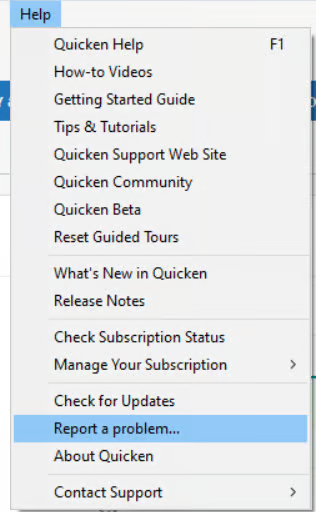
If you are affected, please help support the investigation by submitting the following through Help > Report a Problem in Quicken:
At this time, we do not have an ETA for resolution.
Thank you for your patience! (CTP-15396)
A week or so the problem was solved preventing download of PNC Bank checking account transactions. It was fine for a few days. Then a couple of days ago when downloading from PNC (via Direct), I'm now getting duplicate transactions downloaded. Happened again this morning.
Seeing the same thing, both yesterday and today.
Hello @Gary E & @captiveuser,
Thank you for reaching out! I have merged your posts with this thread that discusses the same issue. As mentioned in my previous comment, this issue is being tracked under our internal ticket (CTP‑15396) regarding duplicate transactions from PNC and other financial institutions.
To help our teams investigate and work toward a resolution, please submit the following via Help > Report a Problem in Quicken:
Providing these details ensures your case is included in the ongoing investigation. We appreciate your patience while the teams continue working on this.
Thank you!
Having duplicate transactions on update from PNC Bank (Online Banking) into quicken for payments/debits. Deposits/Credits to the account do not show up at all with a sync from PNC bank into quicken. This is most likely related but I did not see others post about missing deposits.
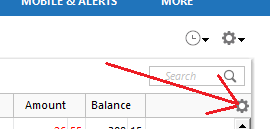
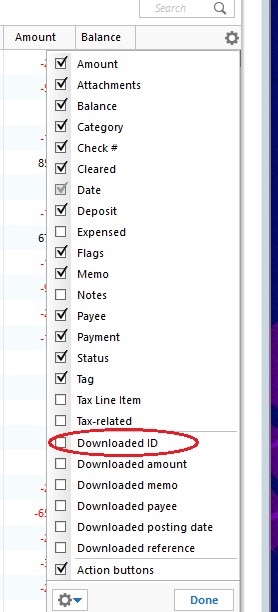
Thank you all for continuing to report these duplicate transaction issues with PNC Bank. To help our teams investigate and work toward a resolution, we’ll need a bit more information from you:
You can submit this information here in the thread, or along with your log files, screenshots, and a sanitized copy of your data file via Help > Report a Problem in Quicken—Attn: CTP‑15396. Let us know when you have done so.
We really appreciate your help and patience as our teams work to resolve this issue.
Hello everyone,
I wanted to check in and remind you that to help our teams investigate and work toward a resolution, we really need the information requested in my previous response above.
Please submit these via Help > Report a Problem in Quicken and reference CTP‑15396. Providing this information ensures your case is included in the ongoing investigation and helps our teams identify the pattern causing duplicates.
We appreciate your patience and cooperation!
I resubmitted the Report a Problem with CTP‑15396 in the subject line with the download id column showing.
@jwieriii Thank you! We will get your details and files added to the ticket.
Do we have a timeline for when we can expect this to get fixed? It makes your product useless for me. I have a renewal coming up in a few weeks and I'm not renewing if this isn't fixed.
Hello @Tommy100,
I understand how frustrating these duplicate transaction issues are, and I’m sorry for the impact this is having on your use of Quicken.
At this time, our product and development teams do not provide estimated timelines or release dates for fixes. However, I want to reassure you that this issue (CTP-15396) is actively being worked on and is currently a priority with our teams and our service provider.
We appreciate your patience while the investigation continues, and we will update this thread as soon as new information becomes available.
An Alert was posted today regarding this issue and states what the cause was and that it has been corrected.:
It makes sense to me because I have not had any duplicates in my downloaded transactions outside of the narrow date range of the issue.
If anyone is still getting duplicates included in their PNC DC downloads mention it here and be sure to report it to Quicken (Help > Report a Problem).
Thank you, @Boatnmaniac, for sharing the Community Alert—this is correct.
Our teams have confirmed that the duplicate transactions were caused by an isolated PNC Direct Connect data migration issue and that the underlying issue has now been resolved. The Community Alert posted on 12/17/25 explains the cause and includes step-by-step guidance for reviewing and removing any duplicate transactions that may have downloaded between 12/1/25 and 12/10/25.
If you were affected, we recommend following the troubleshooting steps outlined in that alert and comparing your Quicken register to your PNC online statements to ensure accuracy.
Thanks for your continued reports. We wanted to share an update from our development team.
For those experiencing duplicate transactions with the “PNC Bank – Direct Connect” connection, a fix has already been deployed with the latest release. If you’re still seeing duplicates from before the fix took effect, you can safely delete those duplicate transactions as a cleanup step.
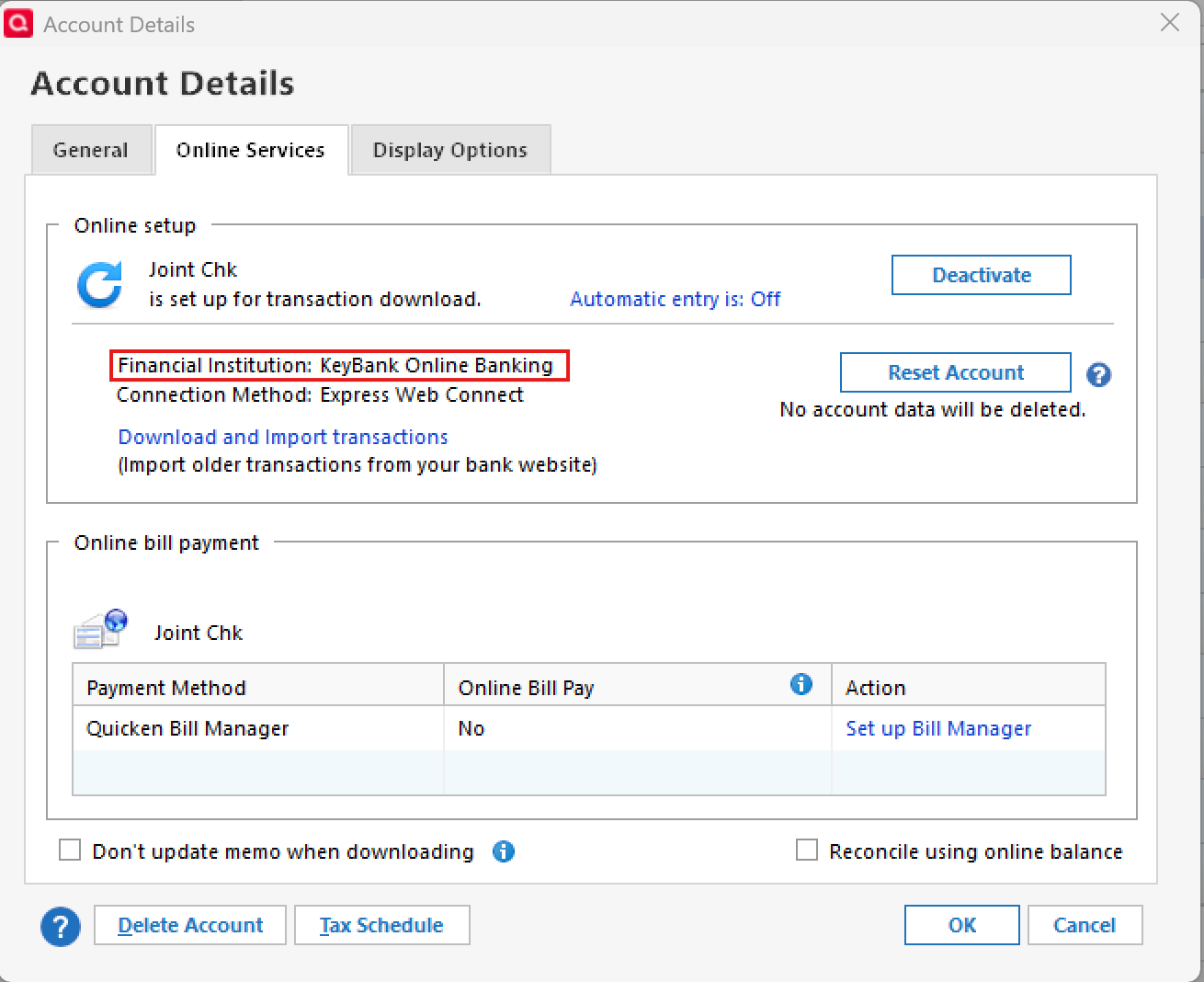
If you are still encountering duplicate transactions and are not using “PNC Bank – Direct Connect”, we need a bit more information to continue the investigation. Please let us know the exact name of the PNC connection you’re using, which you can see via Tools > Account List > Edit > Online Services in Quicken (example below).