This discussion was created from comments split from:
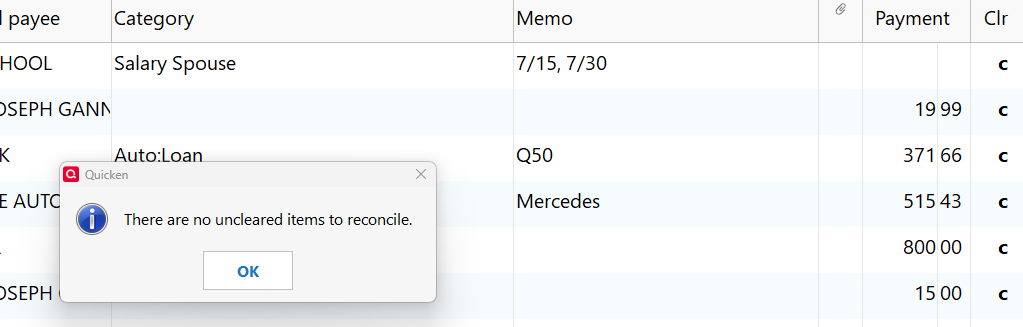
getting erroneous "there are no uncleared items to reconcile" message
.
I get this message when I try to reconcile my Checking Account. Quicken seems to think that the online balance is still at the value it was when the last reconcile worked. It's 6 months later and the balance is very different. Can you help me?
Hello @fmayhood,
Thanks for sharing your experience.
I do have some follow-up questions for you to help narrow down what could be happening here.
Additionally, screenshots of what you are seeing could be helpful. If needed, please refer to this Community FAQ for instructions on how to attach a screenshot. Alternatively, you can also drag and drop screenshots to your response if you are not given the option to add attachments.
Looking forward to your response!
I am also getting the same message. This only happens for my Captial One Checking Accounts. It doesn't ask me if I want to use Paper or Online Balance. It just goes straight to the error message. I have two months worth of Cleared Items
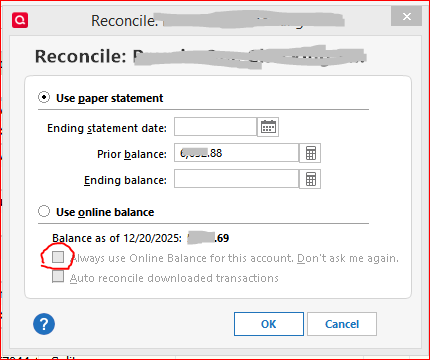
Be sure to switch off "Reconcile using online balance" so that you can verify and correctly enter the statement ending date.
The first setting is in Edit Account Details / Online Services. The second setting is in the Reconcile dialog when you start a manual Reconcile. Click the "Use paper statement" radio button and enter the correct statement ending date that you're working with as well as the ending balance. If you decide to reconcile using online balance, please review the two settings under this selection. You may want to uncheck the setting "Always use online balance … Do not ask me again" to get your prompt back
Hello @fmayhood & @jgannoun,
Just checking in, we haven't heard back from you in a while.
Do you still need assistance?
Thank you!
Hello again,
Checking in once more before this thread is closed.
Let us know if you still need assistance.
Due to the lack of response, I went ahead and closed this post.
If you still require assistance, please feel free to start a new post.