Assign a Zelle payment to my rental property

Hello,

I'm new and using Classic Business and Personal (Windows)

I had previously made a few payments to a contractor for repair work at my rental property.

I used Zelle, and the payments are present in the bank account linked in Quicken. The rental property has also been added to Quicken.

My question: How do I link the payments I made to the contractor to the rental property, so they will be part of my expenses? I have categorized the payments as "Home Repair and Maintenance (Rental) but that doesn't assign those to the specific property. Hoping someone here can help with something I thought would be easy and obvious (and maybe it is and I'm just looking in the wrong place)

Thank you!

Answers

  • UKR
    UKR Quicken Windows Subscription SuperUser ✭✭✭✭✭

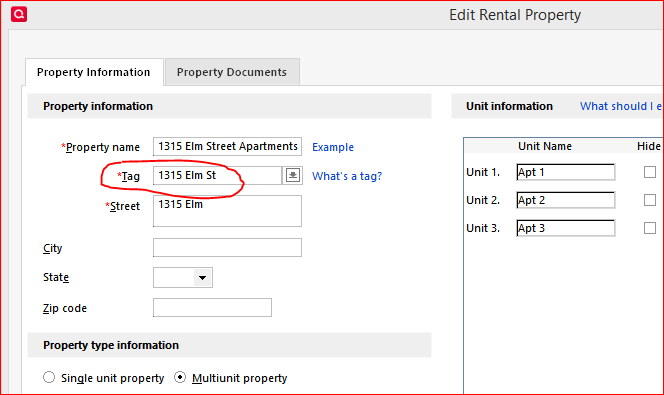
    Have the rental properties been created in the Rental tab / Rent Center?
    If so, they will have been assigned a Tag.
    You can use this Tag in your vendor payment transactions in the checking account.

    image.png
  • Quicken Anja
    Quicken Anja Moderator mod
    edited January 13

    Hello @sargepepper,

    We haven't heard back from you in a while. Do you still need assistance?
    Were you able to give @UKR's suggestion a try?

    Check back and let us know! Thank you.

    -Quicken Anja
    Make sure to sign up for the email digest to see a round up of your top posts.

  • Quicken Anja
    Quicken Anja Moderator mod

    Hello again,

    Checking in once more before this thread is closed.
    Let us know if you still need assistance.

    Thank you!

    -Quicken Anja
    Make sure to sign up for the email digest to see a round up of your top posts.

  • Quicken Anja
    Quicken Anja Moderator mod

    Hello again,

    Due to the lack of response, I went ahead and closed this post.

    If you still require assistance, please feel free to start a new post.

    Thank you!

    -Quicken Anja
    Make sure to sign up for the email digest to see a round up of your top posts.

This discussion has been closed.