Cdn Version of Quicken R65.20 on Windows 11: can't create a new US$ investing account

I can't successfully create a new US$ investing account with the newest version of Quicken R65.20 on Windows 11. System lets you create the account and allows you to specify desire for new account to be in US$, but once created - defaults to Cdn$. Existing US$ accounts function. Spent an hour on help line yesterday - doesn't seem to be a fix?
Comments
-
Hello @Life User,
Thank you for sharing your experience and posing this question.
The steps to set up a foreign currency account are:
- Choose Tools menu > Accounts List.
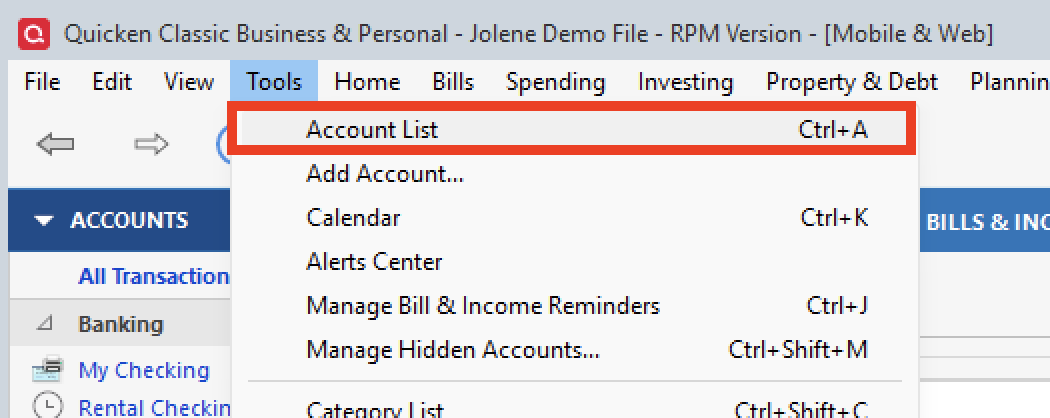
- Click Add Account.

- In the Add New Account window, choose the type of account you want to create.
- Enter a descriptive name for the account, indicating the name of the currency, such as SFr for Swiss francs.
- Select the currency from the Currency drop-down list.
- Complete the Account Setup.
- Click OK.
Are these the steps you are taking to accomplish this? If so, I have some additional questions for you.
- When was the last time you successfully added a foreign currency account?
- Have there been changes to your data file since then?
- Like copying the file, or restoring a backup?
- Where is your data file located?
- Is your file being synced/backed up by any third-party services like Dropbox, OneDrive, or Norton?
Additionally, screenshots of what you are seeing may be helpful. If needed, please refer to this Community FAQ for instructions on how to attach a screenshot. Alternatively, you can also drag and drop screenshots to your response if you are not given the option to add attachments.
Looking forward to your response!
Quicken Alyssa
Make sure to sign up for the email digest to see a round up of your top posts.
0 - Choose Tools menu > Accounts List.
-
Just checking in, we haven't heard back from you in a while.
Do you still need assistance?
Thank you!
Quicken Alyssa
Make sure to sign up for the email digest to see a round up of your top posts.
0 -
Hello again,
Checking in once more before this thread is closed.
Let us know if you still need assistance.
Thank you!
Quicken Alyssa
Make sure to sign up for the email digest to see a round up of your top posts.
0 -
Due to the lack of response, I went ahead and closed this post.
If you still require assistance, please feel free to start a new post.
Thank you!
Quicken Alyssa
Make sure to sign up for the email digest to see a round up of your top posts.
0
