Downloaded transactions available for review, but 'Downloaded Transactions' tab is not visible

This regarding Quicken Classic Premier desktop edition: R65.17
I have a situation where from my left hand Accounts menu I can see there are downloaded transactions available for review in a particular account. Clicking on the 'red flag' to the left of the account name I see the count of those transactions.
However, when I go to that account's register the "Downloaded Transactions" list is no longer visible or available for me to review these transactions.
These transactions were downloaded and visible in the "Downloaded Transactions" tab that was visible until the company closed and their "On-Line Services" with Quicken went out of existence. I did not get to reviewing these transactions before this happened.
I am of the understanding that the "Downloaded Transactions" tab will not be visible if "On-Line Services" are not set up for this account. The problem is that I have no way of reestablishing these services since the company is gone.
Is there a work-around anyone is aware of to make the "Downloaded Transactions" visible again so that I may review these transactions and properly close this account in my file?
If it is true that the tool is coded with a conditional that disables visibility of the "Downloaded Transactions" tab if "On-Line Services" are not set up, can we get a code modification to include the extra condition that the "Downloaded Transactions" memory space for this account also be empty?
Best Regards
Comments
-
Hello @aorlow,
Thank you for letting us know you're encountering this issue. To help troubleshoot, please provide more information. Does Quicken currently see the account as a connected account, or as an offline/manual account? You can check this by navigating to Tools>Account List and looking in the Transaction Download column. If Quicken thinks the account is connected, then you should see "Yes" in that column.
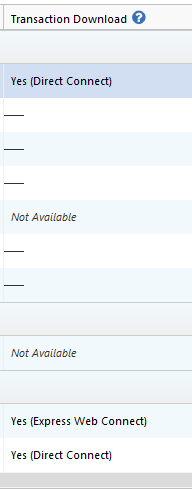
If Quicken still thinks the account is connected, then you should be able to switch the account to have automatic entry turned on. That should force those transactions into your register.
To do that, go back to Tools>Account List and click the Edit button next to the problem account. On the Online Services tab, you should see a blue Automatic entry is: Off link. Click on it.
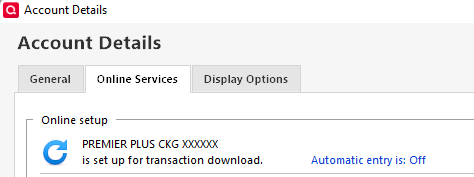
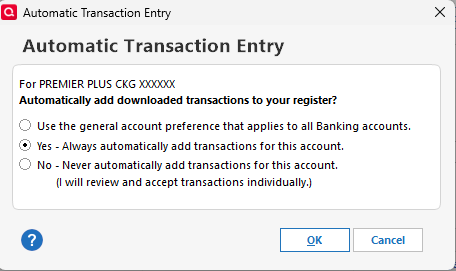
In the window that comes up, click Yes, then click OK.
I look forward to your response!
Quicken Kristina
Make sure to sign up for the email digest to see a round up of your top posts.
0 -
Hello,
Thank you for the follow-up.
The brokerage is out of business and on-line services are no longer available.
In the Account List for this account in my Quicken file "Download Transactions" are "not available".
On the "Online Services" services tab of the "Account Details" window for this account in my Quicken file, I am shown the "Set Up now…" button. The brokerage no longer even appears in Quickens "Financial Institution" selection list…
"On-Line Services" for this account no longer exist as this brokerage was merged out of existence. These transactions were downloaded prior to this occurring, but I did not get to reviewing them in time before the backend "On-Line Services" were removed from availability earlier in the year..
I am now doing end of year cleanup and am left with a memory space of downloaded transactions in my Quicken file that I need to clear as evident by the Red Flag to the left of the account name in my left-hand-menu account list. If I click on that red flag I get a hover text box that tells me how many transactions to review there are. I'm trying to do end of year clean-up and close this account. I'd like to do it neatly, ie properly clean up these transactions
If there is a simple conditional in code that disables view of the "Downloaded Transactions" tab/list at the bottom of the account's register page if "On-Line Services" are not currently set up for the account,,,, that simple conditional needs to be expanded to capture the corner case of if the memory space for downloaded transactions for the account is also empty.
Please let me know if I may assist further.
Best Regards
0 -
Thank you for your reply,
Since it sounds like it's not giving you an option to try switching to automatic entry (to see if you can force the transactions into your register that way), another possibility is to navigate to Tools>Online Center and see if you're still able to choose that financial institution from the Financial Institution dropdown.
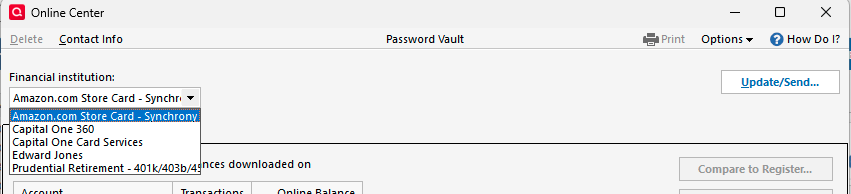
If you are, then you might be able to access the transactions from that screen.
If there is no option there either, I suggest that you try validating your data file. Please save a backup file prior to performing these steps.
Validate:
- File
- Validate and Repair File...
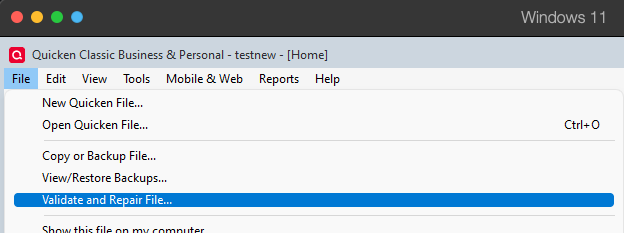
- Validate File
- Click OK
- Close the Data Log
- Close Quicken (leave it closed for at least 5 secs)
- Reopen Quicken and see if the issue persists.
Please let me know how it goes!
Quicken Kristina
Make sure to sign up for the email digest to see a round up of your top posts.
0 -
Hello, Thank you for you're response.
I'm not sure my point is getting across.
The brokerage is no longer in business and on-line services are no longer available for this account.
As mentioned above, on the "Online Services" services tab of the "Account Details" window for this account in my Quicken file, I am shown the "Set Up now…" button. The brokerage no longer even appears in Quickens "Financial Institution" selection list…
"On-Line Services" for this account no longer exist as this brokerage was merged out of existence. These transactions were downloaded prior to this occurring, but I did not get to reviewing them in time before the backend "On-Line Services" were removed from availability earlier in the year..
I have previously completed validation on this file and that will not make the "Downloaded Transactions" tab visible toward the bottom of the account's register page.
I believe that if you passed along the entire contents of this thread to the development team they may understand where the issue lies.
I am of the impression that there is a simple conditional in code that disables view of the "Downloaded Transactions" tab/list at the bottom of the account's register page if "On-Line Services" are not currently set up for the account. If this is true, that simple conditional needs to be expanded to capture the corner case of if the memory space for downloaded transactions for the account is also empty.
Please let me know if I may assist further.
Best Regards
0 -
Thank you for your reply,
I do understand the issue, and the behavior you describe is not the expected behavior when you have transactions which are downloaded, but not yet reviewed, and the connection with the financial institution no longer exists.
Since validating the file did not correct the issue, per our article on troubleshooting when there are downloaded transactions to review, but they're not visible in Quicken, please follow these steps:
If you know when the issue started, and it's not so far in the past that you'd lose a lot of data, the simplest solution is to restore a backup from before the issue started.
If restoring a backup is not a viable option, try making a copy of your file and validate the copy:
- Choose the File menu > Copy or Backup File.
- Select Create a copy or template, then click Next.
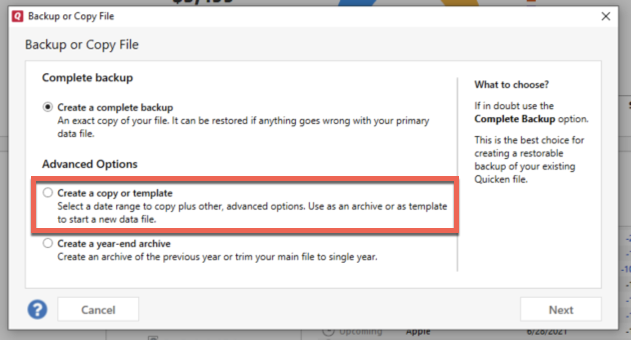
- Accept all defaults and click Save Copy.
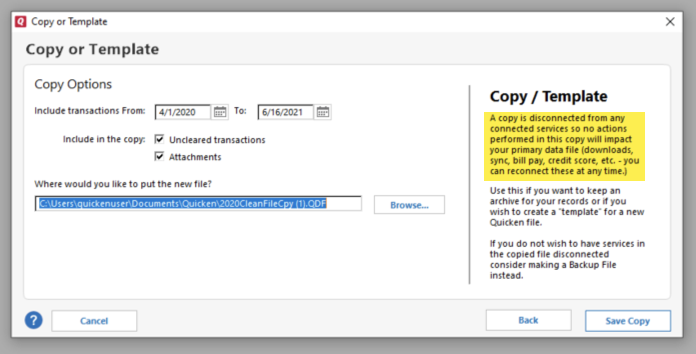
- Open the New Copy when prompted.
- Choose File > Validate and Repair File.
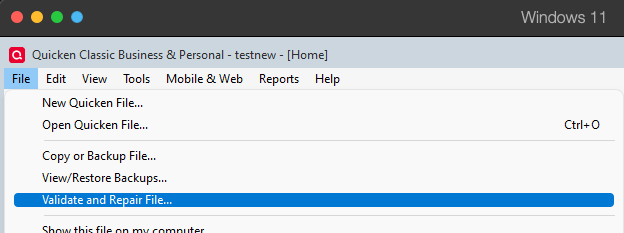
- Select the new copy created in step 3 and click OK.
Note: Depending on the size of your data file, you may need to wait a while for the validation process to finish. Do not use the Task Manager to close Quicken. Quicken displays an error message if it cannot validate the file. If Quicken is able to validate the file and any errors are found, Quicken displays a message, "Data losses were found in your file." You can view the log file for more information.
When the validation process is complete, test to see if the issue is resolved in the copied file. If it is, you will need to Reactivate your accounts for transaction download in the new file copy. To do that, please follow the steps below.
- Go to Tools > Add Account.
- Select the bank for the deactivated account(s). If prompted, select the connection method.
- Enter your credentials and click Connect.
- When the list of located accounts appears, choose LINK next to each account you want to reactivate.
- Click Next then Done on the last prompt.
- After all of your accounts have been Reactivated, complete the Check the account register... section steps above again.
If the issue is not resolved, return to your original file. For instructions on switching between Quicken files, please click here.
Thank you!
Quicken Kristina
Make sure to sign up for the email digest to see a round up of your top posts.
0
