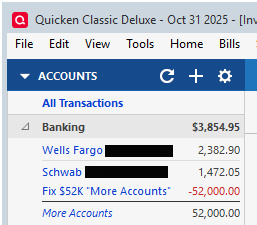
On windows, R65.17. A couple months ago a phantom account showed up.

BriantheK
BriantheK Quicken Windows Subscription Member

On windows, R65.17. A couple months ago a phantom account showed up under Banking. It is listed as "more accounts" in italic for $52,000. If I click on it, the only option I have is to "manage hidden accounts." I follow that, and I've made sure that there are no phantom accounts listed. Under "Separate accounts" at the bottom of the account listing, "More accounts" is also listed, following that link lists all the hidden accounts, and once again I confirm there are no phantom accounts. When this first showed up, I searched for a $52,000 entry and couldn't find it in any transaction. I thought maybe it was tied to savings goals, so I deleted all of those. I also validated and super validated the file. I have never downloaded any transactions, I enter everything by hand, and always have. Since I can't seem to find the entry, I created another Banking account, called "Fix $52K 'More Accounts'" with a balance of -$52,000 so my totals are correct. But its annoying to not be able to clean it up. It is beginning to look like my only option is to create a new Quicken file, and manually re-enter everything—which will be a nightmare. Any suggestions to try first?

Answers

  • NotACPA
    NotACPA Quicken Windows Subscription SuperUser ✭✭✭✭✭
    edited December 2025

    When you do TOOLS, Account List and click on "Show Hidden Accounts" in the lower left corner … does the mystery account NOW show in the list?

    When you click on the words "More Accounts" under Banking, does a list of those accounts show?

    Q user since February, 1990. DOS Version 4
    Now running Quicken Windows Subscription, Business & Personal
    Retired "Certified Information Systems Auditor" & Bank Audit VP

  • UKR
    UKR Quicken Windows Subscription SuperUser ✭✭✭✭✭

    Sometimes a picture is worth a thousand words …
    Can you please capture one or more images of the parts of your Quicken window showing the phantom account, sensitive information blacked out as necessary to protect your privacy and attach the image(s) here?
    How do I post a screenshot in the community from a mac

    How do I post a screenshot in the community from windows

    Please save images to files of file type PNG or JPG only. They're easier to work with than PDF files.

  • BriantheK
    BriantheK Quicken Windows Subscription Member

    When I go TOOLS, Show hidden accounts, the only accounts that are NOT hidden and open are the active accounts still in use. Everything else has been has been CLOSED and hidden. I previously noticed that I could not CLOSE Savings goals, since I did not have those showing up in transactions, I simply deleted all of those.

    quicken1.jpg quicken2.jpg

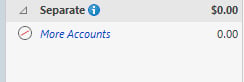
    I've attached a screenshot of the banking section, and also the separate accounts section. If I click on MORE ACCOUNTS in the banking section, it shows one hidden account with a zero balance, and a link to MANAGE HIDDEN ACCOUNTS, but the pop up box disappears when I try and take a screen shot.

  • UKR
    UKR Quicken Windows Subscription SuperUser ✭✭✭✭✭

    Please try this alternative to Shift+PrtScrn capture of images:
    Press Win key + PrtScrn.
    Doing so will take a screenshot of the current screen including popups and save it to a file; in most cases, you'll see the screen dim briefly. You'll find the screenshot in your \Pictures\Screenshots folder. Each screenshot that you take will be consecutively labeled "Screenshot (number)" to correspond with the order in which the screenshots were taken.
    Now locate the \Pictures\Screenshots folder in Windows File Explorer. Open the image file with Paint and crop the image to only contain the relevant portion. Save the file, then attach or drag and drop it here.

    What would really interest me is a register view of the account register hiding under Banking / More Accounts, to see where the money is coming from. A busted transfer transaction, perhaps?

  • BriantheK
    BriantheK Quicken Windows Subscription Member

    I think I've solved it. Under the Banking heading, and "more accounts" where the $52,000 showed up, there was, as I indicated above, one closed account with a balance of $0.00. Your interest in the register view gave me a clue. This account was for misc. cash transactions, that didn't fit else where. There were a total of 10 transactions, all but one were under $50 from 2019, and one for $130 on July 31 of this year. I had zeroed it out July 31, closed it, and hid it. This is about when the phantom asset showed up, although I didn't initially associate the two. Since the total amount of all transactions was about $200, I figured, "Why not just delete the account?" So I did. Initially, Quicken reported it failed to delete, but it did on the second try, and the mysterious $52,000 banking asset disappeared, and I then deleted the liability "Fix $52,000 'More Accounts'" and I'm back to normal. Now I know I have to go through and audit the accounts that linked to the deleted phantom account (fortunately there are just a few), but I usually audit everything this time of year (and around July 31 as well). I'm not sure why a couple hundred dollars worth of random transactions would create a $52K asset, but I'm rid of it now. If I find anything that far off when I audit, I'll report back, but a cursory look indicated that everything is ok. Thanks for the help!!