Quicken Subscription Expired - But Not Really
My Quicken was just updated today to v27.1.65.29. When I look at the ABOUT box, it shows that my subscription expired on December 03, 2025. However, when I use the CHECK MY SUBSCRIPTION STATUS menu option, it shows my subscription is up to date.
For what it's worth, my subscription did renew on December 3rd. My credit card was charged. I'm not sure why the ABOUT box is not showing the correct information.
Anybody else notice this?
Comments
-
Hello @SKeyser,
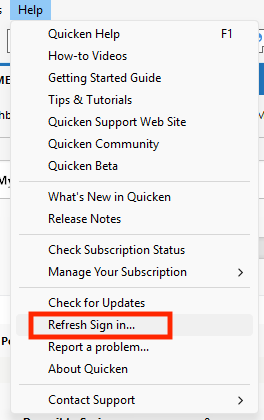
Thank you for letting us know you're seeing this issue. To troubleshoot this issue, I recommend that you navigate to Help>Refresh Sign in…, and follow the prompts.
Refreshing your sign in should get your Quicken file back in sync with the Quicken servers and correct the issue.
Please let me know how it goes!
Quicken Kristina
Make sure to sign up for the email digest to see a round up of your top posts.
1 -
Use menu Help>Refresh sign-in to get it updated in About Quicken.
1
Categories
- All Categories
- 63 Product Ideas
- 35 Announcements
- 223 Alerts, Online Banking & Known Product Issues
- 21 Product Alerts
- 704 Welcome to the Community!
- 672 Before you Buy
- 1.2K Product Ideas
- 54K Quicken Classic for Windows
- 16.4K Quicken Classic for Mac
- 1K Quicken Mobile
- 812 Quicken on the Web
- 115 Quicken LifeHub