Oakmark Funds & Janus Transaction Download - Issues with Password [Edited]

2»

Comments

  • donper
    donper Quicken Windows Subscription Member ✭✭

    I just wanted to add my voice to others. I too am running version R65.17 Quicken Classic and am facing the same problem expressed by other re: the Oakmark password problem. To Quicken support - please get on this ASAP and year transactions are many. My thanks to others for the suggestion to roll back to R64.30.

  • Quicken Kristina
    Quicken Kristina Quicken Windows Subscription Moderator mod

    Thank you for reaching out,

    I added you to the ticket, so that our teams know you're also impacted by this issue.

    Thank you!

    Quicken Kristina

    Make sure to sign up for the email digest to see a round up of your top posts.

  • marcaronson408
    marcaronson408 Quicken Windows Subscription Member ✭✭✭

    Hi @Quicken Kristina , please also add me to the ticket, thanks

    Marc

  • rich
    rich Member ✭✭✭

    I am running Quicken Classic Premier version 27.1.65.17 on Windows 10 Pro version 22H2 Build 19045.6691 64 bit and am facing the same problem with Janus Henderson.

  • Quicken Kristina
    Quicken Kristina Quicken Windows Subscription Moderator mod

    Hello @marcaronson408 & @rich,

    Thank you for letting me know you're also impacted by this. I've added you to the ticket also.

    Thank you!

    (CTP-15582)

    Quicken Kristina

    Make sure to sign up for the email digest to see a round up of your top posts.

  • HS32806
    HS32806 Quicken Windows Subscription Member

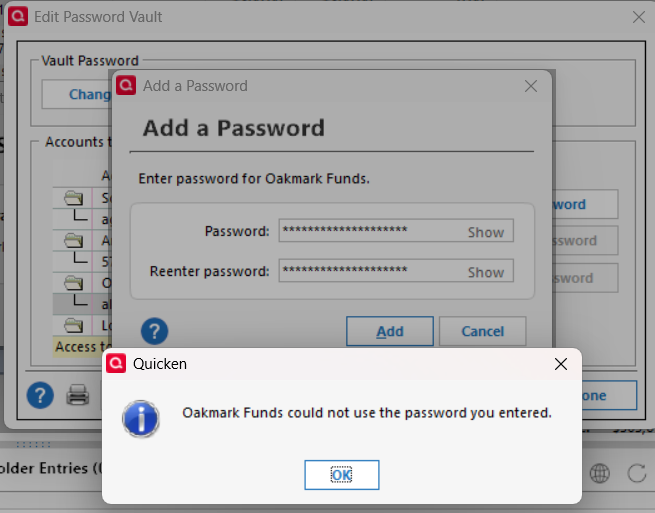
    Having same issue with Oakmark download. When I attempt to download from the Oakmark menu I am asked to input the Oakmark password. When I add the password, I get the below message. I am using Quicken Classic release 65.17 build 27.1.65.17 with the data file on my local machine.

    image.png
  • Robin Davidman
    Robin Davidman Quicken Windows Subscription Member

    I'm having the same problem with Quicken Premier R65.17 Build 27.1.65.17. Please add to ticket.

  • StevenC
    StevenC Quicken Windows Subscription Member
    edited December 16

    Please add me to the ticket. Same issue

    R65.17 Build 27.1.65.17

    Did two patches take helped for a couple of tines.

    Resetting one of the accounts does make it work for one or two times. Reset before doing the update. Does not fix in the long term.

  • Quicken Kristina
    Quicken Kristina Quicken Windows Subscription Moderator mod

    Hello @Robin Davidman & @StevenC,

    Thank you for letting me know you're also impacted by this issue. I added you to the ticket.

    Thank you!

    Quicken Kristina

    Make sure to sign up for the email digest to see a round up of your top posts.

  • Steve Finance
    Steve Finance Quicken Windows Subscription Member

    Please add me to the ticket. Same issue with Janus accounts and inability to enter password.

    R65.17 Build 27.1.65.17

  • BarryMo
    BarryMo Quicken Windows Subscription Member ✭✭✭
    edited December 22

    Same issue here with Janus. I do nut use the vault, but cannot get past the password screen to execute the update.

    R65.17 Build 27.1.65.17

    @Quicken Kristina Can you open up an official alert?

  • algee99
    algee99 Quicken Windows Subscription Member ✭✭

    Upgraded to version 65.29 this morning. I had already run the one step update for the day using version 64.30 and typically, once it works with no password issues at Oakmark, it keeps working for the day. I'll report back tomorrow if it works using the password vault.

  • Quicken Kristina
    Quicken Kristina Quicken Windows Subscription Moderator mod

    Hello @Steve Finance,

    Thank you for letting us know you're also impacted by this issue. I added you to the ticket.

    Thank you for the update @algee99,

    Please let us know how it goes tomorrow!

    Quicken Kristina

    Make sure to sign up for the email digest to see a round up of your top posts.

  • ShortCircuit404
    ShortCircuit404 Quicken Windows Subscription Member

    Quicken Deluxe for Windows - just installed new update today 12/22 but the problem hasn't been erased

    I've had a Janus account for decades. Never had a problem with one step update until the past couple of weeks. I've deleted and re-added my password in the vault, and when I try to update I get a popup that says you need to add the password for Janus, but there's no window to add the password, and I delete and re-add my password and still no dice.

  • HS32806
    HS32806 Quicken Windows Subscription Member
    edited December 23

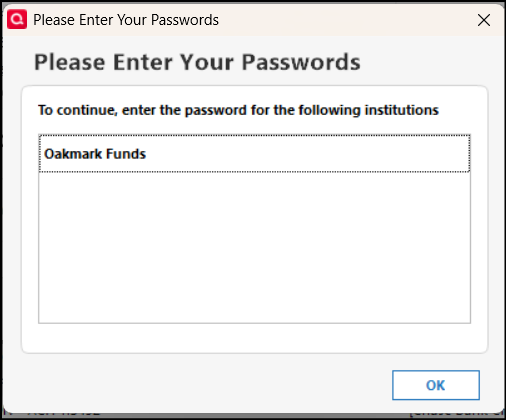
    I'm not able to add an Oakmark password in the password vault or in updating Oakmark directly from the Oakmark "Update Transactions" button in any release later than release R64.30. Release R64.30 allows me to add an Oakmark password, although it warns that Oakmark requires no more than eight characters (Oakmark requires between 10 and 20 characters). Any later release will not take the Oakmark password. If I try to add the password, I receive a request to enter the Oakmark password, even though I have just entered it. Is anything being done to resolve this issue? this has been an issue for weeks now. It's the end of the financial year, and accurate financial information is critical at this time of year.

    [Merged Post]

  • algee99
    algee99 Quicken Windows Subscription Member ✭✭

    Update to my upgrade yesterday to version 65.29. No joy, same password errors as the previous release. Downgrading back to 64.30, where I know things work fine.

  • NotACPA
    NotACPA Quicken Windows Subscription SuperUser ✭✭✭✭✭
    edited December 23

    Neither Q, nor you, can fix this. Oakmark has provided incorrect info ("max 8 characters") to Intuit and Oakmark needs to correct the info that Q/Intuit has.

    You can try contacting Q Support, via the link at the top of this page and see if they'll forward the issue to Oakmark, but you'll probably need to contact Oakmark also.

    [Merged Post]

    Q user since February, 1990. DOS Version 4
    Now running Quicken Windows Subscription, Business & Personal
    Retired "Certified Information Systems Auditor" & Bank Audit VP

  • Quicken Anja
    Quicken Anja Moderator mod

    Hello @HS32806,

    Thank you for the detailed explanation, and I understand how disruptive this is—especially with year-end financial reporting underway.

    I’ve gone ahead and merged your post into this existing thread since it describes the same issue. This is a known issue that has already been escalated internally, but at this time we do not have an ETA for a fix.

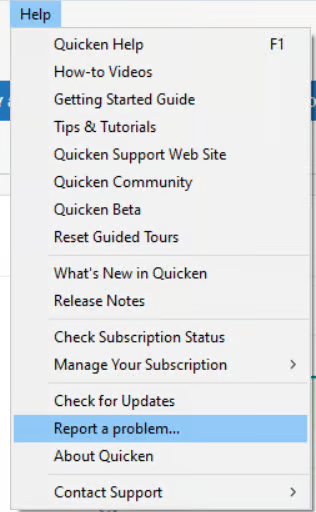
    To help support the ongoing investigation, please submit your log files by going to Help > Report a Problem.

    image.png

    Once submitted, those logs can be added to the active ticket (CTP-15582), which helps our teams gather additional data and prioritize resolution.

    We appreciate your patience and understand how critical accurate data access is right now. Updates will be shared as soon as more information becomes available.

    Thank you!

    -Quicken Anja
    Make sure to sign up for the email digest to see a round up of your top posts.

  • PR06074ATT
    PR06074ATT Quicken Windows Subscription Member

    Same issue lately with Oakmark