Warning Message - Add Details tab to show which reminders are not supported [Edited]

ricesquared17
ricesquared17 Quicken Windows Subscription Member ✭✭

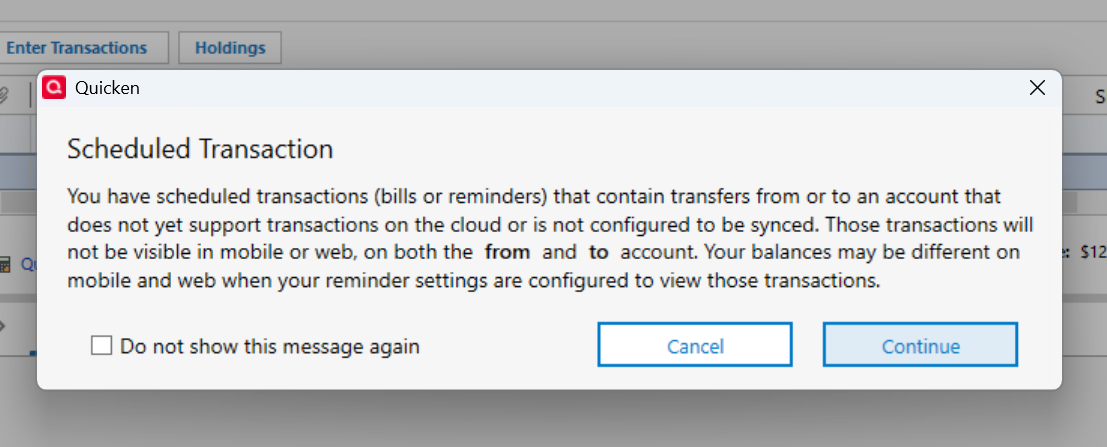
When doing cloud synch, this cryptic warning message will pop up. It would be nice if there was a "Details" tab that would explain which bills or reminders are not supported.

Does anyone know how to solve this and figure out which bills or reminders are not supported so the message will go away? If not, DEVS is this something you could add to your solution ticketing system to provide feedback/input to the customer?

TYIA
quicken windows warning.png
1
1 votes

Reviewed · Last Updated

Comments

  • Quicken Kristina
    Quicken Kristina Quicken Windows Subscription Moderator mod

    Hello @ricesquared17,

    Thank you for reaching out! Since you're asking for additional functionality to be added, I converted your post into an Idea post. Ideas that get enough votes may be implemented in the future!

    In the meantime, you can navigate to Edit>Preferences>Mobile & Web and click on the blue "x of x eligible accounts enabled" link to see which accounts you have set up to sync to the cloud.

    Screenshot 2025-12-26 at 3.50.50 PM.png

    Any scheduled transactions you have set up for accounts which are not selected to sync with the cloud, or are of an account type where transactions aren't supported (such as investments, mortgage, etc.) would be the ones the warning is letting you know about.

    If your goal is just to make the message go away, does checking the "Do not show this message again" box work, or does the message still come up every time?

    I hope this helps!

    Quicken Kristina

    Make sure to sign up for the email digest to see a round up of your top posts.
