How do I record a fee on an investment acct without creating a negative cash balance?

thetallestpaul
thetallestpaul Quicken Windows Subscription Member ✭✭

I closed an account and paid 20 dollars as a closeout fee by selling shares. When I downloaded this info from my custodian the data is recorded as a MiscExp. This shows -20 inv amt and -20 cash amt.

So now, my investment account is showing -20 cash. How do I properly record this as a payment to my custodian so that my cash balance is zero, but they get paid?


Answers

  • Boatnmaniac
    Boatnmaniac Quicken Windows Subscription SuperUser ✭✭✭✭✭
    edited December 2025

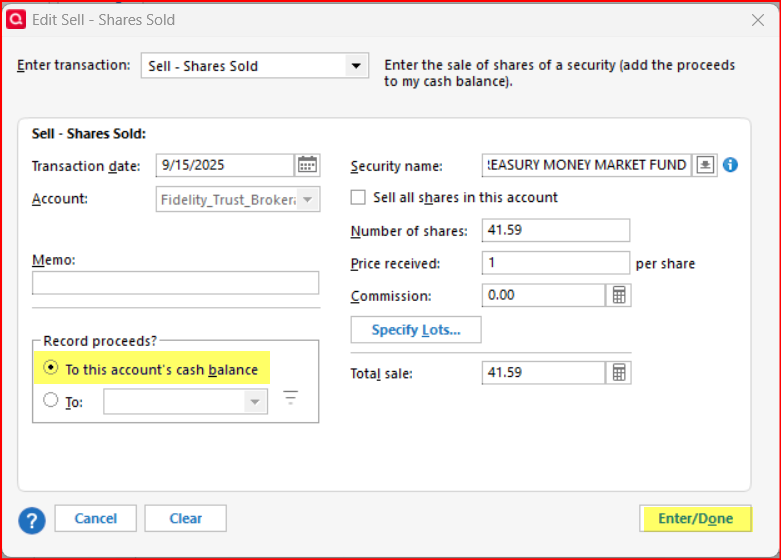
    In the Sell transaction you should have been given 2 options for what to do with the resulting cash. Edit that transaction to make sure that the proceeds from the transaction are recorded to the account's cash balance. Quicken will then draw upon this cash balance to pay for the MiscExp transaction.

    image.png

    Did these resolve the issue for you?

    Quicken Classic Premier (US) Subscription: R65.29 on Windows 11 Home

  • marpler
    marpler Quicken Windows Subscription Member ✭✭✭

    I have a similar problem. In the past years I have recorded account fees under "Shares Removed". This seems to cause Quicken to now list this entry as needing a share cost on the investment page. But there is no way I can add a share cost to the Remove Shares option. Transitioning this Remove Share to "Sell Shares" causes the problem noted by the first entry in this thread. For some reason, my Sell Shares window has all of the "Record Proceeds?" greyed out. What do you recommend in this case?

  • UKR
    UKR Quicken Windows Subscription SuperUser ✭✭✭✭✭

    If the brokerage sold shares of some security to cover the Fees transaction, then you should have recorded the same pair of transactions:

    1. Sell shares for amount of Fee, add to account's cash balance
    2. MiscExp transaction for same amount, categorized to some Investment Expenses category, subtracts from cash balance

    For some reason, my Sell Shares window has all of the "Record Proceeds?" greyed out. What do you recommend in this case?

    Is that a brokerage account with a linked checking/cash account? If so, cash automatically flows to the linked cash account and cannot be directed elsewhere. MiscExp draws from the linked cash account, too.

  • Jim_Harman
    Jim_Harman Quicken Windows Subscription SuperUser ✭✭✭✭✭
    edited January 17

    Another thing that could cause the Record Proceeds options to be grayed out is one or more Placeholders in the account for that security on a later date. If you delete those Placeholders, you should be able to send the sale proceeds to the cash balance. Depending on what you have already tried to enter, there may also be a cash balance adjustment for the same amount as the sale proceeds, which you can delete once the Placeholder is deleted.

    QWin Premier subscription