Left Side Panel MF Value Wrong While Portfolio or Detail View is Correct

fairwarning
fairwarning Quicken Windows Other Member ✭✭
edited January 3 in Investing (Windows)

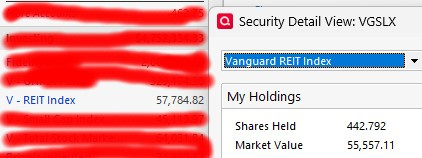
One of my mutual funds (VGSLX) value showing in the left panel is incorrect. When looking at the security view it is also incorrect. But, when viewing it in the Portfolio View or Security Detail View the market value is correct. The share price is showing correct and the amount of shares owned showing is correct.

None of my other funds are showing this discrepancy. I've tried validating and that didn't find any issues. The left side panel value is about 4% higher in value. Why would it be incorrect value in the left side panel? Not sure where else to look, or where it is getting this higher value.

thanks!

Comments

  • Quicken Kristina
    Quicken Kristina Quicken Windows Subscription Moderator mod

    Hello @fairwarning,

    Thank you for letting us know you're seeing this discrepancy. To clarify, when you refer to the left panel, are you referring to the accounts sidebar? Which security view are you referring to that is incorrect? If possible, please include screenshots of what you are seeing (with any personal information redacted). If needed, please refer to this Community FAQ for instructions on how to attach a screenshot. Alternatively, you can also drag and drop screenshots to your response if you are not given the option to add attachments.

    Thank you!

    Quicken Kristina

    Make sure to sign up for the email digest to see a round up of your top posts.

  • volvogirl
    volvogirl Quicken Windows Other SuperUser ✭✭✭✭✭

    I'm staying on Quicken 2013 Premier for Windows.

  • fairwarning
    fairwarning Quicken Windows Other Member ✭✭
    edited January 5

    Hi Kristina,

    Yes, the left side is the accounts sidebar. Attached is the view of the left side bar with the security detail view next to it.

    The portfolio view shows the 55,557.11 as well. And viewing the security transaction list (register) shows the 57,784.82 value.

    quicken-vgslx.jpg quicken-vgslx-securiy.jpg

    And, the 55k value should be the correct one. 443.782x125.47=55,557.11

  • fairwarning
    fairwarning Quicken Windows Other Member ✭✭

    And their solution was to delete the investment/security. lol

  • volvogirl
    volvogirl Quicken Windows Other SuperUser ✭✭✭✭✭

    What date are you using for the price? I show 12/31 $125.39. And you show shares as 442.792 in the Security Detail box but you wrote 443.782x125.47 which really is $55,681.327. I would check all your investment accounts and see if there are more shares in another account. Or if you have a transaction with the wrong security name.

    Maybe you have a security price or transaction dated in the future? Check the price history. And you can click on a blank space in the left Account Bar and show Ending Balance or Current Balance or Online Balance.

    I'm staying on Quicken 2013 Premier for Windows.

  • fairwarning
    fairwarning Quicken Windows Other Member ✭✭

    Oops, sorry fat fingers when entering here (although I was using 1/2 price history). I wasn't aware of being able to see current/ending, but both show the same. Looked at price history and didn't notice anything.

    BUT, I went through the transactions going back 20 years, and there were a four different securities with dates of 2012 and 2013, but were sorted ahead of 2002. I'm guessing they somehow got there through some sort of corruption (not sure when the value discrepancy showed up). I deleted those 4 entries and now the balances match! And, all other securities look okay.

    Thank you for your help and the different suggestions!