Quicken Windows, Bill and Income Reminders, Due Dates Changing

Radio Dave
Radio Dave Quicken Windows Other Member ✭✭

This is a frustration I've had for YEARS! I will discover a missed payment reminder because the Due Date changed on its own! Usually 3 months after the date I set, but sometimes exactly 12 months later. I will go in and try to fix all the incorrect due dates and later discover, always by accident, that some Due Dates changed again!

I use OneDrive to backup my Quicken data folder AND a separate folder where I put all my Ctrl+B Quicken backups. I use only one computer against these files. (Quicken would often complain upon launch that it couldn't open my data file, but that problem seems to be fixed now.) Another unique thing about my system is that all dates are in the following format: YYYY-MM-DD.

Today I discovered one particular reminder that kept getting pushed into 2028 when it should be 2027. I would fix the due date, close Quicken & Sync, and the same reminder again got pushed one year later. In desperation, I turned off syncing (0 accounts are synced now). THAT FIXED IT! I almost never use the Quicken mobile app on my iPad, but I would like the freedom to do so. Is this a known issue? Is there a fix? Is there another reason why Due Dates are changing on their own?

Been using Quicken since the first DOS versions in the 1980's. It was bullet proof then, but that trust has been gone for many years now.


Comments

  • Quicken Kristina
    Quicken Kristina Quicken Windows Subscription Moderator mod

    Hello @Radio Dave,

    Thank you for sharing your experience! To help troubleshoot, please provide more information. Were the due dates changing in the mobile app, the desktop app, or both? Was this happening with manual reminders, reminders linked to online billers, or both? What frequency were you using for the problem reminders (for example, every 28th day, every 2 weeks, monthly, annually, etc.)?

    Syncing your file with OneDrive can potentially cause problems if OneDrive tries to sync while your Quicken file is open. Keeping your backups synced is a good idea, since it gives you off-site storage of the backups, but it's recommended that you not have your main Quicken file synced. If you need to keep it synced, please at least pause the sync when the file is open.

    Since the issue may have been caused by file-specific issues, if you haven't already done so, I suggest that you try validating your data file.  Please save a backup file prior to performing these steps. 

    Validate: 

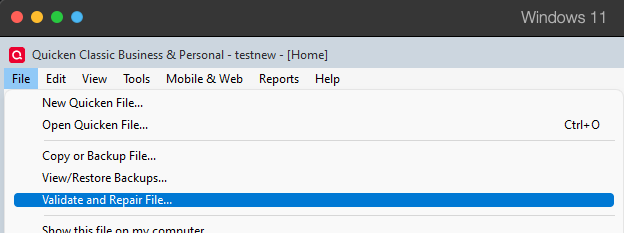
    1. File
    2. Validate and Repair File... Validate and repair.png
    3. Validate File
    4. Click OK
    5. Close the Data Log
    6. Close Quicken (leave it closed for at least 5 secs)
    7. Reopen Quicken and see if the issue persists.

    Please let me know how it goes!

    Quicken Kristina

    Make sure to sign up for the email digest to see a round up of your top posts.

  • Radio Dave
    Radio Dave Quicken Windows Other Member ✭✭
    edited January 4

    File Validate and Super Validate didn't find anything. I updated Quicken from R64.30 to R65.29 yesterday. Interestingly, my .QDF file decreased in size to 49.0 MB from 59.2 MB. As long as Quicken has the .QDF file open, OneDrive isn't going to attempt to back it up.

    I use the Windows Desktop app exclusively for the last six months or so. I have used the iPad mobile app occasionally prior to that to query transactions, but only a few times over the last couple of years have I ever posted transactions in the mobile app — I really don't trust it.

    Up until the above post I would nearly always perform a Ctrl+B backup before closing and choosing the Sync option upon close. However, if I ever posted transactions using the mobile app then opened the desktop app, it would never ask me to sync upon open. This doesn't make sense to me and that's one reason I don't trust it. I have received a few sync errors in the past, but this didn't correlate at all with these reminder problems which have gone on for years.

    You ask a lot of questions about the due dates on various bill reminders. I never used the mobile app or web version enough to notice any date problems there. My Quicken is NOT linked to any online accounts at all. I use Quicken for a few checks per year, but every other transaction is manually posted so that I can enter detailed payees and memos.

    Until a few days ago, I never caught Quicken in the act of changing the Due Dates in scheduled transactions, but I finally did, and it was repeatable. When printed, I have two nearly full pages of Bill and Income Reminders which I access with Ctrl+J, so if dates are shifting on a couple, how would I notice? Quarterly check payments to the IRS and my state (on 15th of the month) were getting hosed, and I always assumed I goofed up somewhere. (These are each setup as four separate reminders with Yearly recurrence.) I don't recall the day of the month ever changing, it was usually the month (would slip by 3 months usually), or the year, by a whole year. This problem mostly affected check payments, but that's a red herring because the consequences of NOT sending a check on time are very noticeable/dire (late fees), whereas the consequences of a date discrepancy on an automatic payment might affect my daily balance but can be fixed in reconciliation. The recent discovery of a repeatable problem with a particular reminder shows that this absolutely is not directly tied to check payments.

    Automatic payment frequency was (almost?) always Yearly for these delayed reminders. Again, could slip by a few months or a full year. Patterns with this problem are very difficult to perceive due to this infrequency coupled with the fact that the Bill and Income Reminders window is not generally open for very long. If I'm right, the problem is happening upon Quicken Close & Sync. When starting Quicken, who normally goes into the Bill and Income Reminders and checks all the Due Dates? So, these annoying issues are discovered much later, when it's difficult to draw a straight line to a repeatable cause.

    I turned off syncing, and that seems to have fixed the most recent manifestation of this problem. I feel confident that this issue is tied to Mobile Syncing and I won't see any more of these problems, but I would like Quicken developers fix it. I would like to be able to query my accounts from the Quicken web interface or my mobile device without fear of data corruption. It will be a long time before I can trust Quicken to accurately post transactions from one of the mobile platforms without causing collateral damage to my 50 MB of data, which spans decades.

    I finally found the smoking gun for this years long annoyance. Please prioritize the fix.

  • Quicken Kristina
    Quicken Kristina Quicken Windows Subscription Moderator mod

    Thank you for your reply,

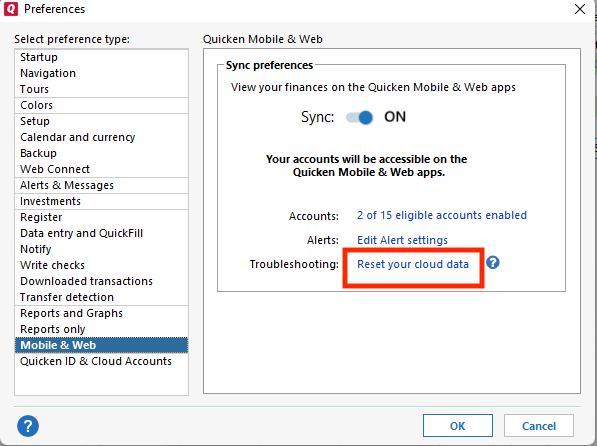
    Since you were able to track the issue down to mobile sync, I recommend that you try resetting the Quicken cloud, just in case the due dates are changing due to outdated information in the cloud. To do that, backup your file, turn mobile sync back on (Edit>Preferences>Mobile & Web, turn Sync on, then click OK), then navigate to Edit>Preferences>Mobile & Web, and click the Reset your cloud data link.

    Reset Cloud QWin.png

    After the cloud reset completes, test to see if the issue is resolved.

    Thank you!

    Quicken Kristina

    Make sure to sign up for the email digest to see a round up of your top posts.

  • Radio Dave
    Radio Dave Quicken Windows Other Member ✭✭

    I will think about it, but I'm now very reluctant to resume syncing with the cloud, even with the suggested Reset first. Is there hard evidence and history of the issue I described being resolved with a Cloud Reset? Did the problem ever recur? My experience with this issue has been incredibly frustrating and elusive. Why would the cloud dates shift by 3 months or one year, for random Scheduled Bills?

    This Cloud Data Reset suggestion feels like the standard request to perform a File Validate. Have you actually researched my problem?

  • Quicken Kristina
    Quicken Kristina Quicken Windows Subscription Moderator mod

    Thank you for your reply,

    I suggested the cloud reset because resetting removes the existing cloud copy so a fresh dataset is rebuilt from the desktop file.

    There is not currently a confirmed defect logged for this exact reminder-date behavior. That is why this step is being recommended as a diagnostic, not as a guaranteed fix.

    You are not required to permanently re-enable sync. To reset the cloud, you would need to turn it on, but you can turn it off again after. Leaving it disabled is a valid workaround if you prefer to avoid further risk.

    Your observations regarding yearly and quarterly reminders shifting by months or years are noted. If the issue reproduces after a cloud reset, that would provide the information needed to pursue next steps.

    Thank you!

    Quicken Kristina

    Make sure to sign up for the email digest to see a round up of your top posts.