This discussion was created from comments split from:
Online billers - ongoing issues
.
As we all know, online billers no workie. Now Manual Reminders are no longer working correctly. Under the Bills & Income tab, dates and amounts shown in the "Last Payment" column are now erroneous. They used to show the correct last payment date and amount prior to this fiasco. Note: Validate and Super validate do not solve the issue. Who knows how to fix this?
Hello @thorn5,
Thank you for letting us know you're seeing this issue. To help troubleshoot, please provide more information. When did you first notice this issue? At what point does the Last Payment column show incorrect information? Is there anything that seems to trigger it, like One Step Update or syncing to the cloud? Do you keep your Quicken file directly on your local hard drive? Is it synced with any cloud service, such as OneDrive, iCloud, or Dropbox?
I look forward to your reply!
Hi Kristina,
I have always kept my Quicken file on my hard drive.
This started when I accidentally synced to the cloud from the "Mobile & Web" tab. When I discovered that I toggled "Quicken Mobile & Web" on (instead of off), I tried to toggle it back. I do not use mobile and do not want to sync to access Quicken web. I do not use any other cloud service. I must have corrupted my file on my hard drive when I switched it back.
This all happened a few days ago. I reported the erroneous "Last Payment Date" info via Quicken Chat. They suggested I do a "Validate & Super Validate", but it only compounded the Last Payment Date errors.
Thank you for your reply,
When I check your interaction with Support, it looks like they also recommended restoring a backup, but you didn't have a suitable backup to restore. Is that correct? If it is not correct, then please try restoring a backup from before the issue started.
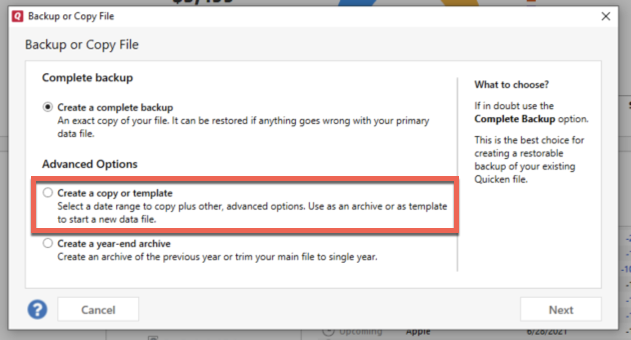
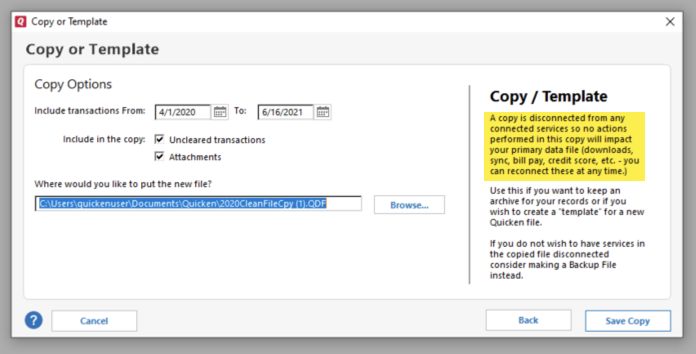
If it is correct, and you don't have a suitable backup to restore, then the next step is to create a copy of your file. This will rebuild all of the internal lists and database tables. If successful, you would then move forward with the copied file. To create a copy, please navigate to File > Copy or Backup File... > Create a copy or template (see examples below) which will also allow you to select a date range to move forward with.
If you wish to move forward with your entire data file, please check the full date range of your entire data file before copying so you can enter the correct date range if you do not wish to "shrink" your file by eliminating certain dates. Note - There is no need to "shrink" your file unless you believe that older data is causing the issue.
It's important to know that all online services will be disconnected in the copied file, and you will need to sign back in with your Quicken ID and reconnect all of your online accounts, online billers, Quicken Bill Manager services, etc if you plan to use that copied file going forward. The reason for this is that the new copy also creates a new and separate dataset ID.
Please reconnect only what is necessary to test if the issue is resolved. If the issue is resolved, then reconnect your online services and use the copy as your main file going forward.
If the issue is not resolved in the copied file either, then feel free to switch back to your original file. For instructions on switching between Quicken files, please click here.
Thank you!
I haven't seen a response in a while. Do you still require assistance?
Hi Kristina. Deleted all of my manual bill reminders and re-entered them. Seems to have resolved, at least for now. Thank you.
Thank you for the follow-up,
I'm glad to hear that deleting and recreating the reminders seems to have corrected the issue.
If you need further assistance, please feel free to reach out!