Categories With Pre-filled Amounts and CLR Checks

Chrisg727
Chrisg727 Quicken Mac Subscription Member ✭✭

I'm currently using Quicken Classic for Mac Version 8.3.3. I recently went on an extended trip and used the web app to keep my records updated. While this has limited use (unable to manually update investments or assets isn't available) it helped to keep my bank and credit card accounts updated. When I returned home and began using my desktop again, I noticed that when making entries for any of the Payee/Categories that I used via the web app, the amount was pre-filled with one of the entries I made online. Also, some of these are automatically checking the CLR box in my registers. Why is this happening and how do I rectify this problem? It's made transaction entry more difficult as it now requires two additional steps - one to change the pre-filled amount and one to reset the CLR flag.


Answers

  • Chrisg727
    Chrisg727 Quicken Mac Subscription Member ✭✭

    Update: It appears that the web app is changing the Quick Fill Rules. I can manually parse through the rules and update them. Question remains why the web app is changing my quick fill rules.

  • Quicken Kristina
    Quicken Kristina Quicken Windows Subscription Moderator mod

    Hello @Chrisg727,

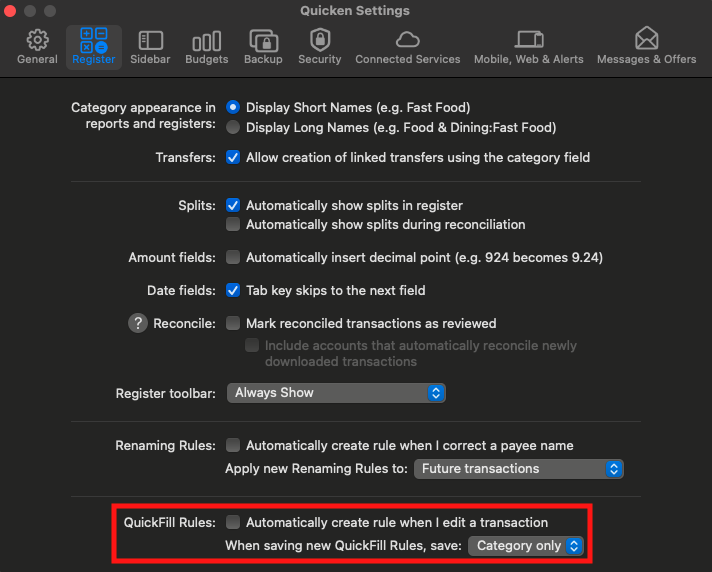
    Thank you for sharing your experience. To help troubleshoot, please check your settings in your desktop file. To do that, navigate to Quicken>Settings… and select Register.

    Screenshot 2026-01-04 at 5.53.48 PM.png

    Is "Automatically create rule when I edit a transaction" selected? If it is, try unselecting it and see if the behavior persists.

    Please let me know how it goes!

    Quicken Kristina

    Make sure to sign up for the email digest to see a round up of your top posts.