Sort of Categories in Split Transaction

idh1909
idh1909 Quicken Canada Subscription Member

Why does Quicken rearrange the sort of categories that have been entered in a split transaction?

I enter the categories in the order I want them to be recorded, and when I revisit the transaction, the category sort has been changed from what I entered.

[Edited - Readability]

Comments

  • volvogirl
    volvogirl Quicken Windows Other SuperUser ✭✭✭✭✭

    Don't know about that exact problem but what kind of transactions are you splitting out? There may be a better way.

    I'm staying on Quicken 2013 Premier for Windows.

  • fbeach
    fbeach Quicken Windows Other Member ✭✭

    I have the same issue. Randomized splits started about three Quicken updates ago.

    I like to be able to sort the split columns manually. Should be a feature not an irritation.

  • BK
    BK Quicken Windows Subscription Member ✭✭✭✭

    Many users have reported this issue which started with one of the releases in the past few months and it is not resolved yet. I have experienced it as well and therefore I downgraded to an older release.

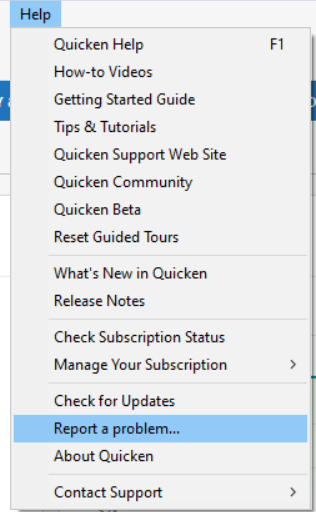
    Please make sure to report it via Help > Report a problem.

    - Q Win Deluxe user since 2010, US Subscription
    - I don't use Cloud Sync, Mobile & Web, Bill Pay

  • Quicken Kristina
    Quicken Kristina Quicken Windows Subscription Moderator mod

    Hello @idh1909, @fbeach, & @BK,

    Thank you for letting us know you're impacted by this issue. It has already been reported to the proper channels for further investigation and resolution. To help with the investigation, please navigate to Help>Report a Problem and send a problem report with log files attached.

    Report a Problem QWin.png

    Thank you!

    (CBT-824)

    Quicken Kristina

    Make sure to sign up for the email digest to see a round up of your top posts.