Message to the CEO
I received the message from Eric Dunn last year and was hopeful my experience with Quicken would improve, but unfortunately it has not. I wrote the below message to him, but it bounced back. Sharing it here in case it can somehow find its way to him (or whoever can actually help me make the use of Quicken much easier than it has been).
Hi Eric,
I hate to send a message like the following, but I am really hoping the challenges I am facing with my Quicken software is a user or set up error. That said, I have continued to have issues with data quality, system logic, and speed.
Data quality: I have had to develop an excel file where I aggregate the data from Quicken and my bank accounts (20+) to compare as each month there are 2 or 3 transactions that Quicken is missing.
System logic: When the system identifies what it believes to be a transfer between accounts that is not actually such, changing the category of 1 of the transactions causes Quicken to delete the other transaction from the other account.
Speed: It takes more than 15 seconds for Quicken to update after changing the category of a transaction before I can update the next transaction.
I called the support line last year and was told that my file had a bug and that I needed to start over. I actually did that and have had the same issues. It took me 6 hours today to merely update for my December financials.
Please help!
Comments
-
Hello @christorres833,
Thank you so much for taking the time to share your experience with us. I’m really sorry to hear how frustrating and time-consuming this has been for you, especially after putting in so much effort to make Quicken work for your needs. We truly appreciate your honesty and your willingness to provide detailed feedback.
I want to make sure we fully understand what you’re experiencing and what outcome you’re hoping for, so we can help in the most effective way possible. I see notes indicating your case may have been transferred internally, but I don’t see clear details about an escalation, and I want to ensure nothing was missed.
From what you’ve described, it sounds like you’re encountering ongoing concerns in three main areas:
- Missing transactions across multiple accounts
- Unexpected behavior when editing transfer categories
- Significant performance delays when updating transactions
I also understand how discouraging it must have been to rebuild your file after being advised to do so, only to continue seeing the same issues.
To help us move forward, could you please let us know:- Are all of the affected accounts connected for downloading, or are some manually maintained?
- Does the transfer issue happen consistently with specific accounts, or randomly?
- Approximately how large is your Quicken file (number of accounts/years of data)?
- What version of Quicken and operating system are you currently using?
Our goal is to get a clear picture of what’s happening in your file so we can determine whether this is a setup issue, a file-specific problem, or something else that needs deeper investigation.
We genuinely want to help improve your experience and make Quicken easier and more efficient for you to use.
Thank you again for your patience and for giving us the opportunity to assist. We look forward to working with you to get this resolved.
-Quicken Anja
Make sure to sign up for the email digest to see a round up of your top posts.1 -
Regarding:
System logic: When the system identifies what it believes to be a transfer between accounts that is not actually such, changing the category of 1 of the transactions causes Quicken to delete the other transaction from the other account.
I have two comments on this.
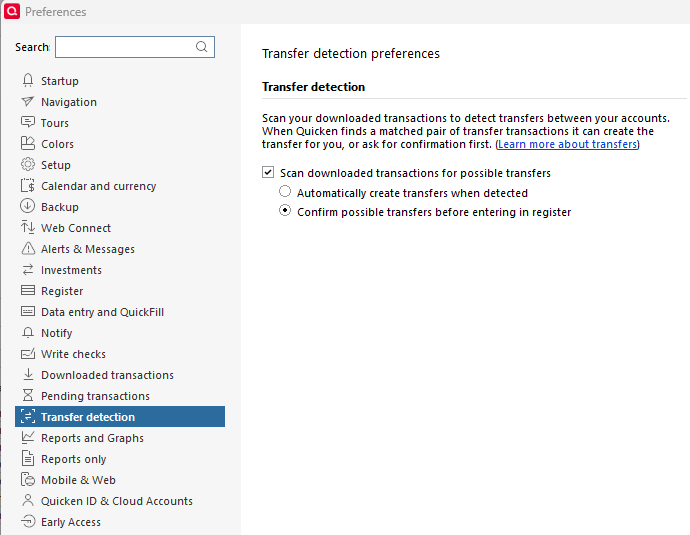
1. Transfer detection: The good news is that there is a solution to this. Go to Edit > Preferences > Transfer detection, and uncheck the box "Automatically create transfers when detected". Then check the box "Confirm possible transfers before entering in register". As in the image below.
With these settings, when Quicken "thinks" something might be a transfer (correct or not), you will be presented with a pop-up to accept or decline. This will put the control in your hands.2. Transfer deletion: I see your valid point and perhaps this should be an enhancement to the product where when I delete a transfer on one side, Quicken will [optionally] ask if I want the other linked transaction to be deleted as well or not. And this option can be managed in the Preferences (maybe somewhere in the image above in a variety of ways). If you create a New Idea post I'd support it and maybe other users will add to it as well - everyone benefits.
And a general comment, that I recognize your frustrations and issues you are having. However not every user has those issues. I have been trouble-free for two years and Quicken has a stellar performance and faster than any other program on my system. I say this not to dismiss your challenges but I suspect that your data file may need some repairs and therefore I'd like to encourage you to work with @Quicken Anja to identify and hopefully resolve them.
- Q Win Deluxe user since 2010, US Subscription
- I don't use Cloud Sync, Mobile & Web, Bill Pay1
Categories
- All Categories
- 41 Product Ideas
- 36 Announcements
- 224 Alerts, Online Banking & Known Product Issues
- 21 Product Alerts
- 497 Welcome to the Community!
- 676 Before you Buy
- 1.3K Product Ideas
- 54.3K Quicken Classic for Windows
- 16.5K Quicken Classic for Mac
- 1K Quicken Mobile
- 814 Quicken on the Web
- 115 Quicken LifeHub