This discussion was created from comments split from:
CSV File Import for Banking Transactions not working.
I’m unable to import my banking transaction .csv file from Fidelity like the people above. I’m using a U.S. Quicken for Mac (just updated to latest version) and have set up the csv file exactly as specified. The import instructions in Quicken.com support don’t match the actually process in Quicken. Support article says Open your Quicken data file, then:
Select OK. :
___________________________________________________________
But the options in the Quicken program are only this:
File > Import > Bank or Brokerage File (OFX, QFX) Quicken Mac 2007 (QDFM) Quicken Windows file (QDF, QXF) Quicken Essentials File (quicken data) Quicken Mac 2015 file (quicken2015) Quicken Mac 2016 file (quicken 2016) Quicken Mac 2017 file (quicken 2017) Mint.com file (csv) Client file (csv) THIS IS “GRAYED OUT" Mileage trips (csv) THIS IS “GRAYED OUT" Security Prices (csv)
I’ve tried importing with all of these options (except the grayed out ones) but all I get is an error saying the file is in the wrong format. Why don’t the options in the Quicken program match the instructions on your website? What am I doing wrong?
@crshlagor "Clients (CSV)" is for importing billable Client records and is only applicable if you are using the Business & Personal subscription level. The same for "Mileage Trips (CSV)": it's a feature only available in the Business & Personal subscription. That's why those two are grayed out for you.
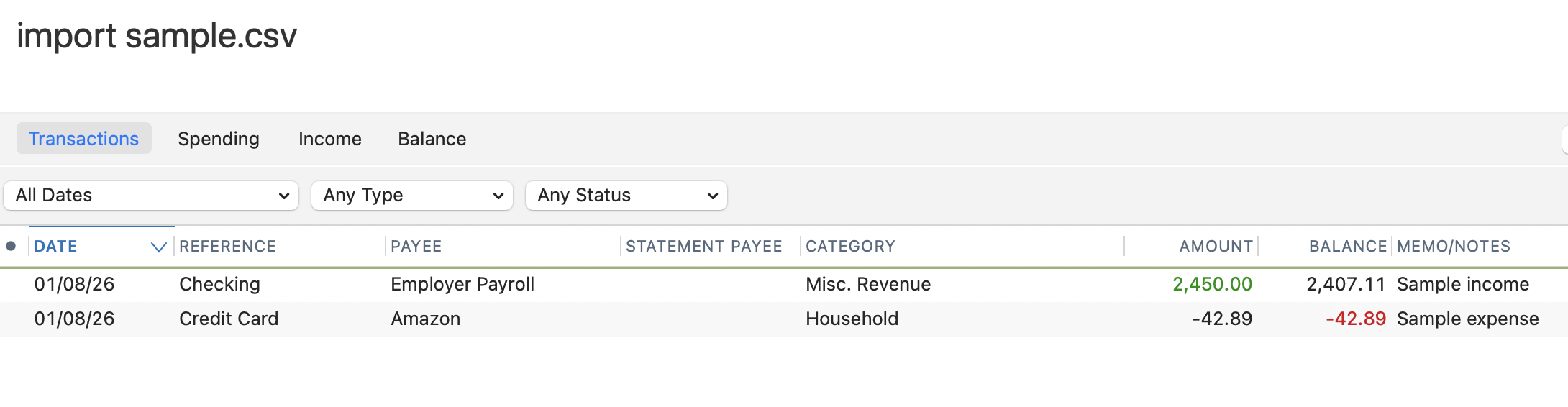
You should be using the "Mint.com File (CSV)" option for importing transaction records. You have to edit the data in your spreadsheet to exactly match the import specified in Quicken; if you do, it should work. I just tried downloading the sample file they provide, editing it a bit, saving it as a CSV, and importing it — and it worked correctly:
Some things I'd note…
I will note that with almost certainly the instructions on the website that you were reading were for Quicken Windows, not Quicken Mac. The two different versions of Quicken have very different CSV import capabilities and menus and such. Quicken Windows recently removed the "Mint only" option for a "Banking" and "Investment" CSV importing. Pretty limited in both cases since the data has to line up exactly how they expect which is very unlikely.
And as I understand it Quicken Mac only understands Mint format, and as such I don't believe Mint ever had exporting of investment transactions because it never supported that (only the number of shares of each security and the cash balance). Given that you are importing from Fidelity I suspect that you are dealing with an investment account, not a banking account.
You are correct that the Mint CSV format doesn't accommodate any asset transactions, only cash transactions. But as long the transactions are simply deposits & withdrawals you should still be able to import them & move them to an investing account.