Problem updating bank information

I'm using Quicken Classic Premier on Windows 10 and having trouble updating my checking account transactions. My bank is Chase.

When I attempt to download recent bank transactions, I get a message telling me to insert a CD-ROM for installation. But I don't want to install Quicken — it's already installed. I've updated my bank information hundreds of times over the years, and this is the first time I've encountered this issue.

Your suggestions will be appreciated.

Thanks.

Hugh

Comments

  • Quicken Alyssa
    Quicken Alyssa Quicken Windows Subscription Moderator mod

    Hello @Hugh,

    Thank you for sharing your experience.

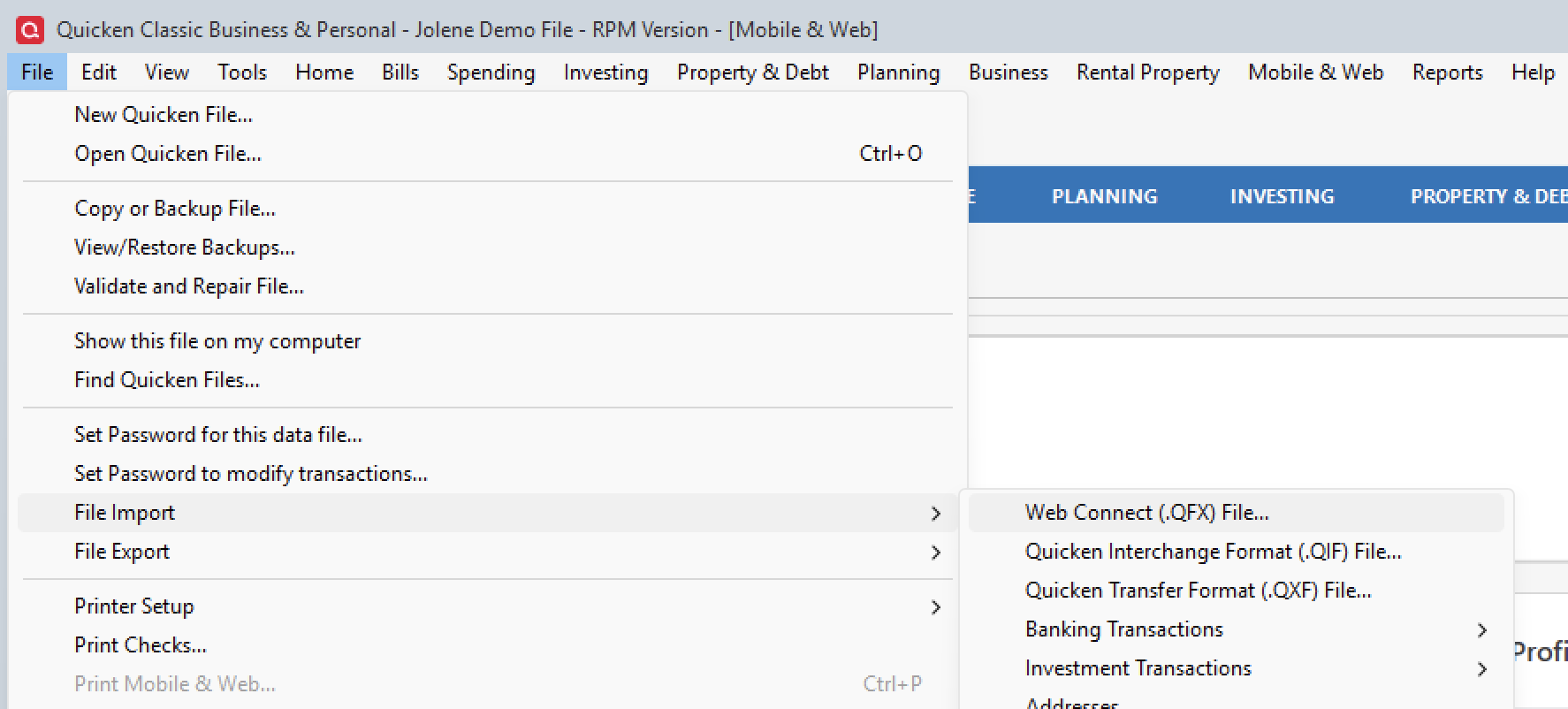
    Are you receiving this installation prompt when trying to import a QFX file? If so, how are you importing this file? Are you dragging and dropping it? Try going to File>File Import>Web Connect (.QFX) File…

    file-import-qfx.png

    Do you still get the same installation prompt?

    If you were not getting the installation prompt after importing a QFX file, please provide more information on exactly what's happening.

    Additionally, screenshots of what you are seeing may be helpful. If needed, please refer to this Community FAQ for instructions on how to attach a screenshot. Alternatively, you can also drag and drop screenshots to your response if you are not given the option to add attachments.

    Thank you!

    Quicken Alyssa

    Make sure to sign up for the email digest to see a round up of your top posts.