Zero totals in Actual but correct details sub-report
When I click on the "0" in my budget report, I see a sub-report that correctly lists all the transactions I'm expecting —
I followed the AI instructions on how to fix.., All the transactions are categorized as "Income" and not as transfers, and the report settings are set to include all transfers. AI is at a dead end, does someone else have some insight? I have validated the file. Help..
Comments
-
Hello @Paul Smith2,
Thank you for letting us know you're seeing this issue. To help troubleshoot, please provide more information:
- When did you first notice this issue?
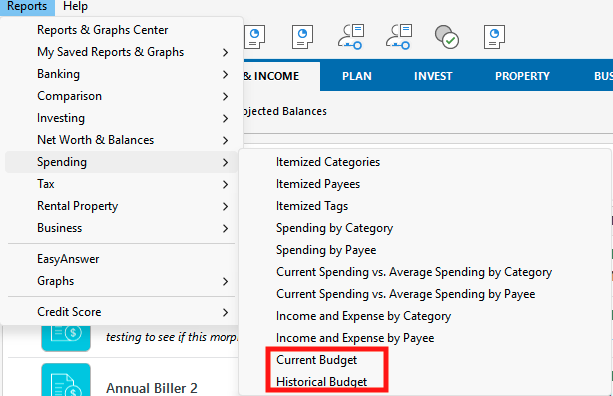
- Is this happening in the Current Budget report, Historical Budget report, or both?
- Do you see the same thing in the Planning tab when viewing your Budget, or do the actuals reflect correctly there?
- Is this happening with all categories in your budget?
- If not, then which specific categories are affected?
I look forward to your response!
Quicken Kristina
Make sure to sign up for the email digest to see a round up of your top posts.
0 -
The report was correct 12/31/2025. I did a year end summary and printed it for my records.
The problem is happening in a historical budget report I created last year (2025). There have been no changes in the budget report since it ran successfully at the end of 2025.
The specific category is "social security" — which as I mentioned in my posting is classified as "Income" in the "Personal Income" group. All the other categories work fine. The totals are the same as the printed out version I put in my paper archive.
When I change the budget setting to "Current Budget" and adjust the timeframe to 1/1/2025 to 12/31/2025 ; Go back to the 2025-1 budget I was using at the time — the same problem occurs in the "Social Security" category only.
The "advanced" settings in the report that worked fine were: Transfers: include all; subcategories: show all; Categories: Budgeted only
I'm currently running on R65.1.65.29
0 -
Additional comment: my 2026 cash Flow budget has the same category — social security and it recently downloaded from the US treasury. The transaction was found in the budget report as expected.
0 -
Thank you for your replies,
Do you keep your Quicken file directly on your local hard drive? Is the file synced with any cloud service, such as OneDrive, iCloud, or Dropbox?
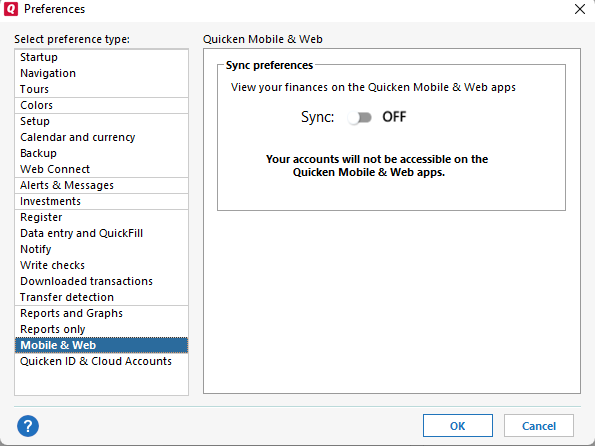
I notice that you sync your file with the Quicken Cloud. Have you tested to see if turning cloud sync off helps? You can do that by navigating to Edit>Preferences>Mobile & Web.
Thank you!
Quicken Kristina
Make sure to sign up for the email digest to see a round up of your top posts.
0
Categories
- All Categories
- 57 Product Ideas
- 35 Announcements
- 219 Alerts, Online Banking & Known Product Issues
- 18 Product Alerts
- 504 Welcome to the Community!
- 673 Before you Buy
- 1.4K Product Ideas
- 54.8K Quicken Classic for Windows
- 16.6K Quicken Classic for Mac
- 1K Quicken Mobile
- 824 Quicken on the Web
- 120 Quicken LifeHub