Fidelity Netbenefit downloads entries with zero price and unable to clear

TigerJoe
TigerJoe Quicken Windows Subscription Member ✭✭✭

I have been avoiding updating the Fidelity Netbenefit account since I disabled it in July and started to hand load all the entries.

Today (Jan 26, 2026) I reconnected the account in Quicken. I got double the asset amount.

Ok review transactions, and found several Deposits (no Security) with amounts, and Withdrawals (no Security) without amounts.

So I removed the extraneous entries.

Checked the "Holdings" they matched.

Tried to Reconcile, and it says "You Have Unaccepted Transactions".
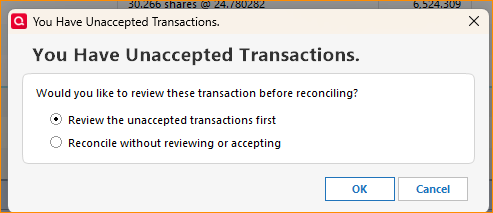
image.png

Tried to go look at any unaccepted Transactions:
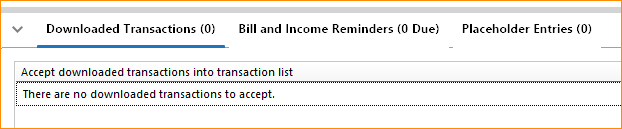
image.png

I tried to go to the online Center, and found 8 transactions with $0 in the Price column.
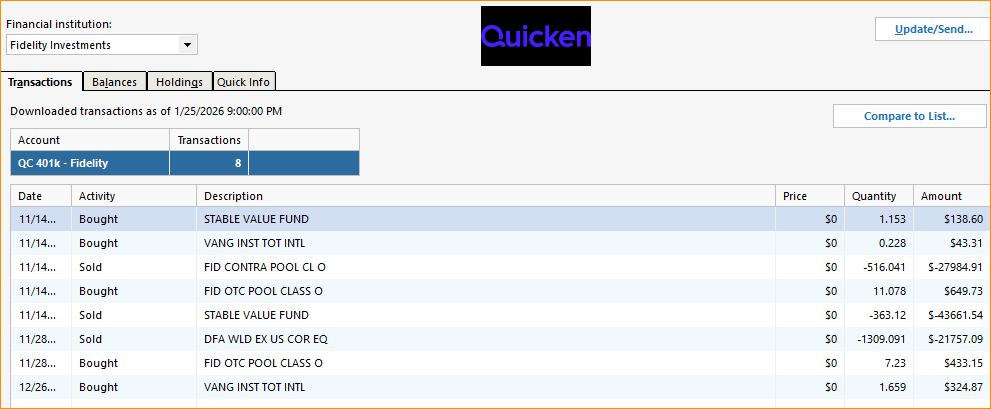
image.png

Clicking "Compare to List" shrinks the Online Center window no action taken.

Going to the entries listed in the account, and I see that they are valid with a Price.

Tried to change the entry and re-save. No effect. How to clear the unaccepted transactions?
They do not show up in the downloaded transaction window either.

I was able to reconcile by selecting the "Reconcile without reviewing or accepting" but having this window pop-up every time I try to reconcile is going to be annoying.

Note also you cannot change the width of the columns in this Online Center pop-up window..Also very annoying.

I was hoping that the Fidelity of all institutions would be the best integrated as they are advertised on the main startup splash screen.
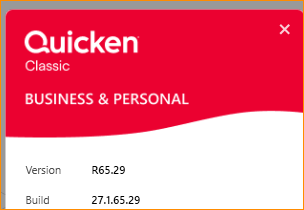
image.png

Comments

  • Quicken Kristina
    Quicken Kristina Quicken Windows Subscription Moderator mod

    Hello @TigerJoe,

    Thank you for letting us know you're seeing this issue. To troubleshoot the problem with Quicken saying you have unreviewed transactions, but not loading them into your register, please backup your Quicken file and follow these instructions from our article on when Quicken says there are transactions to accept, but you can't see any:

    First, turn automatic entry on

    1. Press Ctrl+A on the keyboard to bring up the Account List, then click the Edit button next to the affected account in the list.

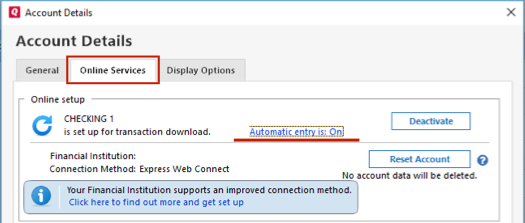
    2. In the Account Details window, click on the Online Services tab then click Automatic entry is.

    WinAutoEntryAccountDetails_support

    3. Select Yes on the next dialog box and click OK. Automatic entry should show as "On" now.

    4. Click OK to close the Account Details window, then click Done on the Account List.

    5. Close Quicken, wait a few seconds, then re-open it. The transactions should appear upon re-opening Quicken.

    Lastly, correct data issues

    If the Quicken data file is damaged, you might receive prompts about downloaded transactions when you don't have any downloaded transactions.

    If you know when this issue began, the best solution is to restore a backup created before this issue began.

    If you do not have a backup to restore, Quicken has a built-in utility, Validate, that will correct many data issues. Please note this does not correct all issues and these steps should be taken if the other steps outlined did not resolve the problem.

    1. Choose the File menu > Copy or Backup File.
    2. Select Create a copy or template, then click Next.
    3. Accept all defaults and click Save Copy.
    4. Open the New Copy when prompted.
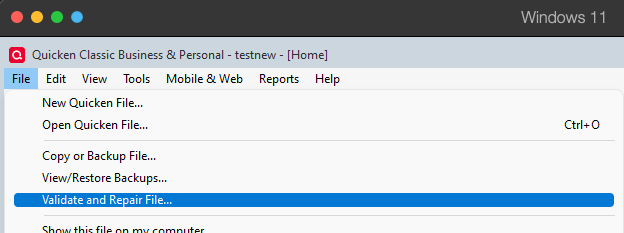
    5. Choose File > Validate and Repair File. Validate and repair.png
    6. Select the new copy created in step 3 and click OK.

    Note: Depending on the size of your data file, you may need to wait a while for the validation process to finish. Do not use the Task Manager to close Quicken. Quicken displays an error message if it cannot validate the file. If Quicken is able to validate the file and any errors are found, Quicken displays a message, "Data losses were found in your file." You can view the log file for more information.

    When the validation process is complete, you will need to Reactivate your accounts for transaction download in the new file copy.

    1. Go to Tools > Add Account.
    2. Select the bank for the deactivated account(s). If prompted, select the connection method.
    3. Enter your credentials and click Connect.
    4. When the list of located accounts appears, choose LINK next to each account you want to reactivate.
    5. Click Next then Done on the last prompt.
    6. After all of your accounts have been Reactivated, complete the Check the account register... section steps above again.

    Please let me know how it goes!

    Quicken Kristina

    Make sure to sign up for the email digest to see a round up of your top posts.

  • TigerJoe
    TigerJoe Quicken Windows Subscription Member ✭✭✭
    edited January 27

    Thanks @Quicken Kristina for responding.

    Note that I had been able to reconcile and the shares and cash balance were matched on Monday prior to my reconnecting the Fidelity-NetBenefits account.

    This error occurred after I reconnected it (I had been watching the updates and thought maybe it would be ok.).

    Following your instructions, I checked for the Automatic Entry setting…it was "On" already, so I toggled it off, Immediately I had a red flag on the Accounts list, but I just closed Quicken, Rebooted the computer.

    When it came back up, it ran One step update, and then When I went to the account, it had 6 new Entries that were "Nearly Matched" I had never seen that in the reconcile window before…so I checked and 4 of the 6 were off a few cents. Correcting the amount, changed to "matched". but the other 2 entries matched Number of shares/value, but the share price was off (in the 4-6 decimal places). So I changed them to be off 2 cents, and then put the value back to the correct value. This caused the share price to recalculate and become "Matched".

    I was thinking this is great…but the total cash value was now off 0.03. annoying, so ok let's look at it again.I happened to notice in my Accounts list that my checking account was now off over $10k. It showed a surprising negative value. Checking into that I account I found the infamous (and already commented/noted in another thread) Paycheck magically changing… 4 paychecks changed from the Net deposit to one of the internal transfers. ok, open each one, and save. now account is ok now.

    Return to Fidelity-Netbenefits, and found that now my account is off over $60k. (Negative no less).

    Remember it was all balanced and correct on Monday. So, I found that Nov 2025 and Dec 2025 had several new transactions and some of the transactions that had been reconciled now had incorrect values. I removed the new bogus entries and corrected the ones that had been altered. I think I am good now.

    Note that a Restore backup would not have been a viable option as the backup was just prior to connecting Fidelity, what seems to be the source of corruption. Hopefully no further corruption will occur.

    I had run the Validate and Super Validate Monday in making sure all was good before I reconnected Fidelity and afterward as I tried to resolve this issue on my own. Your suggestion of toggling the Automatic Entry was the key to get on the path or correction. (I have run Validate at the end of this exercise, and no errors reported).

    Hopefully My experience has been helpful to someone else.

    Kind Regards,

    Jon

  • Quicken Kristina
    Quicken Kristina Quicken Windows Subscription Moderator mod

    Thank you for your reply,

    I'm glad to hear that toggling automatic entry helped to correct the issue!

    If you need further assistance, please feel free to reach out!

    Quicken Kristina

    Make sure to sign up for the email digest to see a round up of your top posts.