Payees and Categories on Auto Download - Can't Turn Off (Q Mac)

I have been using Quicken for Mac (currently ver. 8.4.2) for a while now.
Each time I download transactions autoatically, the payee is modified and the categories autofilled (often with the wrong category).
I have the "Automatically improve the quality of downloaded payee names and categories" unchecked. Quick does still change them.
What am I missing? I have searched here and elsewhere for an answer.
Comments
-
OMG… I've started to have the same problem, but only with one of my accounts. I'm going to try to fix using some of the fixes above, but we shall see. Each time I correct the transaction download manually, I make sure to check the appropriate boxes so the transaction will download properly the next time, but it hasn't worked for the last 3 months.
0 -
Hello @necochino,
Thank you for reaching out! If you haven't already done so, please navigate to Window>Payees & Rules, and check to see if there are any renaming rules or quickfill rules which may be causing this unwanted behavior.
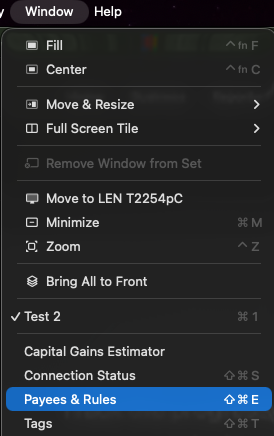
Please let me know how it goes!
Quicken Kristina
Make sure to sign up for the email digest to see a round up of your top posts.
0 -
The only thing you are missing here @necochino, is that Quicken doesn't give a rip about Mac users. Unchecking "Automatically improve the quality of downloaded payee names and categories" used to work until about 2 years ago. I contacted support back then and they were useless. I've been waiting ever since for it to be fixed. There are multiple posts on this. In one post last January (link below), Quicken Jasmine said she submitted a bug report CBT-532. I was hopeful that FINALLY something would be done about it with the subscription fees I have been paying. But still NOTHING. I am sick of having to select "Revert to Downloaded Payee Name" for every single transaction for the last 2 years. Maybe Quicken Kristina can kick someone's ****$ in this company to get something done about it.
1 -
I am sick of having to select "Revert to Downloaded Payee Name" for every single transaction for the last 2 years.
@ScottX I agree with you 100% that being able to turn off server renaming is a bug which needs to be fixed or a feature which needs to be implemented. That said, if you're really doing a Revert for every transaction, you could reduce some of your pain by creating Renaming Rules for at least some of your more frequently-used Payees.
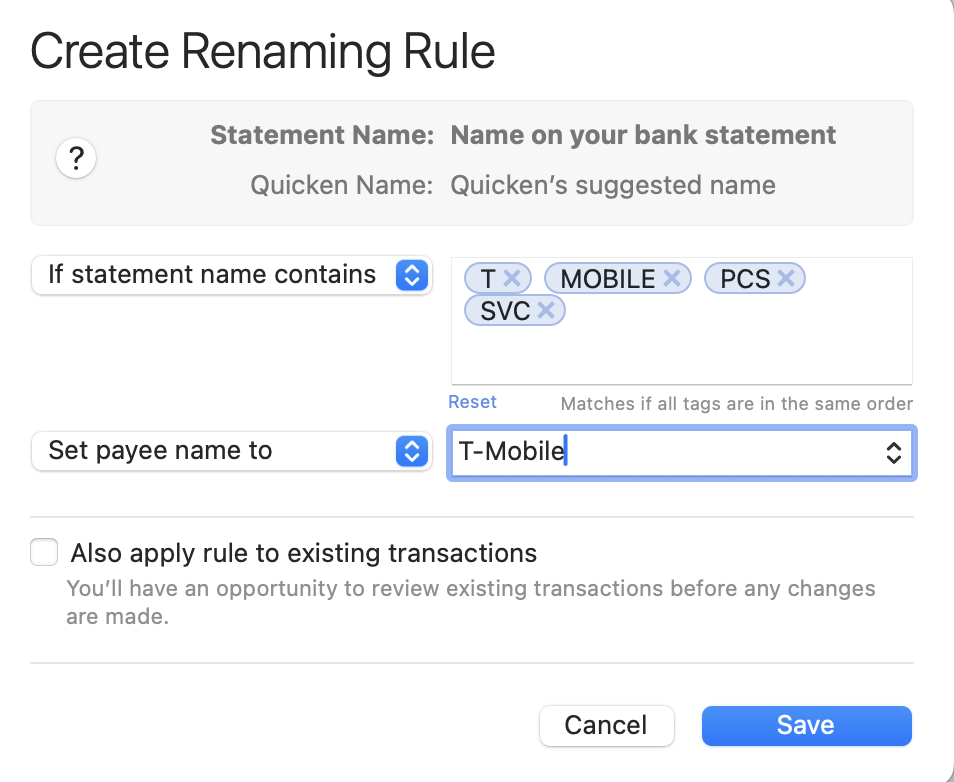
For instance, one of my monthly payees is T-Mobile for my cellphone. the payee name downloaded from my bank is "T-MOBILE PCS SVC", but I want it to be "T-Mobile" in my registers. If Quicken was renaming it something I didn't want, I could create a Renaming Rule to force it to do what I want:
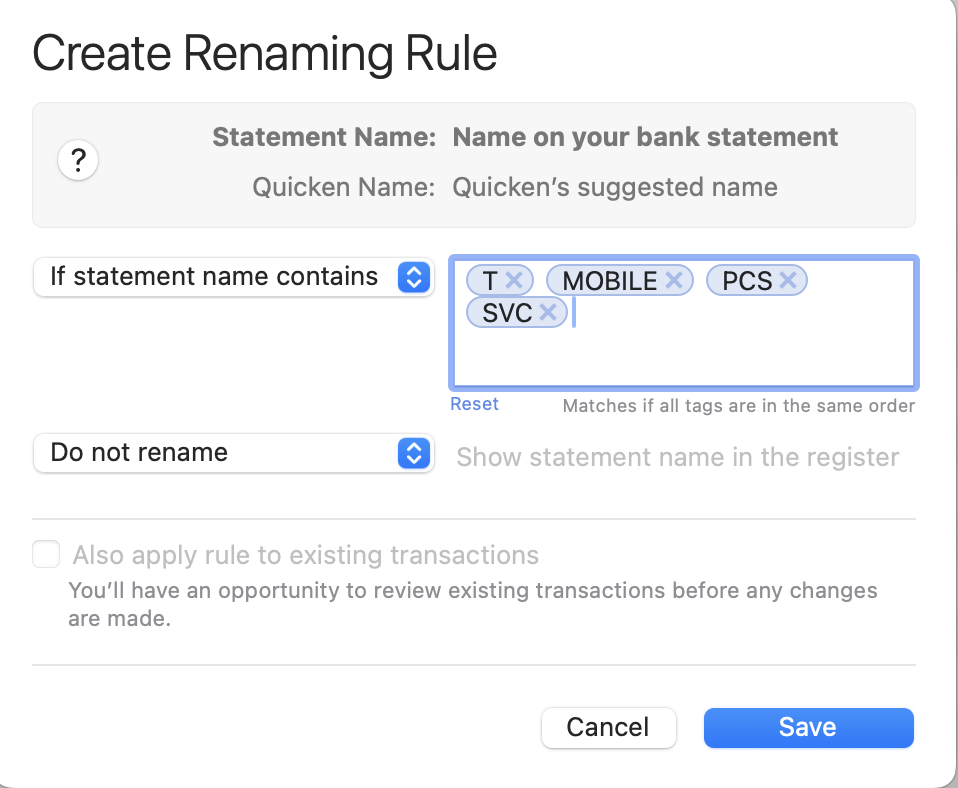
But in your case, you may have the opposite: the Quicken server-based renaming might be renaming it "T-Mobile" or something else, and you want the Payee name to remain what was downloaded, "T-MOBILE PCS SVC". That's equally easy to accomplish with a Renaming Rule:
Create 10 or 20 or 30 of these Renaming rules — you don't have to do them all at once — and you can drastically cut down on the number of transactions you need to manually Revert the Payee name after download.
Again, this is a workaround to an issue we both agree Quicken should allow users to override on their own. But unless/until they do, you can make life less frustrating by spending a few minutes creating a few dozen Renaming rules.
Quicken Mac Subscription • Quicken user since 19930 -
I am having the same problem with Quicken Mac. The main accounts having the problem are with USAA banking. Many, but not all, transactions will have to payee changed to the one of the account owner name during download. I have double-checked my renaming rules and "Automatically improve the quality of downloaded payee names and categories" is unchecked. Creating a new rule would not work because there could be 3 downloaded transactions with my name as payee, all from different sources. I agree with the others, that it is tiresome to have to revert payee names every time I download.
0 -
Thanks @jacobs. Appreciate the help but I am aware of that renaming feature. However, many transactions come with come with location info which is usually stripped out. I like to see the location as it will immediately alert me to fraud if for example it's Home Depot in another state where I haven't been recently. Will also keep me from thinking a charge my daughter made at college is fraud if I can't see that the town is where she is. Also, their renaming changes Worldmark to Worldmarket every time. But we occasionally shop at Worldmarket. So how would a rule know if Worldmarket is correct and leave it alone or change it? They just need to fix it.
@Quicken Kristina are looking into this?
0 -
I've been having the same problem for about a month now. I have a Mac and just upgraded to Tahoe. About half my payees are filled with my name or my wife's name all in caps. And no category is filled in. The rest of my transactions are OK. No help from Quicken Support and my bank, USAA, had no solution. Support basically had me go thru the steps above and nothing's worked. Any help would be appreciated. It's a pain to adjust my transactions manually, but I'll continue doing so. I don't plan to go to another product. I've been using Quicken for a long time with no major issues until now.
0 -
Thank you for your reply,
I can see that you contacted Quicken Support about this issue yesterday and they escalated it. To assist with the investigation, please navigate to Help>Report a Problem and send a problem report with log files attached.
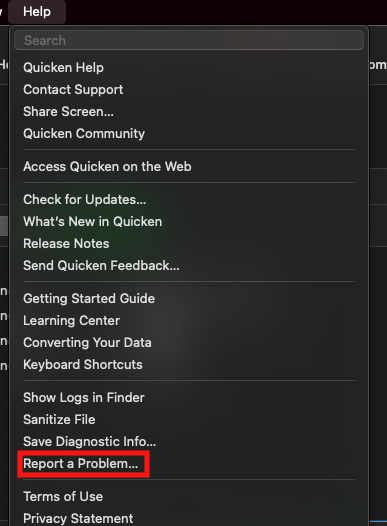
Please post to this discussion to let me know once the problem report is sent!
Thank you!
(CTP-16231)
Quicken Kristina
Make sure to sign up for the email digest to see a round up of your top posts.
0 -
However, many transactions come with come with location info which is usually stripped out. I like to see the location as it will immediately alert me to fraud if for example it's Home Depot in another state where I haven't been recently. Will also keep me from thinking a charge my daughter made at college is fraud if I can't see that the town is where she is.
@ScottX But you can do exactly that with the Renaming Rule I described:
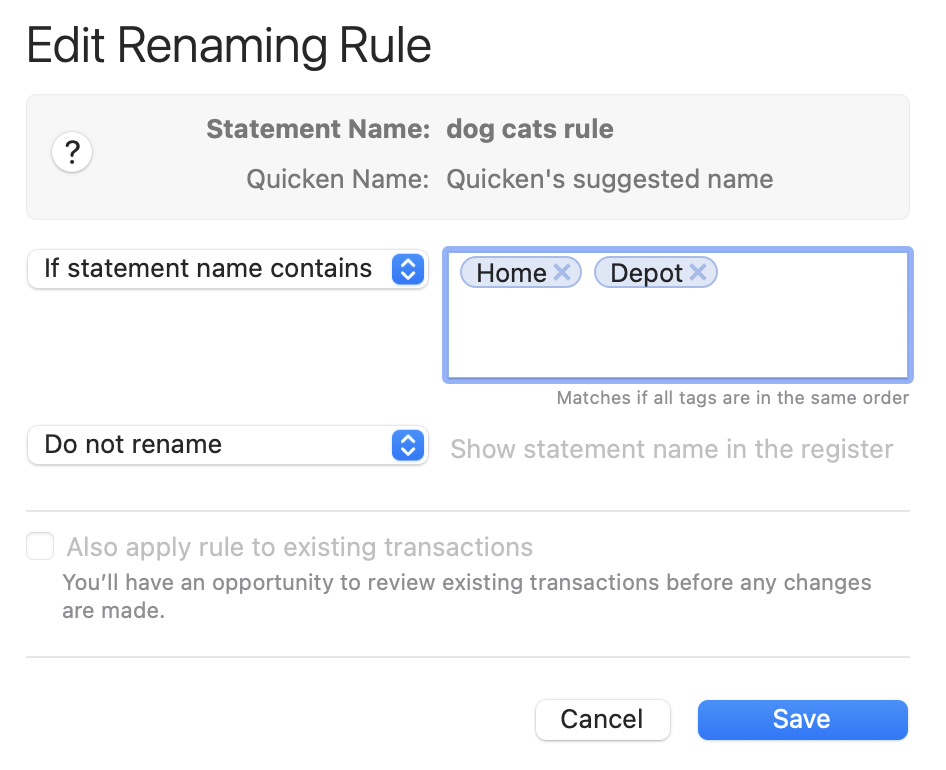
This rules will leave all Home Depot transactions without renamed Payees. So if the original Payee from the banks is "Home Depot Store #1234 Anytown, CA", that renaming rule would leave the Payee name unchanged.
Also, their renaming changes Worldmark to Worldmarket every time. But we occasionally shop at Worldmarket. So how would a rule know if Worldmarket is correct and leave it alone or change it?
Create a Renaming Rule to not rename if the statement name contains "Worldmark" and another to not change "Worldmarket".
The key here is defining the rules using "if statement name contains" in the first dropdown rather than "if Quicken name is". "Statement name" is the Payee name directly as it download from the from the financial institution; "Quicken name" is the Payee name after going through Quicken's server-based renaming engine.
Again, it seems bassackwards to have to create Renaming Rules to NOT rename Payees, but if you want unedited Payees, you can do it with a little set-up work for many of your recurring Payees.
Quicken Mac Subscription • Quicken user since 19931 -
Hello @aw.ross & @wemismith,
Thank you for letting us know you're also encountering this issue. Since you are using Quicken for Mac, I moved your posts from the Quicken for Windows discussion to the Quicken for Mac discussion on the issue.
Please navigate to Help>Report a Problem and send a problem report with log files attached so that our teams can further investigate this issue.
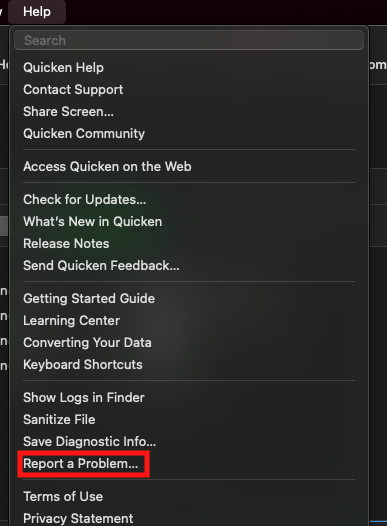
Once the problem report is sent, please post to this discussion to let me know.
Thank you!
Quicken Kristina
Make sure to sign up for the email digest to see a round up of your top posts.
0 -
@Quicken Kristina Problem report sent.
@jacobs Thanks again. Rushing I overlooked the second part where you said you could say "do not rename". Thanks. I may use that for some but as you say this is so bassackwards to do this. And would still require manually reverting other transactions.
Anyone else having this problem and reading this please post here. More complaints may FINALLY lead to action.
0 -
@jacobs Created a couple of rules for now. Figured out that for one credit card most transactions include the 2 letter state in the location info. So I created a rule for that to catch most on that card. Seemed to work in one try. Unfortunately my most used credit card doesn't do that. UGH. Thanks again.
0 -
Sent a Problem Report to Quicken with log files this morning.
0 -
Thank you for your replies and for sending logs,
I added both of you to the ticket.
Thank you!
Quicken Kristina
Make sure to sign up for the email digest to see a round up of your top posts.
0 -
@Quicken Kristina OK, so we've been added to an old ticket. Are you ever doing anything about it?
0 -
Thank you for your reply,
Adding you to the ticket ensures that our teams are aware that the issue is still ongoing. It also signals that more customers are affected, which can help increase the priority for resolution.
Thank you!
Quicken Kristina
Make sure to sign up for the email digest to see a round up of your top posts.
0 -
@Quicken Kristina Thanks for the reply. Since this has been going on for 2 years and the CBT-532 ticket is a year old, one might infer from your statement and the lack of corrective action that only a few of us are affected. Perhaps that means there is some settings or cache file that is corrupted somehow for just we few. And therefore, perhaps there is a fix for us, like deleting such files, re-installing, or something rather than a software change.
Perhaps you could inquire about that and maybe even respond with a fix to try. Otherwise if many are affected it doesn't look good that Quicken would ignore it for so long.
0 -
@ScottX My memory is that this was a problem sometime in the past, it was fixed sometime in the past, and then the code was broken once again in a subsequent update. I'm sorry I can't pinpoint dates or version numbers, but that's my recollection.
Quicken Mac Subscription • Quicken user since 19930 -
@jacobs Agree. Some years back, I experienced it for maybe a couple of months?? And then it was fixed somehow. I assumed it was a software update rather than random glitch correction. That it happened to you too would suggest that it was a software problem as I suspect it is now despite what I said above. Was just prodding Kristina to look deeper. Whatever the case is, they should be embarrassed it has lingered so long.
0

