Vancity Savings went "digital" a couple of weeks ago. Since then I cannot download the transactions and they tell me that the problem is not with them but with Quicken.
Any ideas about what to do?
Thanks Denys
Hello @aamazingd,
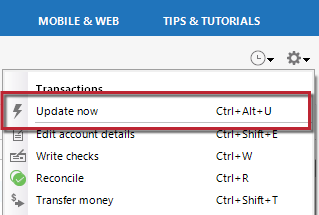
Thank you for letting us know you're encountering this problem. To help troubleshoot, I checked our internal tools and can see that you're getting a CC-502 (server timeout) error. Is that what you're seeing on your end also when you try to connect/update your account?
To troubleshoot this issue, please follow these steps from our article on CC-502 errors:
Try waiting one business day. This error message is typically caused by maintenance on your bank's website. You can try updating again in a few hours or the next business day. If the issue still occurs after one business day, try the steps above again.
You also mentioned that they went digital a couple weeks ago. When they did that, did they make any changes to their website? Did the URL (web address) you use to login to your account change?
I look forward to your response!
Following up on my previous post,
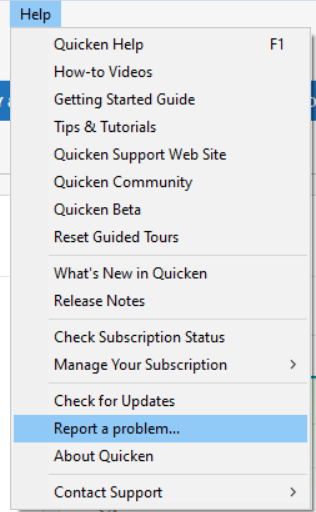
Due to how long the issue has been happening, this issue has also been reported to the proper channels for further investigation and resolution. In the meantime, we request that you please navigate to Help > Report a problem and submit a problem report with log files attached in order to contribute to the investigation.
While you will not receive a response through this submission, these reports will help our teams in further investigating the issue. The more problem reports we receive, the better.
We apologize for any inconvenience! Thank you.
(CTP-16113)
I tried all the suggestions and so far to no avail. My credit union says that the software company (Quicken) has received all the information regarding making changes to their software in order to work with the new digital system. so, playing ping-pong is the game.
Now I have to download the transactions in excel and enter the transactions manually until such time that someone fix something.
thanks though for your suggestions.
Denys
Thank you for your reply,
I'm sorry to hear the troubleshooting did not correct the issue. Our teams are investigating the issue. To contribute to the investigation, please follow the instructions in my earlier post:
Thank you!
Hello All,
We now have an alert that you can follow while our product team works on a resolution to this issue with Vancity Credit Union.
(CTP-16113/ Ticket #12206079)
I received word from our teams that they implemented a fix. Please check whether the connection is working now and let me know!
I tried Quicken this morning and I am am happy to report that all my VanCity accounts updated successfully.
I am still unable to download from VanCity. Installed the latest update this morning.
Hello @Cayzer,
Thank you for letting us know you're still unable to download. To help troubleshoot, please provide more information:
I believe this is an issue from the Vancity side, but it may be some incorrect information that Quicken has supplied. I found a workaround that seems to work for using the manual download and import method rather than a direct connection, but you have to delete/deactivate every Vancity update link you have in your file.
I have included more information than probably long-term users need, but new users may not be as familiar with these deeper settings:
I tested this on my active Quicken file plus a couple of other files to ensure it worked, but I am just one guy hacking away because this broken feature got me a bit peeved. Vancity updated their business accounts to the new platform last night and I did before and after downloads to see where the changes were. The account information changed between the two but that information didn't crash the downloads - only the <ACCTTYPE> field crashed it. I then had to figure out how to get my working file back to accepting them (didn't at first).
I'm going to post this on a number of the other threads on this same topic and will send it to Vancity to clean things up. Hopefully Vancity will update their download protocols so things get back to working and that they will post when things are fixed. If they reply directly to me that things are fixed I will post on this thread.
This thread may be relevant for any other BC Credit Union or ATB customer with a similar issue.
Further to my previous comments.
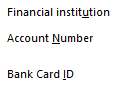
I experimented a bit with a new Quicken file and tried the Express Web Connect setup for Vancity and it worked for each of my member cards / account buckets, but still did not work when I tried with my primary member card. Experimented with a member card that just had one account and got it to work by ensuring every account was deactivated and that the "Account Number" and "Bank Card ID" boxes for each account were blank.
<Right Click> on your mouse over each linked account name to "Edit/Delete account" and then select the "Online Services" tab. <Deactivate> or other equivalent button. Then go back to the "General" tab to clear the "Account Number" and "Bank Card ID" boxes (and "Financial Institution" if it is still filled in).
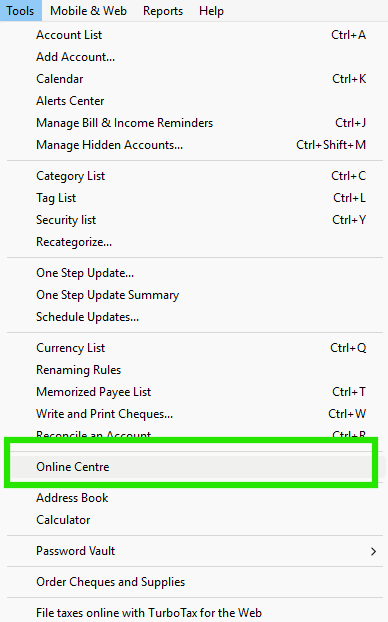
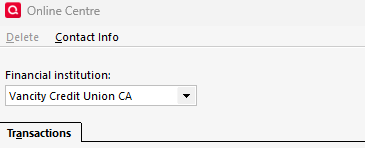
When these steps are done for each of your linked accounts, open the Tools / Online Centre menu from the main menu bar. Vancity Credit Union CA should NOT appear as an available financial institution in the drop-down menu. If it does, you still have another account(s) connected (look at the Transactions below to see what may be still connected).
Doing these steps seemed to reset each of my Vancity accounts to be able to download using the Web Connect process in my relevant Quicken files. Try this first before doing the manual adjustment noted in my previous post. I believe the issue was the change in account type (<ACCTTYPE>) between the two versions of the Vancity banking platform messing things up.