Cash transfers between Fidelity accounts no longer processed as a transfer
This used to work prior to the EWC+ cutover.
Cash transfers between Fidelity accounts used to processed as transfers with the catagories included for the sending a receiving accounts. Now, Quicken just treats a transfer as a deposit/withdrawal with no categories entered. I would use a renaming rule, but those are also broken for Fidelity accounts.
I've reported the problem.
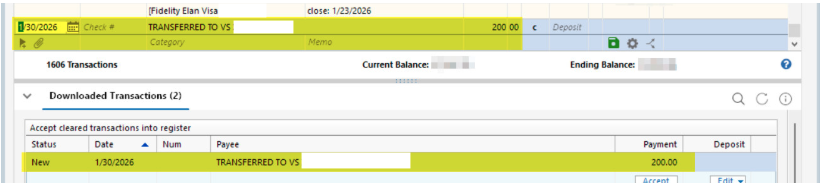
[Edited - Removed personal information]
Deluxe R65.29, Windows 11 Pro
Comments
-
Hello @leishirsute,
Thank you for letting us know you're seeing this issue. To help troubleshoot, please provide more information:
- When did you first notice this issue?
- Are you able to manually correct it to reflect the transfer?
- Is this happening in accounts with a linked cash account?
- Is this happening only in Fidelity accounts?
- If not, which other financial institutions are impacted?
I look forward to your reply!
Quicken Kristina
Make sure to sign up for the email digest to see a round up of your top posts.
0 -
- When did you first notice this issue?
I've noticed it for a few month end transaction downloads.
- Are you able to manually correct it to reflect the transfer?
Yes. I manually correct them. Just an FYI. I have transfer detection activated in Quicken but it doesn't seem to recognize the transfer. I don't really know how transfer detection is supposed to work. Does it work prior to the downloaded transactions being accepted or do the transactions first have to be accepted?
- Is this happening in accounts with a linked cash account?
Good question. Yes. It is transferring from a Fidelity linked cash account to a Fidelity investment account.
- Is this happening only in Fidelity accounts?
- If not, which other financial institutions are impacted?
I have not seen this issue with other accounts. But, I very rarely transfer between non-Fidelity accounts. Maybe, once every couple of year, to give an idea of frequency.
It's not a huge issue, just an aggravation that didn't occur prior to the EWC+ cutover.
Deluxe R65.29, Windows 11 Pro
0 -
Thank you for your reply,
This issue sounds like it may be file specific. Do you keep your Quicken file directly on your local hard drive? Is the file synced with any cloud service, such as OneDrive, iCloud, or Dropbox?
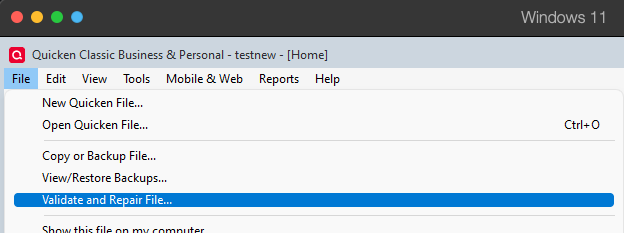
If you haven't already done so, I suggest that you try validating your data file. Please save a backup file prior to performing these steps.
Validate:
- File
- Validate and Repair File...
- Validate File
- Click OK
- Close the Data Log
- Close Quicken (leave it closed for at least 5 secs)
- Reopen Quicken and see if the issue persists.
Please let me know how it goes!
Quicken Kristina
Make sure to sign up for the email digest to see a round up of your top posts.
0 -
@Quicken Kristina Not sure how you determined that it looks file specific. However, the datafile is always on the local hard drive and is not sync'd with any cloud service.
I perform a Validate/Repair on my datafile once/month and there are no errors.
This problem did not occur prior to the Fidelity EWC+ cutover.
Deluxe R65.29, Windows 11 Pro
0 -
Thank you for your reply,
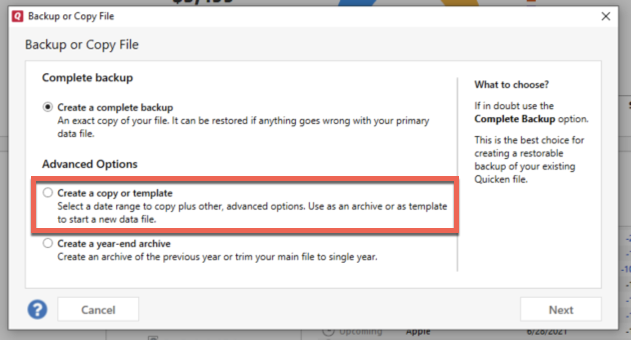
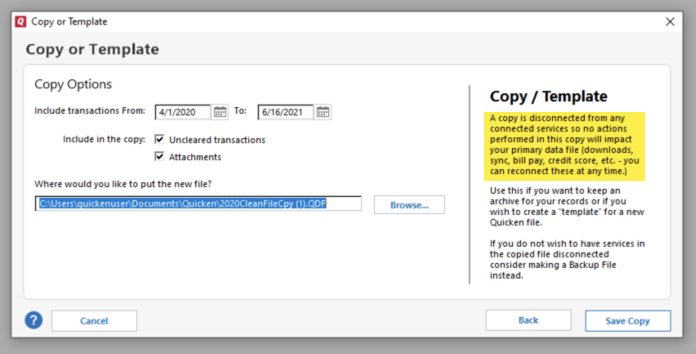
I suspect it may be file specific because I'm unable to replicate the issue in my own Quicken. If you haven't already done so, please try creating a copy of your data file which will rebuild all of the internal lists and database tables. If successful, you would then move forward with the copied file. To create a copy, please navigate to File > Copy or Backup File... > Create a copy or template (see examples below) which will also allow you to select a date range to move forward with.
If you wish to move forward with your entire data file, please check the full date range of your entire data file before copying so you can enter the correct date range if you do not wish to "shrink" your file by eliminating certain dates. Note: There is no need to "shrink" your file unless you think the issue is being caused by older data in your file.
It's important to know that all online services will be disconnected in the copied file, and you will need to sign back in with your Quicken ID and reconnect all of your online accounts, online billers, Quicken Bill Manager services, etc if you plan to use that copied file going forward. The reason for this is that the new copy also creates a new and separate dataset ID.
Please reconnect only what is necessary to confirm if the issue is resolved. If the issue is resolved, then I recommend reconnecting all your accounts and using the copied file as your main file going forward.
If the issue is not resolved in the copied file either, then feel free to switch back to your original file. For instructions on switching between files, please click here.
Thank you!
Quicken Kristina
Make sure to sign up for the email digest to see a round up of your top posts.
0
Categories
- All Categories
- 58 Product Ideas
- 34 Announcements
- 238 Alerts, Online Banking & Known Product Issues
- 19 Product Alerts
- 511 Welcome to the Community!
- 678 Before you Buy
- 1.4K Product Ideas
- 55.3K Quicken Classic for Windows
- 16.7K Quicken Classic for Mac
- 1K Quicken Mobile
- 828 Quicken on the Web
- 123 Quicken LifeHub