Prevent Bank Access in quicken Classic
Is there a way to load quicken on a windows PC, load a backup quicken file, and allow someone to look at and search transaction and create reports without permissions to change transactions, update files, or connect to the banks. Actually changing data would be okay if I could prevent any access to the banks.
What I would like to do is to let my wife have access to the file to see what is available without being able to access the bank in quicken. This is to let her see accounts and transactions without the possibility of messing up my connection with the banks.
Comments
-
If you are using Quicken Windows 2016 as the information next to your forum avatar indicates, there are NO connections to the financial institutions for your spouse to mess up. QW2016 hasn't supported FI connections since 2019.
If you aren't using QW2016, please indicate what you are using for further help.
-splasher using Q continuously since 1996
- Subscription Quicken - Win11 and QW2013 - Win11
-Questions? Check out the Quicken Windows FAQ list0 -
I have a deluxe subscription. I checked for updates and it said I was up to date with R 65 29j.
0 -
My reading of what you are asking is that you would like to install Quicken on a second computer (wife's ?) and provide that computer with a copy of your current data file with the online financial connections disabled.
Here is my suggestion:
Install Q on the computer (you can install on as many computers as your want, just all have to use the same Quicken ID).
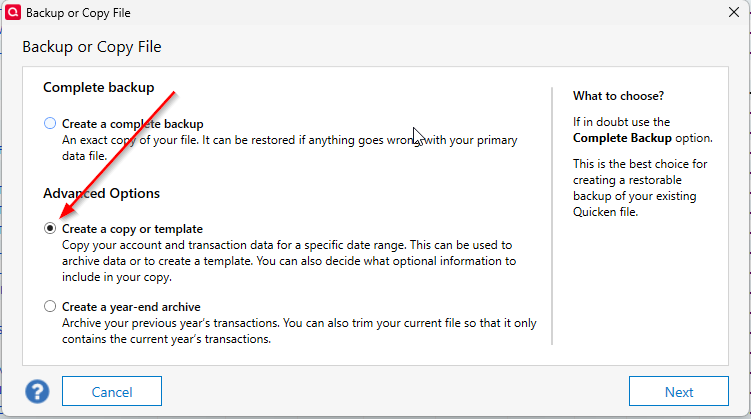
On your computer, make a copy using the copy process on the File menu with the option selected in this screenshot:
Making a copy this way, disconnects the online banking features in the copy, leaving the original unchanged.
You can check the disconnection by going to the Account List (Tools menu) and editing a connected account and looking on the Online Services tab, it should have wording about how to establish the online connection. If it was actively connected, the wording will have a "Deactivate" button.
The last step is to copy the "copied" file to the second computer replacing the last copy on that computer. Your wife can poke around all she wants and not mess up anything.
NOTE: I know of no way for the second computer have a live copy of your data file that is always up-to-date without the ability to mess up the online features.
-splasher using Q continuously since 1996
- Subscription Quicken - Win11 and QW2013 - Win11
-Questions? Check out the Quicken Windows FAQ list1 -
This Idea post proposes a read-only mode for Quicken on the Web, which would give another user read only access to live or almost live data but not the full set of reporting or planning tools that are available in the desktop software. It is currently classified a "Planned," so it may become available at some point in the future.
QWin Premier subscription0 -
splasher's post sounds exactly what I am looking for. I am going to set it this weekend,
I want to let my wife see what quicken can provide with transactions we have actually made without getting to the banking side. She does that on her own app. She is the banker and I am the auditor. I am trying to put her in a position to see all the analysis tools available in quicken with actual transactions.
Thanks for the help
0
Categories
- All Categories
- 58 Product Ideas
- 34 Announcements
- 238 Alerts, Online Banking & Known Product Issues
- 19 Product Alerts
- 511 Welcome to the Community!
- 678 Before you Buy
- 1.4K Product Ideas
- 55.3K Quicken Classic for Windows
- 16.7K Quicken Classic for Mac
- 1K Quicken Mobile
- 828 Quicken on the Web
- 123 Quicken LifeHub