USAA Security Upgrades breaks Quicken for Mac

Flighthawk
Flighthawk Quicken Mac Subscription Member

I'm running Quicken for Mac 8.4.2 under macOS 26.2. I have multiple USAA accounts. The connection status screen indicates I'm connecting, but that 0 new transactions were downloaded. My Quicken account is missing many Jan transactions and all of Feb. I've done the reset of my Cloud Account, but still nothing. Evidently, USAA made some security upgrades in early 2026, but haven't yet stumbled upon how to get Quicken working again. Any solutions other than exporting and importing?

Evidently, there was an engineering team ticket (#12054304), but I've been told that its status is resolved. Evidently many of us are still having issues.


Answers

  • Quicken Kristina
    Quicken Kristina Quicken Windows Subscription Moderator mod

    Hello @Flighthawk,

    Thank you for letting us know you're seeing an issue with transactions not downloading from USAA. There was previously an alert for the issue, but the issue was marked resolved.

    Since you're still encountering this issue, please start troubleshooting by following these steps from our article on missing transactions/transactions not downloading:

    Be sure to follow these steps in order:

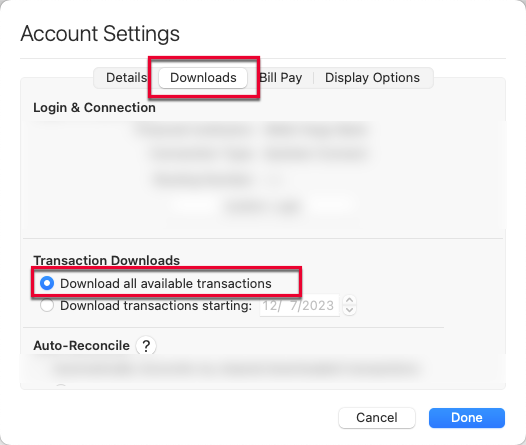
    1. In the affected account, click the Settings icon in the bottom right corner of the screen. Go to the Downloads tab and, under Transaction Downloads, confirm Download all available transactions is enabled.

    MacDownloadAllAvailable_support

    2. Refresh your online account information by clicking on the Update Icon, located on the upper left-hand side of Quicken. Follow any on-screen instructions to complete the account update.

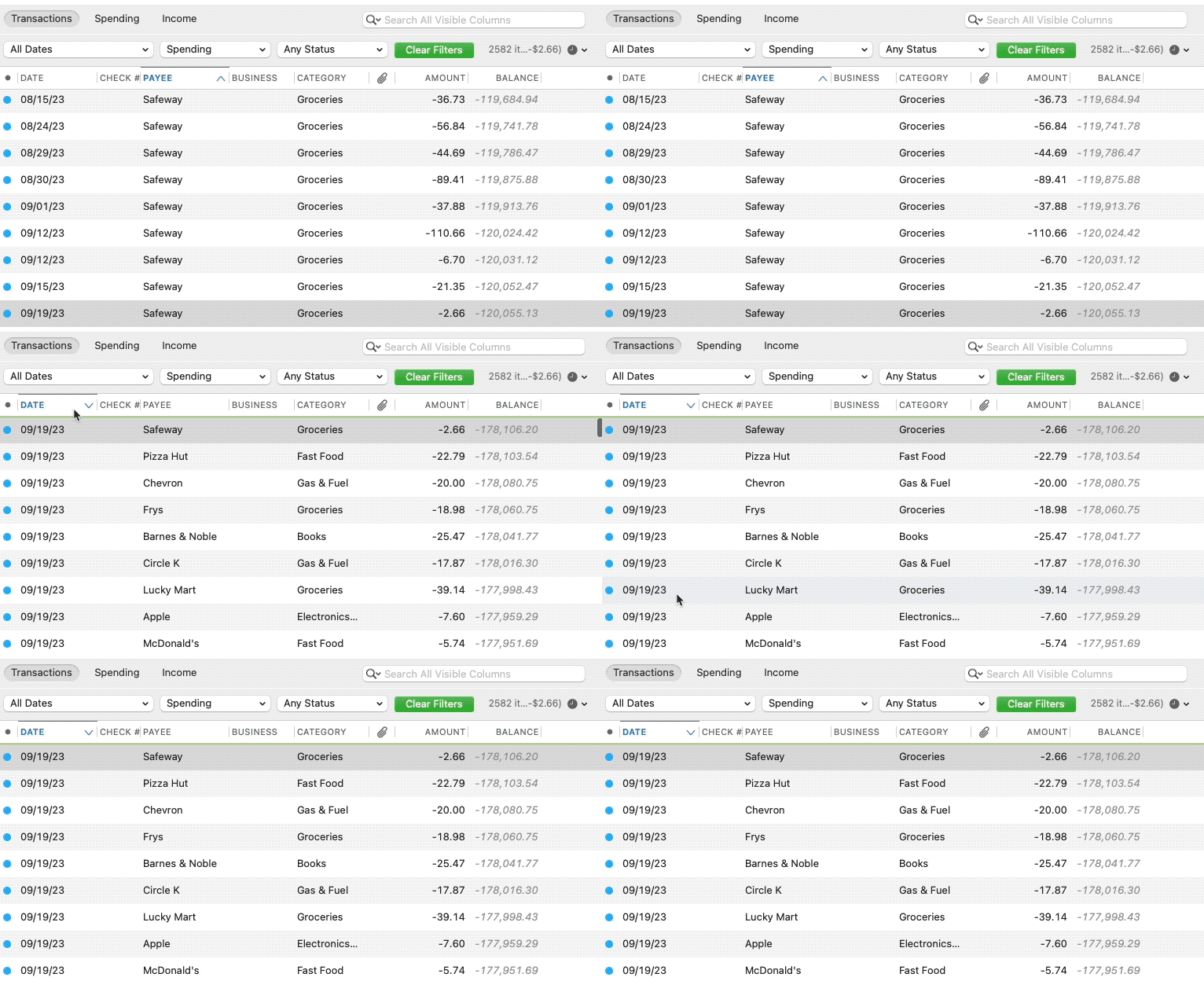
    3. Confirm that the Sort Order in your account is by Date; just click the top of the Date column in your account register. It's possible the transactions are in your register, but not where you thought they'd be.

    MacSortingGif_support

    4. Click the Clear Filters button to the right of the account register’s filter dropdowns. This will confirm that there is no filtering in your account register.

    5. Click Columns in the bottom right of the register, then check the Statement Payee box. This will allow you to search for the downloaded Payee name to confirm that a transaction was not renamed unexpectedly.

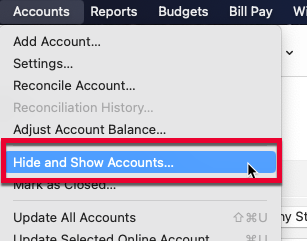
    6. Go to Accounts > Hide and Show Accounts…. You can confirm if missing transactions have been downloaded into a hidden account by unchecking the Hide In Lists box next to the account that is marked as hidden.

    MacHideShowAccounts_support

    Please let me know how it goes!

    Quicken Kristina

    Make sure to sign up for the email digest to see a round up of your top posts.

  • Flighthawk
    Flighthawk Quicken Mac Subscription Member
    edited February 9

    Did all this and my online USAA register and balance don't match my Quicken account. If I try to reconciIe the problem account, it shows use online balance of 0. I then renamed the problem account and created / linked it to a new account. All I get is a live balance, no transactions. The download all transactions as of a date in account settings is dimmed out.

  • Quicken Kristina
    Quicken Kristina Quicken Windows Subscription Moderator mod

    Thank you for your reply,

    Since the troubleshooting didn't resolve the issue, I recommend contacting Quicken Support directly for further assistance. They have access to tools we can't access on the Community, and they're able to escalate the issue as needed. The Quicken Support phone number can be found through this link here. Phone support is available from 5:00 am PT to 5:00 pm PT, Monday through Friday.

    I apologize that I could not be of more assistance! 

    Quicken Kristina

    Make sure to sign up for the email digest to see a round up of your top posts.