When entering an overdue bill reminder, why does it ask me if it's for unrelated bills?

I am entering an overdue bill reminder and it asks me about a dozen different times things like this.
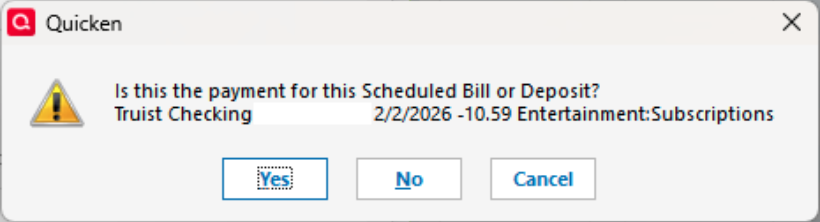
It is a bill for $9.99; not $10.59. The next one that popped up is another one for $10.59 and then one for $2.11.
These are not even scheduled transactions, so where is it getting these from? I have to click No a dozen times just to enter this bill.
I am running Classic Premier vR65.29 Build 27.1.65.29 on Windows 11.
Thanks.
[Edit - Removed partial account numbers]
Answers
-
Hello @Michael Rosen,
Thank you for reaching out with this question. To help troubleshoot, please answer these questions:
- Typically, Quicken uses fairly simple criteria, such as Date, Amount, and Payee, to determine if the reminder might match transactions. Do any of these unrelated bills have the same date or payee?
- You mentioned that they aren't scheduled transactions. Are they transactions in your account register?
- Is this the first time this has happened, or is this a frequent occurrence?
I look forward to your response!
Quicken Kristina
Make sure to sign up for the email digest to see a round up of your top posts.
0 -
Hi, I'll have to see the next time it happens. I recall they were for different payees and dates.
I think they are historical transactions in my register.
I have seen this happen before.
Thanks.
0

Categories
- All Categories
- 6 Product Ideas
- 34 Announcements
- 248 Alerts, Online Banking & Known Product Issues
- 19 Product Alerts
- 265 Welcome to the Community!
- 301 Before you Buy
- 1.5K Product Ideas
- 55.8K Quicken Classic for Windows
- 16.9K Quicken Classic for Mac
- 1K Quicken Mobile
- 834 Quicken on the Web
- 129 Quicken LifeHub